
If your Pixel dies at 30%, shuts off in the cold or needs a charger by lunchtime, a new battery will often fix it. But first confirm the battery is the problem. On a Pixel 6 or later, the phone can tell you. If it is the battery, you have three routes: Google’s own repair channels, a do-it-yourself kit, or a technician who comes to you. Below we explain how to tell the difference, what each route involves and where the risks sit.
TL;DR
- Google considers a battery due for replacement when capacity falls below 80% or it reaches its rated cycle count: about 800 cycles for Pixel 3 through Pixel 8 Pro and Pixel Fold, about 1,000 for Pixel 8a and later.
- On Pixel 6 and later, run battery diagnostics in Settings before you pay for anything. Software, a new update or one rogue app can mimic a dying battery.
- DIY kits cost roughly $40 to $60, but the job means heat, strong adhesive and a lithium-ion cell you must not puncture. A swollen battery should go to a professional.
- In Orlando and Winter Park, we replace Pixel batteries at your home, office or campus, with the price quoted before we start.
Table of Contents
- First, make sure it is the battery
- Your three options for a Pixel battery replacement
- What does a Pixel battery replacement cost?
- Safety: when not to wait
- Our perspective: why we replace batteries on site
- Book an on-site Pixel battery replacement in Orlando or Winter Park
- How to get more life from a new Pixel battery
- What to do before any repair
- FAQ
- Sources
First, make sure it is the battery
Batteries are consumable parts. Google’s own help page says all batteries are consumable components that aren’t meant to last indefinitely, so wear is normal. But “my Pixel battery is draining” is also what people say after an update, after a restore onto a new phone, or when one app misbehaves.
Google notes that after a software update it is normal for the battery to drain a little more than usual while the phone downloads and optimizes the new software. After a factory reset or a new setup, optimization can take a few weeks to settle. If your drain started within days of either event, wait before you spend money.
Run battery diagnostics (Pixel 6 and later)
Google’s guidance for battery drain on Pixel 6 and later is to open Settings, tap Battery, then Battery diagnostics, then Battery draining too quickly. The phone lists what is using power and suggests fixes. The same area, according to Google’s page on fixing Pixel battery issues, also helps you know when the battery needs replacement and lets you calibrate the phone.
If you own a Pixel 7 and the drain started suddenly, this is the first stop. Look for these patterns:
- One app dominates usage. Update it, restrict its background activity or remove it.
- Standby drain overnight. Often a sync problem, a bad account login or a stuck app.
- Normal usage numbers but the phone still dies fast. This points to the battery itself.
- Shutdowns at 20% to 40%. Typical of a worn cell that can no longer deliver power under load.
The habit of ruling out the cheap, software-side cause before replacing a part applies in many fields. For a different kind of sudden drop, this step-by-step approach to recovering from a sudden drop follows the same logic: diagnose first, act second.
Check battery health and cycle count
Google’s battery page gives the replacement thresholds: capacity below 80% or reaching the rated cycle count. For Pixel 3 through Pixel 8 Pro and Pixel Fold that is approximately 800 cycles. For Pixel 8a and later it is approximately 1,000 cycles. You can see the status in your phone’s battery settings.
A rough guide to what that means in real life:
| What you see | What it likely means | What to do |
|---|---|---|
| Drain began after an update or reset | Temporary optimization | Wait a week or two, keep Adaptive Battery on |
| One app uses most of the battery | Software issue | Update, restrict or remove the app |
| Health below 80% or cycles at the limit | Normal wear | Replace the battery |
| Phone shuts off with charge left | Worn cell | Replace the battery |
| Back panel or screen lifting, case bulging | Swollen battery | Stop charging, see a professional now |
For a deeper look at how long phone batteries last, see our guide to phone battery lifespan for U.S. owners.
Your three options for a Pixel battery replacement
Option 1: Google’s own repair channels
Google runs a repair program with genuine parts. Its self-repair page points to a hub for genuine parts, guides and tools. Google also describes a free battery replacement program in select countries, available by mail-in or walk-in, though eligibility depends on the device and region, so check the current terms for your model before counting on it.
Mail-in works, but you are without your phone for days, and your data travels with it unless you wipe it first. Walk-in service at an authorized location can be quicker, though parts availability varies. One thread on the Pixel community forum from August 2025 shows a user told the battery supplier was out of stock, with a four-hour repair estimate once parts arrived.
Option 2: Replace it yourself
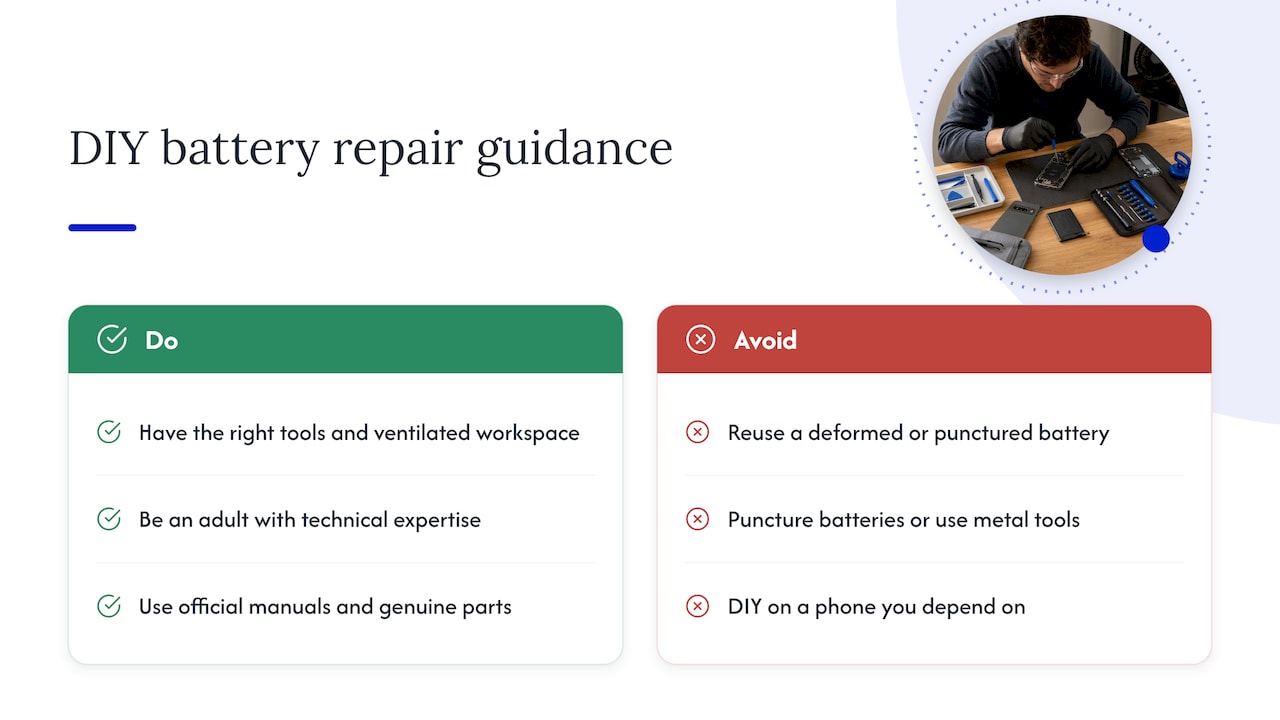
If you are patient and handy, it can be done. iFixit’s Pixel battery page says kits typically cost $40 to $60 and the job can take from 30 minutes to more than two hours. Google makes official repair manuals and genuine parts available through partners like iFixit for most devices from the Pixel 2 on.
Be realistic about what the work involves. The Pixel 9 battery guide describes a battery that is heavily secured with adhesive, so you need heat, patience and isopropyl alcohol for cleanup. The same guide warns never to reuse a deformed or punctured battery because of fire risk.
Google itself is cautious. Its safety guide for the Pixel 8 says self repair is not recommended unless you are an adult with the technical expertise to repair electronics safely. That page also warns that improper removal, such as puncturing the battery or using metal tools, risks fire, explosion or chemical leakage, and that opening the device can compromise factory water and dust resistance.
Our view: DIY makes sense for an older Pixel you do not depend on, if you have the right tools and a clear, ventilated workspace. It is a poor idea for the phone that holds your work, your two-factor codes and your kids’ photos, and a bad idea for any battery that is already swollen.
Option 3: A technician who comes to you
This is what we do. A technician arrives at your home, office or other location, tests the phone, confirms the battery is actually the issue, and replaces it while you watch. You never hand the phone over, which matters when it holds banking apps and private messages. More on that below.
What does a Pixel battery replacement cost?
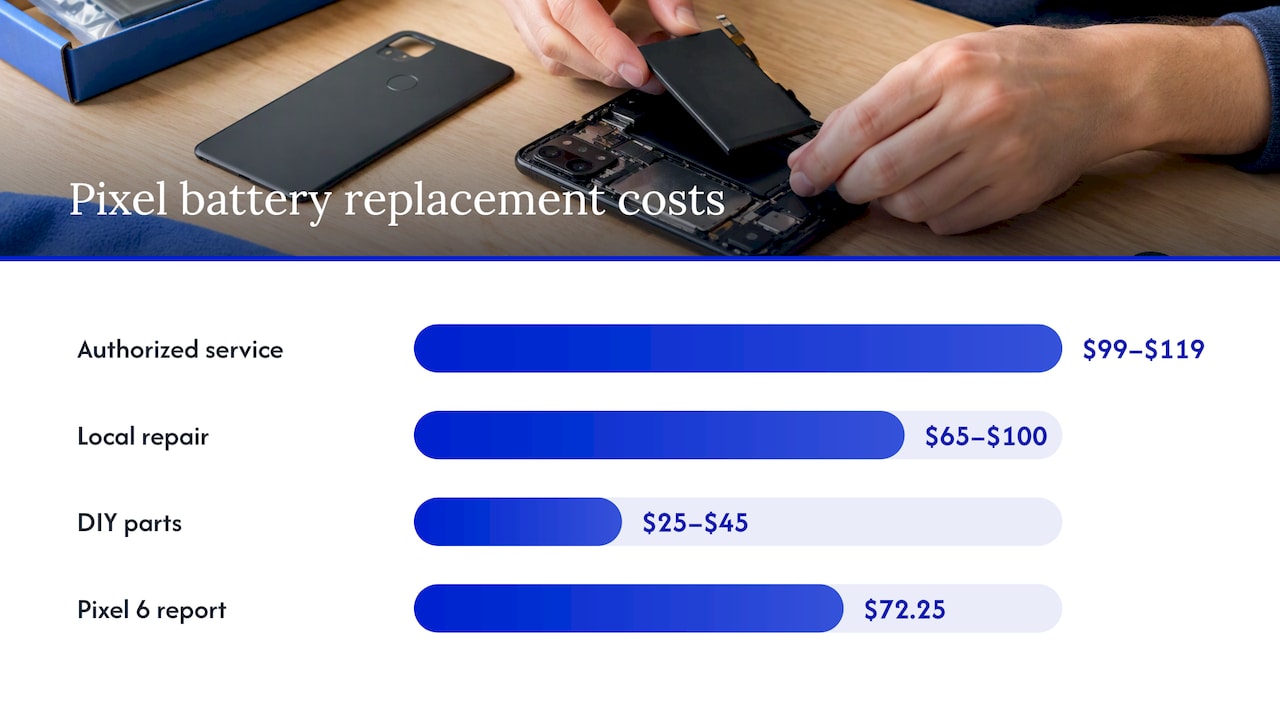
Prices move with the model, the part supplier and the type of provider, so treat any figure as a snapshot. One 2026 cost guide for the Pixel 7 puts a replacement through an authorized service channel at $99 to $119, a local repair shop at $65 to $100, and DIY at roughly $25 to $45. Note that this guide comes from a parts seller, so read the DIY number as a parts-only estimate. A Reddit user reported a Pixel 6 battery replaced in under two hours for $72.25 after the cell began to bulge about two and a half years in.
We do not publish a fixed price list, because the right quote depends on your exact model and what the diagnostic finds. What we do commit to is a price quoted up front, with no hidden fees, covering diagnostics, labor and parts. Our repairs carry a warranty on parts and labor. Ask any provider, us included, for the total in writing before work begins.
Is it worth it versus buying a new phone?
A battery is usually the cheapest way to get another year or two from a phone that otherwise works. The math changes when the phone has several problems at once: a cracked screen, a failing charge port and a worn battery, for example. Our phone repair vs replacement cost guide walks through that decision, and the logic in our iPhone battery replacement vs buying new article carries over to Pixels. If money is tight, see our tips on phone repair with a limited budget.
Quick rule of thumb:
- If the phone is under about three years old and otherwise healthy, replace the battery.
- If it no longer gets security updates, think harder before spending on any repair.
- If the quote approaches the price of a comparable used or new phone, compare before committing.
If you have Pixel Care+, check your coverage first. Google describes it as an insurance protection program available in the United States, Japan and the United Kingdom, so read your plan’s battery terms before paying out of pocket.
Safety: when not to wait
Lithium-ion cells are stable until they are damaged or very old. Warning signs of a failing cell include:
- A back cover or display that is lifting or bowing
- A phone that rocks on a flat table
- Unusual heat while idle or charging
- A swollen look at the edges of the case
If you see any of these, stop charging the phone, keep it away from flammable items and do not press on it or try to pry it open. Book a professional right away. We cover similar risks in our piece on tablet screen repair and swollen battery risks, and the same caution applies to a phone. Do not toss a swollen battery in household trash; take it to a battery recycling drop-off or ask the technician to dispose of it properly.
Our perspective: why we replace batteries on site
We see the same pattern again and again. Someone searches for a Pixel battery fix, watches a teardown video, orders a kit, and then stalls when the adhesive will not release or the screen cable looks too delicate. Others lose a week to a mail-in repair and have no phone for work.
Our approach is simple. We start with a diagnostic, because a battery swap does not help if the cause is software or a failing charging port. We tell you what we find and what it costs before we touch anything. Then we do the repair at the location you choose in Orlando or Winter Park, with certified technicians and quality parts, and the work is backed by a warranty on parts and labor.
Data safety is part of the job, not an add-on. A battery swap does not require access to your photos or messages, and because the phone stays with you, it never leaves your sight. With more than 10 years of experience, we would rather tell you “your battery is fine, update this app” than sell you a part you do not need.
— Michael
Book an on-site Pixel battery replacement in Orlando or Winter Park
We handle Pixel, Samsung and other Android phones through our cellphone repair service. Tell us your model, what the phone is doing and where you are, and we will quote the repair up front and arrange a same-day visit where schedules allow. If you are looking for a quick local option, our page on same-day battery replacement in Orlando explains how it works. You can also start from repairgeniuses.com.
If your Android will not charge at all, read Android not charging? Liquid alerts come first before you assume the battery is the culprit.
How to get more life from a new Pixel battery
A fresh battery starts a new count. Treat it well and it will last longer:
- Keep Adaptive Battery and battery optimization on. Google says this gives the best results because the phone learns your habits.
- Avoid heat. Do not leave the phone on a car dashboard in the Florida sun or charge it under a pillow.
- Use a good charger and cable. Cheap, uncertified accessories are a common source of problems.
- Do not chase 0% to 100% every day. Partial charges are gentler on lithium-ion cells.
- Give it a few weeks after setup. Optimization needs time, so judge battery life after the settling period.
If you also own an iPhone, our guide to diagnosing iPhone battery drain uses the same logic with Apple’s settings.
What to do before any repair
Whoever does the work, prepare the phone:
- Back up your data. Use Google One backup or copy photos to a computer.
- Note your battery status. Take a screenshot of the diagnostics screen so you can compare after.
- Charge to about 50%. A technician generally prefers a phone that is neither empty nor full.
- Remove your case and any screen protector if it is damaged.
- Know your screen lock. Technicians need to test the phone after the repair, and you can unlock it yourself on the spot.
- Ask about the warranty and the part quality before you agree.
We explain why some repairs go wrong in why device repairs fail: common mistakes, and most of the mistakes come down to skipped diagnostics and cheap parts.
FAQ
Can I change my Pixel battery myself?
Yes, for most models from the Pixel 2 on, genuine parts and repair manuals are available through Google’s partners. It is still a delicate job involving heat and strong adhesive, and Google does not recommend self repair without the technical expertise to do it safely. If your battery is swollen, leave it to a professional.
How do I know my Pixel battery needs replacing?
On Pixel 6 and later, open Settings, then Battery, then Battery diagnostics. Google recommends replacement when capacity falls below 80% or the phone reaches its rated cycle count, about 800 cycles for Pixel 3 through Pixel 8 Pro and about 1,000 for Pixel 8a and later. Sudden shutdowns with charge left are another strong sign.
Why is my Pixel 7 battery draining so fast?
Common causes are a recent update, a recent reset, one heavy app or a worn battery. Run Google’s battery diagnostics, update your apps and give the phone a week or two to settle. If drain continues and your health numbers are poor, replace the battery.
Will a battery replacement hurt water resistance?
Opening any phone can compromise its factory water and dust resistance, according to Google’s safety guidance. That is one reason Google recommends qualified professionals or official repair manuals. Ask your technician how the phone is resealed and what the warranty covers.
How long does the replacement take?
DIY takes anywhere from 30 minutes to over two hours, according to iFixit. A technician typically needs far less time on a model they service often. For an on-site visit in Orlando or Winter Park, we confirm the timeline when we quote.
Sources
- Understand your Pixel battery, Pixel Phone Help
- Fix battery drain problem, Pixel Phone Help
- Fix issues with your Pixel phone battery, Pixel Phone Help
- Repair your own Pixel device, Pixel Phone Help
- Battery Replacement thread, Pixel Community
- Google Pixel Battery Replacement: Costs and Considerations, iFixit
- Google Pixel 9 Battery Replacement guide, iFixit
- Safety and regulatory guide for Pixel 8 and Pixel 8 Pro, Pixel Phone Help
- Get Pixel Care+, Google Store Help
- Pixel 7 Battery Replacement: Cost and DIY Guide, PhonePartPro
- My experience replacing a bulging battery in a Pixel 6, r/GooglePixel
Recommended
- Phone Battery Lifespan for U.S. Owners
- iPhone Battery Replacement vs Buying New
- Battery Replacement Near Me: Same-Day Service in Orlando










