
Most Android camera problems are worth a few minutes of software and lens-cleaning fixes first, but a black preview, lines, spots or moisture under the lens usually means hardware and a professional repair. Back up your data before you try anything drastic. If the quick fixes fail, we at Repair Genius can arrange an on-site repair and take steps to protect your data.
TL;DR:
- Restart, clear the Camera app’s cache and data, verify permissions and storage, update Android, then test Safe Mode; back up before a factory reset.
- Black previews, lines or spots, or failed focus across apps and Safe Mode after a reset point to hardware, especially after drops, liquid, or heat.
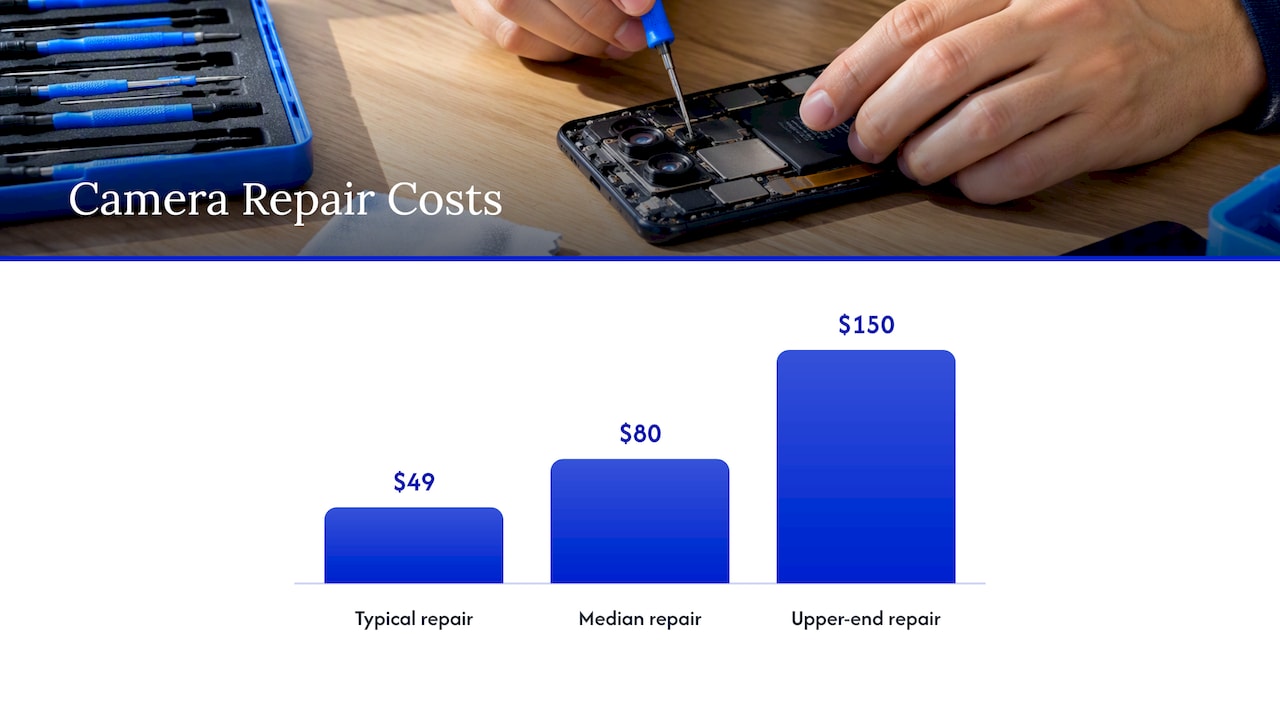
- U.S. camera repairs have a typical cost of $49, an $80 median, and an upper end of $150, though model and parts affect the quote.
- Manufacturer mail in service typically takes 7 to 10 business days plus shipping, while walk in, local, or mobile repairs may avoid that delay.
- Choose a provider offering a written quote, a parts and labor warranty, and careful data handling; back up and enable Repair Mode when available.
Table of Contents
- What software fixes should you try first for a broken Android camera?
- What physical checks can you do without opening the phone?
- How can you tell the problem is hardware?
- What are your Android camera repair options, costs and timelines?
- How do you choose a trustworthy repair service?
- What happens during a professional repair, and how do you prepare?
- When does on-site repair make the most sense?
- Book on-site Android camera repair with Repair Genius
- FAQ
- Sources
What software fixes should you try first for a broken Android camera?
Start here, in this order. Try these steps in order. Together, they can help resolve “Camera failed” errors and freezes.
- Restart the phone, then open the camera again. A reboot clears stuck processes that block the camera.
- Clear the Camera app’s cache and data, then check that the app still has camera permission and that the phone has free storage. Common software faults like crashes and “Camera failed” messages are often solved this way.
- Install pending updates for the Camera app and for Android itself. Update bugs get patched constantly, and a camera that broke after an update often needs the next one.
- Boot into Safe Mode. On Samsung phones, the camera working in Safe Mode points to a third-party app as the culprit. Uninstall recently added apps one at a time until the camera behaves.
- Test the front camera and a different camera app. If only one app fails, the problem is the app, not the lens or sensor.
- Check battery and temperature. Many phones limit camera functions when the battery is low or the device runs hot, so let it cool and charge before you judge the camera. If heat keeps coming back, our guide on Android overheating walks through cooling steps, and one on why Android phones freeze covers a related cause.
- Back up, then consider a reset. A factory reset is a last-resort software fix, and Repair Mode (where your phone offers it) lets a technician test the device without seeing your files. Manufacturers also recommend backing up and preparing the device before any service.
Pro Tip: Test the camera after every single step. If you change five things at once, you will never know which one fixed it.
What physical checks can you do without opening the phone?
Before you blame the hardware, check the outside of the phone. A smudged lens or a case obstructing the camera can be mistaken for a broken camera.
- Clean the lens and sensor window with a dry microfiber cloth. Pixel’s guidance includes wiping the lens and removing cases before testing again.
- Remove cases, screen-protector add-ons and stick-on lenses. A thick case edge or a clip-on lens can block part of the frame or confuse autofocus.
- Take off mounts, gimbals and third-party lenses, then retest. Anything magnetic or clamped near the lens can interfere with focus.
- Look closely for cracks, deep scratches or fog inside the lens. Temperature swings can cause fogging that clears after drying, but moisture that stays means a failed seal and needs a technician.
- Listen for a faint rattle when you move the phone. Autofocus and stabilization parts can make a small noise that is normal. Only worry if your photos also get blurry or shaky.
If focus is the main complaint, our article on why phone cameras stop focusing goes deeper.
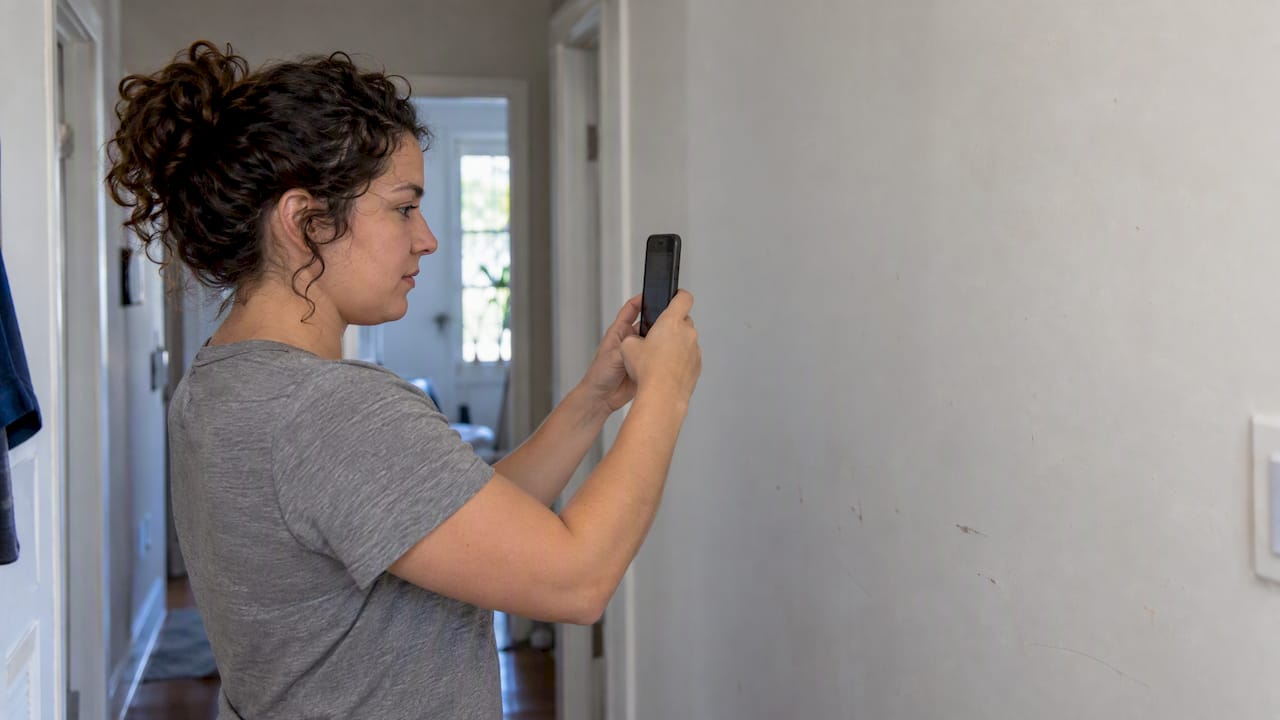
Pro Tip: Shoot a test photo against a plain, well-lit wall. Smudges, spots and soft corners show up much more clearly than in a busy scene.
How can you tell the problem is hardware?
A few decisive tests separate a stubborn software glitch from a failing component. Run them in this order.
- Check Safe Mode and other apps. If the camera still fails in Safe Mode, you are likely looking at a hardware fault. Failing in several camera apps points the same way.
- Look for the classic symptoms. A black preview, lines or spots in every photo, or focus that never locks, even with a clean lens and after a reset, is almost certainly hardware-level.
- Think back to the day it started. A camera that quit right after a drop, or after liquid or extreme heat, usually has physical damage that software cannot repair. Liquid and heat are leading causes of camera failure. If water was involved, see our steps for fixing a water damaged phone.
- Pause if you see moisture inside the lens. Stop charging and repeated power cycling, and have the phone inspected, because trapped moisture can spread to other components.
It is tempting to pop the phone open yourself. Modern phones are tightly sealed and need special tools, and the camera has to be calibrated and the seals restored afterward to keep alignment and water resistance. That is why we advise leaving the opening to a technician. Our overview of phone camera repair shows how to decide between DIY and a pro.
What are your Android camera repair options, costs and timelines?
Once you know it is hardware, you have four routes. Each trades speed, price and convenience differently.
- Manufacturer walk-in service. Often the fastest of the manufacturer options, with availability that depends on warranty and location.
- Manufacturer mail-in service. Convenient but slower, with a typical turnaround of 7–10 business days, plus shipping time on both ends.
- Local repair shops. Many offer walk-in work and include diagnostics, the part and calibration.
- On-site or mobile technicians. The technician comes to your home or office, so you skip the trip and often keep the phone in sight the whole time.
Warranty status matters. Accidental damage is often not covered by a standard warranty, so check your coverage and have your IMEI ready. Whichever route you pick, ask for a diagnostic quote before work starts. Samsung notes that repair cost and timing vary by diagnosis and warranty.
For a U.S. price reference, Yelp’s data from 9,653 quotes gives these typical camera repair costs:
$49 typical, $80 median, $150 at the upper end.
Those figures are a starting range, not a promise. Part prices differ by model: OnePlus lists specific camera modules at $57–$73 before labor, so a flagship with a multi-lens array will land higher than a budget phone.
How do you choose a trustworthy repair service?
A good Android camera repair comes down to a handful of checks you can make in a call.
- Warranty on parts and labor. No warranty usually means the shop does not expect the repair to last.
- Certified, experienced technicians. Authorized centers use genuine parts and certified technicians, which helps restore camera calibration and water resistance, and the same standard is worth demanding from any provider.
- Clear pricing in writing. You should know the diagnostic fee and the total before anything is opened.
- Same-day options and data-safe handling. Ask whether they use Repair Mode and whether they recommend a backup first.
Questions worth asking: Is the part OEM or third-party? How long is the warranty? Is there a diagnostic fee, and is it credited toward the repair? How long will it take?
Red flags: a refusal to give a written quote, no warranty, vague claims about parts, and pressure to approve extras before any diagnosis.
Service that comes to you has one more advantage. On-site service means your phone does not need to be sent in a shipping box, which can reduce how long your data is out of your hands. That is the model we built Repair Genius around.
Pro Tip: Ask the provider to describe their process out loud. A shop that explains diagnostics, calibration and warranty clearly has usually done it many times.
What happens during a professional repair, and how do you prepare?
A repair often follows a familiar process, and knowing what to expect can make it less worrying.
- Back up your data and, if your phone offers it, switch on Repair Mode so the technician can test without opening your personal files. Remove the SIM card, and keep proof of purchase handy for warranty checks, as manufacturers advise.
- Diagnosis. The technician confirms the fault, tells you the cause and gives you a quote.
- Replacement and calibration. The damaged module is swapped, then tested so focus, stabilization and image quality are verified.
- Warranty and handover. Ask what warranty terms apply to the new part before agreeing to the repair.
Confirm the shop’s data-handling policy ahead of time. A technician should never need to browse your photos or messages to fix a lens.
When does on-site repair make the most sense?
My view is simple: on-site repair earns its place when your phone holds a lot you cannot afford to expose, when you cannot be without it for days, or when getting to a shop is a hassle. Certified technicians and warranty-backed parts also carry far less risk than a DIY teardown of a sealed phone. If your camera fault appears to be hardware-related, I would book a technician rather than keep experimenting.
— Michael
Book on-site Android camera repair with Repair Genius

If your camera still fails after the steps above, we can arrange an on-site visit. Our technicians repair your phone at your location, taking care to protect your data during the process. Ask for a clear quote up front and confirm any fees and warranty terms before the repair.
- Back up your phone and turn on Repair Mode if you have it.
- Tell us your model and what the camera does (black preview, lines, no focus).
- Pick a time and we handle the rest.
Book Samsung and Android camera repair without leaving home.
FAQ
Why does my Android phone say the camera failed?
It usually means a software conflict, a full storage drive or a stuck Camera app, and a restart plus clearing the app’s cache and data often fixes it. If the message returns in Safe Mode and in other camera apps, the cause is likely hardware.
How much does a camera repair cost?
Costs vary by model and by the part needed. Yelp’s U.S. quote data can offer a general reference, but a diagnostic quote before work tells you the price for your phone.
Where can I get my camera repaired in Grand Rapids, Michigan?
We serve Orlando and Winter Park, Florida, so we cannot reach Grand Rapids. In any city, look for a shop that offers a written quote, a warranty on parts and labor, and certified technicians.
What is a person who repairs mobile phones called?
A mobile device repair technician. They diagnose faults and handle physical repairs such as lens cleaning, sensor adjustment or replacing a damaged camera module with specialized tools.
Sources
- Android camera not working? Here’s how you can try to fix it
- Issues with Camera app on Samsung phone or tablet
- Cost of Mobile Phone Repair – Last Updated July 2026 – Yelp
- Get your device repaired – Google Store Help
Recommended
- Phone Camera Repair: Fix It Yourself or Call a Pro?
- Why Device Repairs Fail: Common Mistakes Explained
- At Home Phone Repair: DIY vs. Professional Options










