

If your Android’s power button is stuck, mushy or dead, the cause is usually one of three things: a case pressing on it, a worn button flex cable, or a phone that isn’t actually broken but has simply run out of charge. The first and third are free to rule out in a few minutes. The second needs a replacement part and a careful hand. Below you’ll find the checks worth doing, how to use your phone while the button is out of action, what a professional repair involves, and how to decide between doing it yourself and booking a technician.
TL;DR
- Before blaming the button, take off the case, clean around the button gently, and charge the phone for at least 30 minutes with a certified cable.
- If the phone is frozen, Google says holding the power button for 5 to 7 seconds usually restarts it. Holding Volume Down and Power together is the next step.
- A button that stays stiff, stuck or silent after cleaning usually points to a worn flex cable, which needs a replacement part.
- DIY on modern phones is risky: the flex is often glued down and comes out in pieces. Back up your data before anyone opens the phone.
- In Orlando and Winter Park, we come to you for Android power button repair and quote the price before work starts.
Table of Contents
- Is it really the power button?
- How to use your Android while the button is dead
- What actually fails inside the phone
- Why DIY power button repair goes wrong
- Our perspective: fix the cause, protect the data
- What a professional power button repair involves
- What power button repair costs
- Repair or replace?
- Book an on-site power button repair in Orlando and Winter Park
- Frequently asked questions
- Sources
Is it really the power button?
A phone that won’t wake or won’t turn on gets blamed on the button far more often than it deserves. Work through these in order. None of them can hurt the phone.
Rule out a drained battery
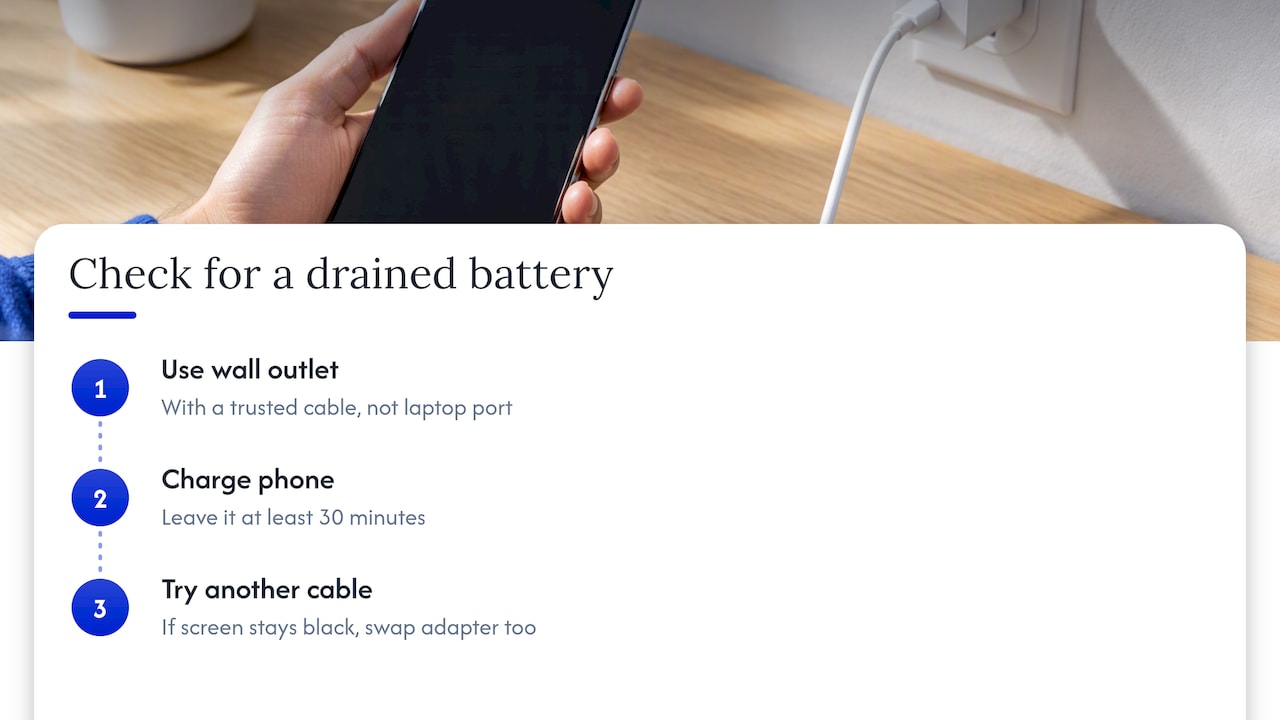
A deeply drained phone may not even show a battery icon. Pocket-lint advises making sure the device is charged before you do anything else. Plug it into a wall outlet (not a laptop port) with a cable you trust and leave it for at least 30 minutes. If the screen stays black after that, try a different cable and adapter. Samsung’s own troubleshooting page lists several causes for a Galaxy that won’t turn on, including a temporary software freeze, a fully drained battery and, in some cases, a hardware problem. The button is only one suspect on that list.
If the phone charges but behaves strangely, or shows a warning about moisture, read our guide on what to check when an Android won’t charge before you try anything else.
Take off the case
Thick or tight cases can press on the side buttons all the time. That makes the button feel hard to press, or makes the phone behave as if the button is held down. Remove the case, press the button a few times, and see whether the feel changes. Whizz Mobile’s troubleshooting guide describes the same scenario: a customer notices stiff buttons right after fitting a thicker case.
Clean around the button
Pocket lint, sand and sticky residue collect in the gap around a side key. Use a dry, soft cloth or a dry soft brush, and avoid liquids. Don’t push anything sharp into the gap. If the button is still stiff, doesn’t click, or doesn’t spring back after cleaning, that’s the pattern of mechanical wear, and it needs a repair rather than another reboot.
Try a forced restart
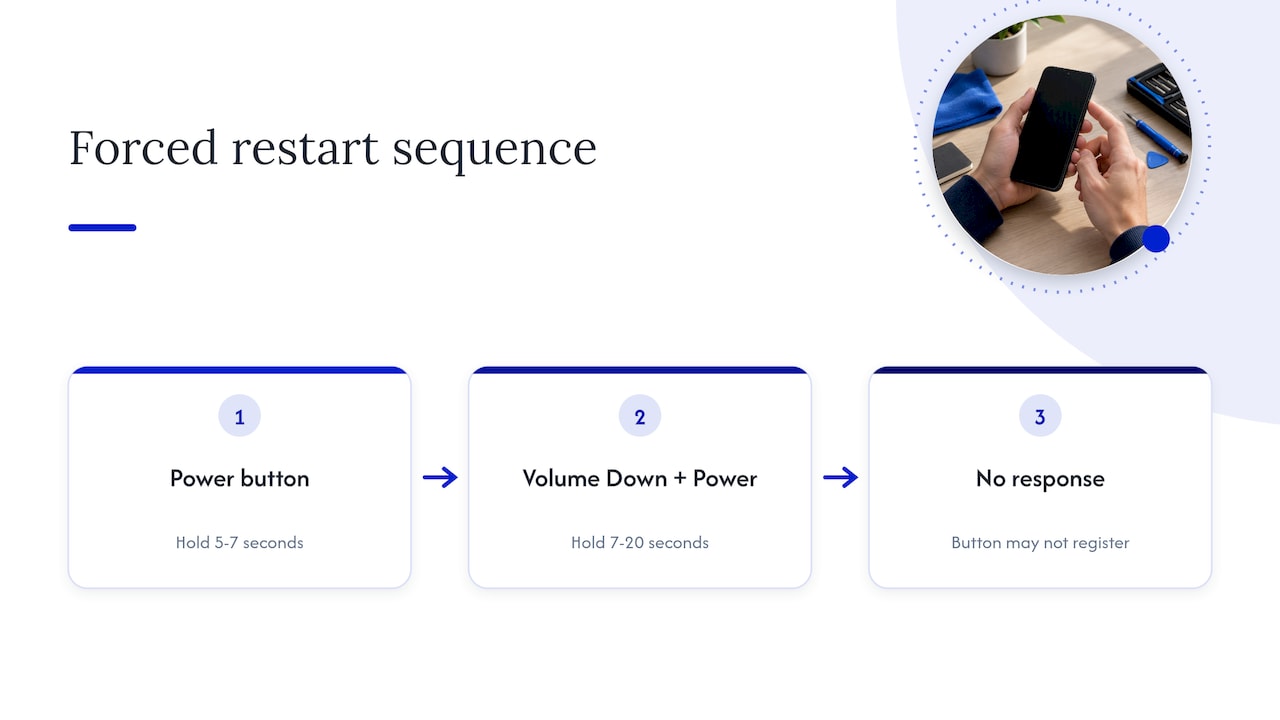
If the phone is on but frozen, Google’s Android Help page says to hold the power button for about 5 to 7 seconds, which usually restarts the phone. If that doesn’t work, holding Volume Down and Power together for roughly 7 to 20 seconds is the next thing to try. If neither does anything, that tells you something useful: the phone may be fine, and the button may not be registering.
How to use your Android while the button is dead
A broken power button is annoying, but it rarely leaves you locked out. These are the common workarounds, and all of them are stopgaps. They don’t fix the switch.
| Situation | What usually works | Caveat |
|---|---|---|
| Screen is off, phone is charging | Plug in or unplug the charger to wake the display on many phones | Behavior varies by model |
| Phone is on but frozen | Hold Volume Down plus Power | Needs the button to register at least partly |
| Phone is completely off | Connect to a computer while holding Volume Down to reach fastboot, then reboot | Needs a PC and Android platform tools |
| Day-to-day use | Use fingerprint or face unlock, and on-screen shortcuts, to avoid pressing the button | Settings differ by manufacturer |
The fastboot route is the most technical. Pocket-lint and How-To Geek both walk through turning on an Android without the power button, and Google’s page mentions the fastboot reboot command for a Windows PC with platform tools installed. If command lines aren’t your thing, don’t force it. That is exactly the point where a technician saves you time.
One practical warning: if your phone is only alive thanks to a workaround, treat it as living on borrowed time. A button that fails completely can leave the phone off, and you may not be able to reach your photos, texts or authenticator apps when you need them. Back up now. If you’re also changing phones or moving numbers, our guide on transferring contacts before phone service covers the basics.
What actually fails inside the phone
On most Android phones, the power key is not a sealed part you pop out. It’s a small switch on a flex cable, often shared with the volume keys, running along the frame and connecting to the main board. Three things go wrong:
- The switch wears out. Heavy daily use, particularly from an always-on-the-side habit like checking the time hundreds of times, eventually leaves a button mushy or unresponsive.
- The flex cable gets damaged. Drops, bending and swollen batteries can crack or crush the ribbon.
- Something on the board is damaged. If a connector is burnt or a trace is broken, a new button won’t help. The repair then moves into board-level work, which is a different level of service than swapping a button module.
It’s also possible for a swollen battery to push on the flex and mimic a button fault, which is a safety issue as much as a repair one. A phone with a bulging back or a screen lifting off the frame should not be pressed, squeezed or charged until someone has looked at it.
Why DIY power button repair goes wrong
We understand the temptation. Parts are cheap online and videos make it look simple. But the specifics matter more than the video suggests.
- The flex is glued. iFixit’s Google Pixel 4 side button guide notes the flex is strongly adhered to the frame and often comes out in pieces, so you need the replacement part in hand before you start. It also advises discharging the battery below 25% before disassembly to reduce risk.
- Battery safety. Opening a phone with a fully charged lithium battery raises the stakes if a tool slips or the battery gets pinched.
- Reassembly errors. Different screw lengths, misrouted ribbons and unseated connectors are common reasons a phone that nearly worked becomes one that doesn’t turn on at all. LML Repair’s Galaxy A12 power button guide lists skipping a full power-off and mixing screw lengths among the risky mistakes.
- Water resistance. Many phones rely on adhesive seals. Once opened, resealing properly takes the right materials, and a poor seal can quietly cost you water resistance.
We’ve written more on this pattern in why device repairs fail. Most failed repairs come from a small number of repeating mistakes, and many of them are made before the first screw is out.
Our perspective: fix the cause, protect the data
We repair phones at people’s homes, offices and campuses around Orlando and Winter Park, and power button calls have a familiar shape. The customer has usually already tried a hard reset, sometimes several, and often the case, cable and charger swap too. What worries them isn’t the button. It’s what’s on the phone.
So we start with the data, not the part. Before we open anything, we ask what’s on the device, whether it’s backed up, and whether it still turns on. A button replacement is a routine job. A phone that won’t power up at all, where the cause might be a connector or board trace, needs a different conversation, and we’d rather have that conversation honestly at the start than discover it halfway through. We tell you which kind of repair it is, what it will cost, and what it will do for your data, before work begins.
We also say no to unnecessary work. If the problem turns out to be a worn cable or a drained battery, we’ll tell you. If the phone is old enough that the repair doesn’t make economic sense, we’ll say that too. A repair that costs a fraction of replacing the phone is a good deal. One that costs most of its value is not, and you should hear that from us.
— Michael
What a professional power button repair involves
The steps are simple to describe even though the work needs care:
- Diagnosis. The technician confirms the button is the fault, not the battery, software or a stuck case, and checks for swelling or liquid damage.
- Backup check. If the phone is working, data is backed up or confirmed safe before opening.
- Power-down and disassembly. The phone is fully shut off, the back or screen is carefully released, and the battery is disconnected.
- Flex replacement. The old flex, often glued down, is lifted out and a new one is fitted and aligned with the frame.
- Reassembly and testing. Screws go back in their right positions, seals are replaced where needed, and the button, volume keys, fingerprint reader and charging are tested.
A typical job is short. Some shops advertise turnaround times of around half an hour for a button flex on common models, though the time depends on the model and on how the phone is built. Samsung, Google Pixel, Motorola and others differ, and some phones need the screen lifted while others open from the back.
When it becomes a board-level repair
If your phone is truly dead and the button isn’t the cause, the fix may be microscopic work on the logic board, such as repairing a burnt connector or a damaged trace. Geekmatics describes this kind of work as a different service from simple module replacement. If your priority is photos and files, say so at the very start, because these procedures are done to bring the phone back long enough to save its data. We cover this kind of repair in our board repair page for MacBooks and iPhones, and the same principle applies on Android: diagnose first, then decide.
What power button repair costs
Prices vary by model, because the work differs from a simple ribbon swap on a budget Galaxy A phone to a tightly packed flagship. Parts availability, whether the screen has to come off, and whether other damage is found all change the quote.
We don’t publish a flat price list, and we won’t quote one in an article. What we do is quote you the price up front, covering diagnostics, labor and parts, with no hidden fees. Warranty applies on parts and labor. If you want a number before booking, tell us the exact make and model, what the button does (stuck, mushy, nothing at all) and whether the phone ever got wet or dropped. That’s enough for a realistic quote in most cases.
For tighter budgets, our guide to phone repair on a limited budget explains how to decide between repairing, downgrading the fix, and replacing the phone.
Repair or replace?
Use these questions:
- How old is the phone, and does it still get security updates? A power button repair on a phone that is near the end of its update life may be a short-term fix.
- Is the rest of the phone in good shape? A good screen, battery and storage make repair a strong choice.
- Is the button the only fault? If the phone also overheats, reboots or shows charging trouble, the problem may be bigger. Our pieces on Android overheating and boot loops explain how those fit together.
- How much is your data worth to you? Replacing the phone doesn’t move the data for you. If the old phone is stuck off, the repair may be how you get your files back.
For most people with a phone only a few years old, repair costs less than a new device and keeps everything where it is.
Book an on-site power button repair in Orlando and Winter Park
If the quick checks above haven’t fixed it, we can take it from here. Our technicians come to your home, office or campus in Orlando and Winter Park, so you don’t have to travel with a phone that barely turns on. We repair Samsung, Google Pixel and other Android phones, and we put data safety first. See our Samsung and Android repair page to request a visit, or have your phone’s make and model ready when you call.
Before we arrive, it helps to do three things: back up whatever you still can, write down your screen lock details if the technician needs to test the phone, and take off the case.
Frequently asked questions
Can I use the volume button as a power button?
Not as a true replacement. On many Androids, the volume keys and power key work together for restarts and for entering recovery or fastboot modes, but they don’t switch the phone on and off by themselves. If the phone is on, you can often use on-screen controls or settings to lock the screen. If it’s off, you may need a charger or a computer connection to wake it.
Why won’t my Samsung turn on even when it’s plugged in?
Samsung says a Galaxy may not turn on because of a software freeze, a drained battery, a system malfunction or a hardware fault. Try a different cable and adapter, and leave it charging for at least 30 minutes. If there is still no sign of life, stop experimenting and have it looked at, especially if there’s liquid exposure or a swollen back.
What is a hard reset on an Android?
People use the term for two different things. A forced restart, such as holding the power button for several seconds, just reboots the phone and doesn’t erase anything. A factory reset wipes the phone. If your goal is to fix a stuck button, you don’t need a factory reset, and you shouldn’t do one before your data is backed up.
Is power button repair worth it?
Usually yes on a phone that’s otherwise healthy, because the repair costs far less than a new device and keeps your data in place. It’s less compelling on a very old phone that no longer gets updates. Ask for a quote with the exact model, and weigh it against what you’d pay to replace the phone.
Sources
- Fix an Android device that won’t charge or turn on, Android Help
- Samsung Galaxy phone or tablet will not turn on, Samsung US Support
- How to turn on an Android phone without a functioning power button, Pocket-lint
- How to Turn On an Android Phone Without the Power Button, How-To Geek
- Phone Physical Buttons Not Responding at All? Whizz Mobile
- Google Pixel 4 Side Buttons Replacement, iFixit
- Power Button Repair Guide for Galaxy A12, LML Repair
- Board-Level Repair and Microsoldering, Geekmatics
Recommended
- Android Not Charging? Liquid Alerts Come Before Any Quick Fix
- Android Camera Repair: Try 7 Fixes Before an Onsite Visit
- Phone Repair with a Limited Budget: Smart Fixes That Last
- Android Overheating: 5 Cooling Steps Before You Call a Pro










