
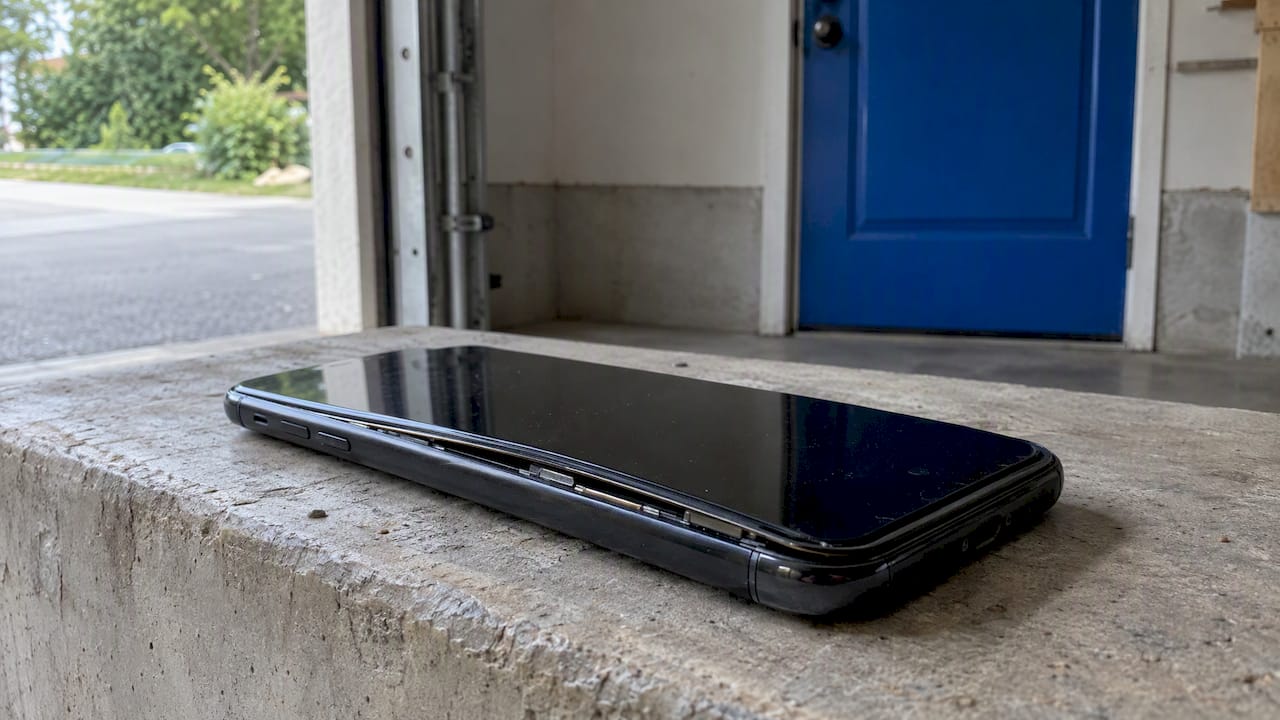
If your phone battery is swollen, stop charging the phone, power it down, and move it away from anything flammable. A swollen battery cannot be repaired or “deflated”. It has to be replaced by a professional and recycled properly. Until then, treat the phone as a fire risk, not just a broken gadget.
This guide covers how to confirm swelling, what to do in the first hour, how to store the phone safely, where to take the old battery in Central Florida, and what a proper replacement involves. It applies to iPhones, Samsung and Pixel phones, and tablets such as the iPad.
TL;DR
- Stop charging and using the phone. Power it off and put it on a hard, non-flammable surface away from beds, couches and paper.
- Swelling is irreversible. There is no way to unswell a battery, and pressing, puncturing or prying at it can start a fire.
- Never put a lithium-ion battery in household trash or curbside recycling. Take it to a hazardous waste site or an electronics recycler.
- Get the battery replaced by a trained technician. Waiting, even “just until the weekend”, is the real risk.
- In Orlando and Winter Park, we come to you for the replacement.
Table of Contents
- How to tell if your phone battery is swollen
- What to do in the first hour
- Can you fix a swollen battery yourself?
- How to store a swollen battery until it’s handled
- Replacement: what a professional does
- Where the old battery goes
- Why batteries swell, and how to avoid it
- Our view: don’t wait, and don’t gamble on a home fix
- Get the battery replaced where you are
- FAQ
- Sources
How to tell if your phone battery is swollen
Swelling is not always dramatic. It often starts as a small change that people explain away. Look for these signs:
- The screen is lifting at one edge, or a thin gap has opened between the display and the frame.
- The back panel bulges or no longer sits flat. On glass-backed phones, the glass may crack or pop loose.
- The phone rocks when you lay it face-up on a table, or it no longer sits flush in its case.
- The case feels tight, or it suddenly doesn’t fit.
- The trackpad or buttons misbehave on laptops, where a swollen battery can push the trackpad up or warp the chassis.
- Battery life falls off a cliff, or the phone runs hot while doing little.
The cause is gas. When a lithium-ion cell is overcharged, damaged or simply old, it outgasses, and the pouch-style cells in phones have no rigid metal shell to vent the pressure. Industry reviews note that pouch cells expand instead, which is why the display or back cover gets pushed out of alignment.
One caution on checking by smell. Escaping gases can smell sweet, metallic or like nail polish remover. If you want to check, iFixit describes wafting the air toward you from a distance. Never hold a swollen or leaking battery close to your face.
Is a swollen battery dangerous?
Yes. It means the cell is damaged inside. The US EPA’s guidance on lithium-ion batteries says swelling is a sign to stop using, charging and handling the device. The underlying danger is thermal runaway: overheating triggers a reaction that makes more heat and gas, which feeds on itself until the battery can ignite. That is why a swollen phone that also feels hot should be unplugged and isolated at once.
How likely is a fire in any one phone? Nobody can tell you, and that is the point. The Consumer Product Safety Commission has documented the outcomes in other lithium-ion products. A 2024 power bank recall covered about 132,000 units because the battery could overheat, and a 2026 recall notice reports a fatality after an earlier recall. These are power banks, not phones, but the chemistry is the same.
What to do in the first hour
Do these in order. Stay calm, but don’t postpone.
- Unplug it and don’t charge it again. Charging raises internal pressure and gas production, which increases fire risk.
- Power it down. If the screen is cracked or lifting and the touch controls are hard to use, hold the side buttons as you normally would. Don’t press hard on the display.
- Take off the case and any accessories. Heat can build up under a case.
- Move it to a hard, non-flammable surface. A tile floor, a concrete garage floor or a metal tray works. Not a bed, couch, car seat or a pile of paperwork.
- Don’t carry it in a pocket or bag. Keep it away from your body.
- Don’t use it “one last time”. That includes pulling photos off it. If the data matters, tell the technician before the repair so it can be handled with care.
- Call a professional the same day.
If the phone is smoking, hissing, very hot to the touch, or you see flames, leave the area and call 911. Don’t try to put out a lithium-ion fire with a small household device and don’t touch the phone.
What not to do
- Don’t press the bulge flat, squeeze it, or put the phone under a heavy object.
- Don’t pry the screen or back off at home, and don’t poke the battery with a tool. Puncturing or compressing a swollen battery can trigger a fire or explosion.
- Don’t put it in the freezer. There is no reliable evidence it helps and condensation adds a new problem.
- Don’t fly with it, mail it, or toss it in a drawer.
- Don’t “run it down” by using it heavily. Heavy use generates heat, which is the opposite of what you want.
Can you fix a swollen battery yourself?
No, and this is not a case for a tutorial. The swelling is permanent, so the only fix is to replace the cell. Even iFixit, a site built around DIY repair, notes that removing and disposing of a swollen battery can be dangerous and tells readers to proceed at their own risk. Modern phones also glue the battery in place. Prying at a swollen, glued pouch cell is exactly how punctures happen.
That is a job for a technician with the right tools, a safe place to set the old cell, and a plan for where it goes afterward.
How to store a swollen battery until it’s handled
Ideally, get the phone to a technician the same day. If you have to wait, the EPA’s guidance suggests a non-flammable container such as a metal bucket or sturdy bin filled with sand or kitty litter, kept somewhere cool and dry, and outside the living space if you can do it safely. In Florida, that means not in a hot car and not on a sunny patio. A shaded, ventilated spot such as a garage floor or covered porch is better, as long as it is away from anything that burns.
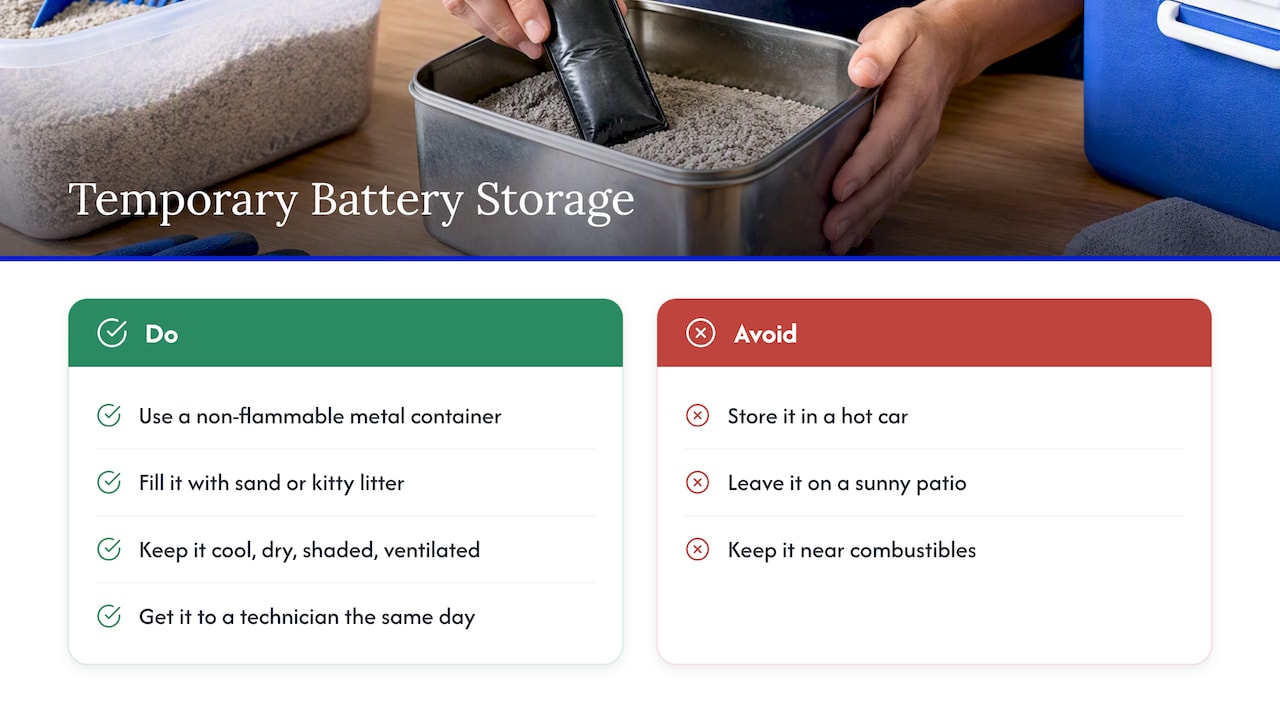
Check on it from a distance. If it starts to get hot, smoke or hiss, leave and call 911.
Replacement: what a professional does
A proper battery replacement is more than swapping a part. On a phone that has already swollen, the technician also needs to check for collateral damage, because a bulging cell can crack the screen, warp the frame, or push on the charging flex cable. Expect a technician to:
- Inspect the device and the bulge before powering anything on.
- Release the display or back carefully, with adhesive softened in a controlled way and no metal tools near the cell.
- Remove the old battery without bending it, and set it aside for recycling.
- Check the screen, frame, and charging port for damage from the swelling.
- Fit a quality replacement battery and test charging, battery health, and heat.
When the screen has been pushed up, the display often needs to be replaced too. A good shop tells you that up front, before the work begins. The same goes for tablets: swelling in an iPad can lift the screen away from the frame, and our guide to tablet screen repair and swollen battery risks explains what that means for the repair.
Is it worth replacing the battery or should you buy a new phone?
Usually the battery is the cheap part of the problem. If the rest of the phone works, replacing the battery is often a fraction of the cost of a new device, and it resets your battery health. If the phone is old, no longer gets software updates, or the swelling has damaged the logic board or display, it can make sense to move on. We go through that math in our guide to iPhone battery replacement versus buying new, and for older devices see what to know about end-of-life repair.
If you own a Pixel, our Pixel battery replacement guide covers what to expect. Samsung owners can compare options in our Samsung battery replacement guide.
What about warranty, recalls and the manufacturer?
Check first whether the device is part of a safety program. Google and Apple both direct customers to official channels for service if a device is covered by a recall or safety program. If your phone is still under warranty or covered by a program, the manufacturer’s route may cost you nothing. If it is out of warranty, which is the case for most swollen batteries because they come with age, an independent technician is a fast and practical option.
Where the old battery goes
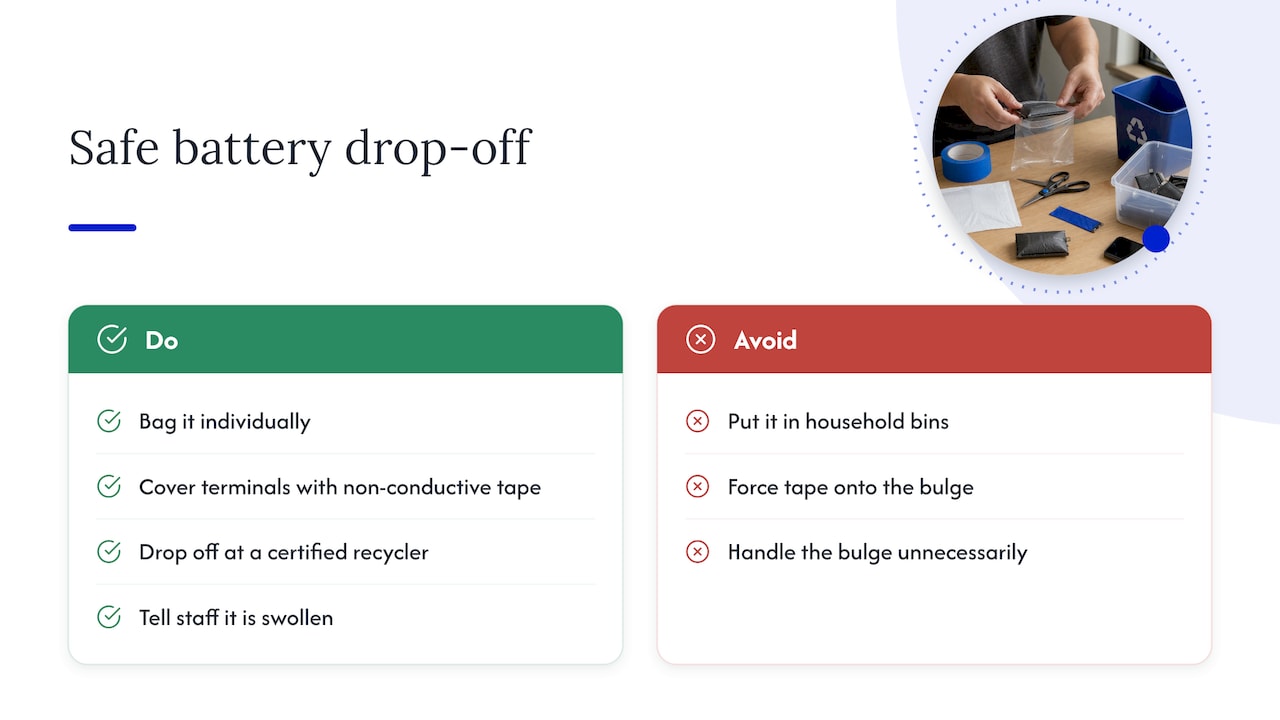
A swollen battery is hazardous waste. Lithium-ion batteries and devices containing them should not go in household garbage or recycling bins, because they can cause fires in trucks, landfills and recycling facilities. To prepare one for drop-off, the EPA advises you bag it individually and cover the terminals with non-conductive tape such as electrical tape, then bring it to a household hazardous waste site or certified electronics recycler. With a swollen cell, don’t force the tape or handle the bulge more than necessary. If you can’t prepare it safely, leave that to the technician or the collection site staff and tell them it is swollen.
In Central Florida, Orange County Utilities accepts household hazardous and electronic waste free of charge from county residents at community collection events and drop-off locations, and it points to the Call2Recycle locator for rechargeable batteries. Check the county page for current locations and hours before you go, and call ahead to say the battery is swollen. Businesses are not covered, since the county site says commercial waste is not accepted.
The principle is the same anywhere: contact the manufacturer, a professional, or a hazardous waste facility. Readers elsewhere can see how a city handles it, for example this guide to battery disposal in Sydney, Australia, though rules and drop-off sites differ by country and city.
Why batteries swell, and how to avoid it
A lithium-ion battery is a consumable. It wears with every charge cycle, and swelling is most common in older batteries. Heat, physical damage and cheap chargers speed it up. A few habits help:
- Avoid heat. Don’t leave the phone on a dashboard or in direct Florida sun. See our guide to fixing an overheating phone for causes.
- Use quality chargers and cables. Uncertified chargers are a common culprit.
- Don’t charge under a pillow or on a couch. Heat has nowhere to go.
- Replace the battery when health drops. Our piece on phone battery lifespan explains the typical wear curve.
- Take early warning signs seriously. Fast drain and unusual warmth can come before visible swelling. You can check for drain with the steps in our iPhone battery drain guide.
- Replace the battery after a drop or water exposure. Damage to the cell may not show right away. If the phone got wet, see how to handle a water-damaged phone.
Our view: don’t wait, and don’t gamble on a home fix
We repair phones, tablets and laptops on site across Orlando and Winter Park, and we have seen that the swollen battery is the one problem where people wait the longest. The phone still turns on. It still takes calls. The bulge is only a little one. That reasoning is how a small problem turns into a hot phone on a nightstand.
Our advice is plain. Stop charging the moment you notice it. Don’t try to flatten it or open the phone yourself. Call a professional that day. Tell the technician the battery is swollen when you book, so the repair is planned around it and not discovered halfway through.
We also think the replacement should be explained before it starts: what is damaged, what needs replacing, what it costs, and what the warranty covers. Pricing should be quoted up front, with no surprises. And because your phone holds your life, we treat data safety as part of the repair, not an add-on.
— Michael
Get the battery replaced where you are
If your phone or tablet is swelling, you shouldn’t have to carry it through traffic or sit in a waiting room. We come to your home, office or other location in Orlando and Winter Park and replace the battery on site. Our technicians handle iPhone repairs, Samsung, Pixel and other Android repairs, and iPad and tablet repairs, and laptops are covered too, including MacBook and iMac repair. Repairs come with a warranty on parts and labor.
Tell us the make and model, describe what you see, and keep the device off and away from heat until we arrive. You can start from repairgeniuses.com.
FAQ
Is it safe to use a phone with a swollen battery?
No. A swollen battery has internal damage and can overheat or ignite, especially while charging. Power the phone off, don’t charge it, and have it serviced as soon as possible.
Can I charge a phone if the battery is swollen?
No. Charging increases pressure and gas production inside the cell, which raises the chance of a fire. If you need the data, tell the technician before the repair so they can plan around it.
How do I unswell a phone battery?
You can’t. The swelling is permanent, and pressing on it or poking it can cause a fire. The battery has to be replaced and the old one recycled.
Does an iPad or tablet battery swell too?
Yes. Tablets use the same lithium-ion pouch cells, and because the battery is large, swelling can visibly lift the screen off the frame. Treat it the same way: stop charging, power down, and get it serviced.
Where do I take a swollen battery in Orlando?
Don’t put it in the trash or curbside recycling. Orange County residents can use the county’s free household hazardous waste and electronics drop-off options, and a technician replacing your battery can tell you how the old one will be handled. Call ahead and say that it is swollen.
Sources
- Frequent Questions on Lithium-Ion Batteries, US EPA
- The Importance of Sending Used Lithium-ion Batteries to Electronic Recyclers or Hazardous Waste Collection Facilities, US EPA
- What to Do With a Swollen iPhone Battery, iFixit
- What to do with a swollen battery, iFixit
- High Energy Density Batteries status report, CPSC
- Baseus power bank recall, CPSC
- Casely power bank recall, CPSC
- Google Pixel Phone Help
- Household Hazardous Waste, Orange County Utilities
Recommended
- Diagnose iPhone Battery Drain in 10 Minutes Using Settings > Battery
- Expect 80% at 1,000 Cycles: Phone Battery Lifespan for U.S. Owners
- Tablet Screen Repair & Swollen Battery Risks
- iPhone Battery Replacement vs Buying New | Repair Guide










