
Most routine laptop repairs take a few hours to a couple of business days, while fixes that need special parts or board-level work can stretch to multiple weeks. Mail-in and manufacturer repairs usually add shipping and queue time on top of the actual labor, commonly landing in the 5 to 15 business day range. On-site or same-day service often shortens the timeline for common faults because it skips shipping and sitting in a shop’s queue.
TL;DR:
- Repair times vary widely depending on the type, with screen, battery, and keyboard fixes often completed within a single day if parts are in stock.
- Storage and data transfers can add hours or days, especially if data recovery or large backups are involved, extending turnaround significantly.
- Parts sourcing is a critical factor, with proprietary components taking longer to obtain and causing delays in motherboard or logic-board repairs.
- On-site or same-day repair services can drastically reduce waiting times for common fixes but are limited for complex motherboard or liquid damage cases.
- Providing detailed symptom descriptions, pre-approving extra work, and backing up data in advance can cut repair timelines by reducing diagnostic delays and communication gaps.
Table of Contents
- Typical turnaround by repair type
- What actually determines how long your repair takes
- Mail-in, retail, local shop, or on-site: which fits your timeline
- How to shave days off your repair timeline
- When a delay is normal and when it’s a red flag
- Why on-site repair changes the math on downtime
- Getting your laptop fixed without the wait
- FAQ
- Sources
Typical turnaround by repair type
The type of repair matters more than almost anything else when you’re trying to guess how long you’ll be without your laptop. A cracked screen and a dead motherboard are both “laptop repairs,” but they live in completely different time zones.
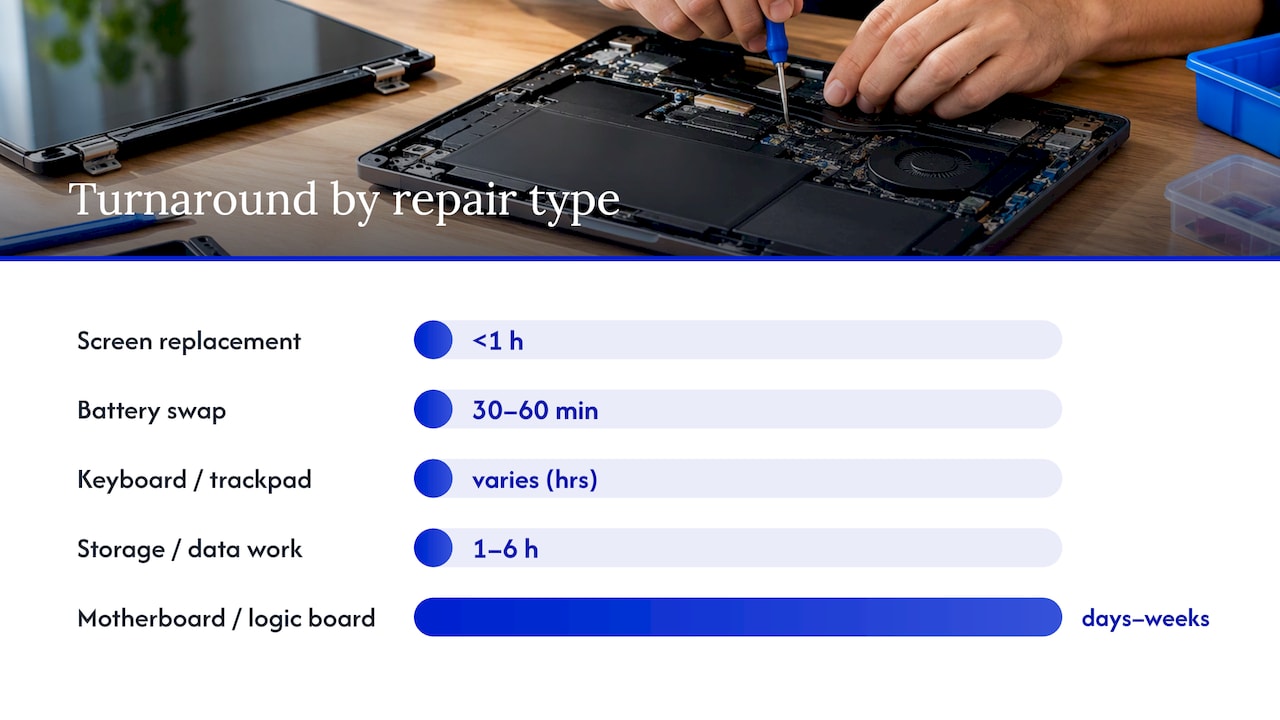
Screen replacements are usually the fastest fix on this list. If the part is in stock, a technician can usually swap a laptop screen in under an hour, and the whole visit, including diagnosis, often wraps up same-day. The catch is sourcing: some business-class laptops use common panels that are easy to find, while certain consumer models use proprietary screens that take longer to order, as explained in this guide to business laptop repair types.
Battery swaps follow a similar pattern. The labor itself is quick, often 30 to 60 minutes, but battery availability varies by brand and model year. A popular model might have batteries on a technician’s shelf; an older or less common one might need a few days to arrive.
Keyboard and trackpad repairs sit in the middle. Many laptops use a keyboard assembly that’s screwed or clipped in, which a technician can replace in under an hour once the part is on hand. Laptops with keyboards bonded to the top case, common on slimmer models, require more disassembly and can take longer even with the part in stock.
Storage and data work introduces more variance than any other category. A straightforward SSD swap with no data transfer can finish in under an hour. Add a full data migration from an old drive, and you’re looking at several hours depending on how much needs to move. If the original drive is failing and data recovery is involved, timelines extend further, since recovery work often requires specialized diagnostics and staged recovery steps rather than a simple copy-and-paste job, as explained in Data Recovery Turnaround Time: Realistic Timelines Explained.
Motherboard and logic-board repairs are the slowest category by a wide margin. Diagnosing a board-level fault takes longer than a simple parts swap because a technician has to isolate which component failed before ordering anything. Once the cause is confirmed, sourcing a replacement board or component can take anywhere from several business days to a few weeks, particularly on consumer laptops that use model-specific parts rather than standardized ones. For a closer look at what drives these delays, see this breakdown of laptop motherboard failure causes and fixes.
Liquid damage repairs are the least predictable of all. Sometimes a laptop that took a spill needs nothing more than a cleaning and a new keyboard, finished same-day. Other times corrosion has reached the board, and the repair turns into a multi-week diagnostic and parts-sourcing process.
A few patterns hold across all of these:
- Same-day completion is realistic for screens, batteries, and keyboards when the part is in stock.
- Storage swaps are fast, but data transfer or recovery can add hours to days depending on volume.
- Board-level and liquid damage repairs carry the widest best-case to worst-case range, from a few hours to several weeks.
What actually determines how long your repair takes
Two laptops with the exact same symptom can have completely different root causes, and that’s the biggest reason estimates vary. A laptop that won’t turn on might have a dead battery, a loose power connector, or a failed motherboard component, and only a physical diagnosis can tell which one you’re dealing with. That’s why a quote given over the phone is always a rough guess, while a quote given after hands-on diagnosis is far more reliable.
Parts lead time is the second major factor, and often the one that turns a one-day job into a multi-week one. Standardized components, batteries and screens for popular models, tend to be easy to source. Proprietary parts, especially on thin consumer laptops or older models, sometimes have to be special-ordered, and that wait is almost entirely out of the technician’s hands.
Testing matters too, even though it’s easy to overlook. A responsible repair includes checking the fix under real conditions, sometimes called soak testing, before handing the laptop back. Skipping this step to promise a faster turnaround can mean the same problem resurfaces days later. A slightly longer repair that’s actually tested tends to beat a rushed one that isn’t.
Data handling adds its own timeline. Backing up personal files before any repair is good practice, and the Federal Trade Commission recommends backing up your data to an external drive or a secure cloud service before a device changes hands for service. Larger backups or recoveries simply take longer to move, which adds real time on top of the mechanical repair.
Finally, delays on your end count too. A technician waiting on your approval to order a part, or waiting for you to clarify when a problem started, adds idle time that has nothing to do with the actual repair work. Queue time, the gap before a technician even starts looking at your laptop, can add as much delay as the labor itself.
- Diagnostic uncertainty means a phone estimate is never as reliable as a hands-on one.
- Parts lead time depends heavily on whether your laptop uses common or proprietary components.
- Post-repair testing adds time but reduces the chance of a repeat visit.
- Data backup or recovery volume directly affects how long the data portion takes.
- Approval delays and technician queue time often add more waiting than the repair itself.
Pro Tip: Ask upfront whether your quote is based on a physical diagnosis or just your description of the symptom. If it’s the latter, treat the timeline as a placeholder, not a promise.
Mail-in, retail, local shop, or on-site: which fits your timeline
How you choose to get your laptop fixed changes the math as much as the repair itself does. Each route trades speed, cost, and convenience differently.
- Manufacturer mail-in service typically offers two speeds: express repairs that aim for roughly 5 to 7 business days, and standard service that commonly runs 12 to 15 business days, according to Dell’s own repair timelines. Shipping to and from a regional repair facility accounts for a meaningful chunk of that window, not just the labor.
- Big-box and retail repair counters often split work between in-store technicians and centralized repair centers, which means your laptop may travel even if you dropped it off locally. Because of that mixed workflow, published ETAs can be less accurate than they sound, and actual turnaround often depends on which path your specific repair takes.
- Local independent shops tend to be faster than manufacturer or retail channels for common parts, since many stock popular batteries, screens, and keyboards. Their limits show up on rare or proprietary boards, where they may need to order the same parts a manufacturer would, erasing some of that speed advantage.
- On-site and same-day service skips shipping and centralized queues entirely, which is why it tends to save the most time on repairs like screens, batteries, keyboards, and straightforward storage swaps. It costs more per visit than mailing a laptop off, but for anyone who can’t be without their machine for a week or two, that trade-off often makes sense. Repairs that genuinely require specialized bench equipment are the exception, and a good technician will tell you upfront when that’s the case, as detailed in this comparison of same-day laptop repair against mail-in options.
How to shave days off your repair timeline
A little preparation before you ever hand over your laptop can cut real time off the total wait, mostly by eliminating the back-and-forth that slows diagnosis down.
Start with your data. The FTC’s guidance on backing up files before service recommends using an external hard drive, a USB flash drive, or a secure cloud service, and doing this ahead of time means a technician isn’t waiting on you mid-repair to confirm what can be wiped or transferred. The bigger your data set, the longer any transfer takes, so backing up in advance, rather than during the appointment, removes that step from the clock entirely.
Next, give the technician specific symptom details instead of a vague description. “It won’t turn on” takes longer to diagnose than “it shuts off after 10 minutes of use and the fan gets loud first.” A clear reproduction path, what you were doing when the problem started, how often it happens, and what you’ve already tried, can remove a day or more of clarifying questions.
If you’re comfortable with it, providing login access, a sample file to test with, or a quick walkthrough of the issue in person speeds up both diagnosis and final testing. You can also ask a technician to test on a guest account or a non-sensitive file if privacy is a concern, which keeps your personal data separate from the testing process.
If your repair is urgent, ask directly about rush service or express parts ordering. Providers that stock common parts can often prioritize your job for an added fee, and a practical checklist for expediting laptop repairs covers what to ask for and what it typically costs.
Finally, have a quick answer ready if a technician calls about extra work. Something as simple as “Yes, go ahead if it’s under $50, otherwise text me the details” keeps the job moving instead of sitting in a queue waiting for your callback.
- Back up your data before the appointment rather than during it to remove that step from the timeline.
- Give the technician a specific symptom description and reproduction steps instead of a vague complaint.
- Offer a test account or sample file if you’re not comfortable sharing full login access.
- Ask about rush service or express parts if your timeline is tight.
Pro Tip: Have a pre-decided spending limit ready for “approve extra repairs” calls. It turns a day of phone tag into a five-minute confirmation.
When a delay is normal and when it’s a red flag
Some waiting is just part of the process. Parts shipping, queue time behind other customers, and the occasional backorder are normal, especially for less common laptop models. A reasonable shop will also give you an estimate with a plausible range rather than an oddly specific promise for a repair they haven’t physically inspected yet.
That said, there are limits. If a shop gives no parts ETA at all after two weeks, that’s worth questioning. If your calls go unanswered for days, or the quoted price keeps changing without explanation, those are signs of a shop that isn’t managing its queue well, not a complicated repair.
- Normal: parts backorders, queue time behind other jobs, and ranges rather than exact promises.
- Red flag: no parts ETA after two weeks, unreturned calls, or shifting prices with no explanation.
- Reasonable ask: a written estimate with a timeframe, and updates at agreed checkpoints.
- Fair request: a loaner device, a status update, or a refund on an unfulfilled deposit if timelines blow past what was promised.
If a repair has dragged on for weeks with no clear end in sight, it’s worth comparing the remaining repair cost and wait time against the value of the laptop itself. For an aging machine, continued waiting sometimes costs more in lost productivity than the device is worth.
Why on-site repair changes the math on downtime
Shipping and shop queues are often the biggest time cost in a laptop repair, more than the actual labor. Cutting them out, which is what on-site and same-day service does for common issues like screens, batteries, keyboards, and straightforward storage work, tends to compress a multi-day wait into a single visit.
That said, on-site service has honest limits. Certain board-level failures and complex liquid damage cases genuinely need bench equipment and more diagnostic time, and no technician doing honest work should promise a same-day fix for those. The realistic promise is speed where speed is possible, and straight talk about timelines where it isn’t.
— Michael
Getting your laptop fixed without the wait
We built our approach around solving the part of laptop repair that wastes the most time: shipping it away and waiting in someone else’s queue. Our technicians come to your location, which means screen swaps, battery replacements, keyboard repairs, and many storage jobs can often be finished the same day, without you packing up your laptop and mailing it anywhere.

To get the fastest possible estimate, have your laptop’s model number ready, a clear description of the symptom, and any details about when the problem started. That information lets us give you a realistic, honest timeframe on the spot rather than a guess.
Our on-site capabilities cover:
- Screen, battery, keyboard, and charging port repairs typically finished in a single visit.
- Hardware upgrades, software troubleshooting, and virus or malware removal.
- Data recovery and backup support handled with your privacy in mind.
If you’d rather see the full range of what we handle before booking, our on-site computer repair services page lays out what’s included and how to schedule a visit.
FAQ
Should a 7 year old laptop be replaced instead of repaired?
It depends on the repair cost relative to the laptop’s remaining value and whether it still meets your performance needs. A motherboard or liquid damage repair on a 7-year-old machine can sometimes cost close to what a comparable refurbished or entry-level replacement would cost, which is worth weighing before committing to a multi-week repair.
How long does Best Buy laptop repair take?
Big-box retail repair timelines vary widely because work is often split between in-store technicians and centralized repair centers, so your laptop may travel even after a local drop-off. Reported customer experience ranges from a few days for simple fixes to multiple weeks for repairs that require parts or specialist work, with backorders and queue length cited as the most common causes of delay.
How long do HP laptop repairs take?
Manufacturer mail-in repair timelines commonly follow an express versus standard split, with express service aiming for about 5 to 7 business days and standard service running about 12 to 15 business days, based on typical manufacturer repair timelines. Shipping and regional facility handling account for a notable part of that window beyond the actual labor.
How much does laptop repair usually cost?
Cost depends on the specific repair, the part needed, and your laptop’s brand and model, so there’s no single universal price. Providers that publish pricing, including our own laptop and computer repair services, quote costs after a diagnosis rather than before, since the same symptom can have very different causes and price points.
What information speeds up a laptop repair estimate?
Giving a technician your exact symptom, when it started, and what you were doing when it happened cuts down on diagnostic back-and-forth. Having your laptop’s model number ready and your data backed up in advance, following FTC backup guidance, also removes steps that would otherwise add time mid-repair.
Sources
Recommended
- How to Expedite Your Laptop Repair Process Fast
- Same Day Laptop Repair Explained: What to Expect
- Why Employee Devices Need Quick Repair: 2026 Guide
- Laptop Repair Before Replacement Checklist 2026





