

Diagnostic software is defined as any program that analyzes hardware components, firmware states, and software behavior to identify faults and guide targeted repairs. The role of diagnostic software in repair has shifted from a convenience to a technical requirement. Modern electronics, from iPhones to enterprise laptops, carry hundreds of interdependent components that no technician can evaluate by eye alone. Tools like PC-Doctor, AI-driven scan platforms, and embedded firmware analyzers now give repair professionals the precise fault data they need to fix devices right the first time, cutting both labor time and unnecessary part replacements.
What is the role of diagnostic software in repair workflows?
Diagnostic software transforms repair from a process of educated guessing into a structured, data-driven workflow. Instead of swapping components until a device works, technicians receive specific error codes, sensor readings, and failure logs that point directly to the root cause. This shift matters because standardized diagnostic workflows reduce inconsistent troubleshooting, minimize repeat repairs, and produce defensible outcomes that protect both the shop and the customer.
The workflow integration typically follows four stages: test, verify, document, and deliver. A technician runs a diagnostic scan before touching any hardware, which establishes a baseline and flags every active fault. After the repair, a second scan confirms the fix and generates a report the customer can review. This verification step is not optional in professional environments. Professional platforms mandate verification before device return specifically to prevent no-fault-found returns, which waste technician time and damage customer trust.

Reporting capabilities are an underrated benefit. When a customer disputes a repair outcome, a timestamped diagnostic report showing pre-repair and post-repair states is far more persuasive than a verbal explanation. It also accelerates onboarding for new technicians, who can follow guided workflows rather than relying entirely on senior staff for every unfamiliar fault pattern.
Pro Tip: Run a full diagnostic scan before quoting any repair. The scan often reveals secondary faults the customer never mentioned, which lets you set accurate expectations and avoid callback visits.
Key workflow improvements diagnostic software delivers:
- Automated fault identification from error logs, sensor data, and firmware states
- Stepwise repair guidance that reduces technician decision fatigue
- Pre-handoff verification that confirms the repair resolved every flagged issue
- Customer-facing reports that document repair quality and build confidence
- Reduced no-fault-found returns, which are among the most costly outcomes in any repair operation
What types of diagnostic software tools do technicians use?
Diagnostic tools fall into three broad categories: basic system utilities, professional repair platforms, and AI-powered adaptive systems. Each serves a different scope of work, and choosing the wrong tier for your repair environment creates either blind spots or unnecessary complexity.
Basic utilities like Windows Memory Diagnostic, Apple Diagnostics, and built-in Android diagnostic modes handle surface-level checks. They confirm whether RAM, storage, and core system functions are operational. These tools are appropriate for quick triage but lack the depth needed for component-level fault analysis or professional reporting.
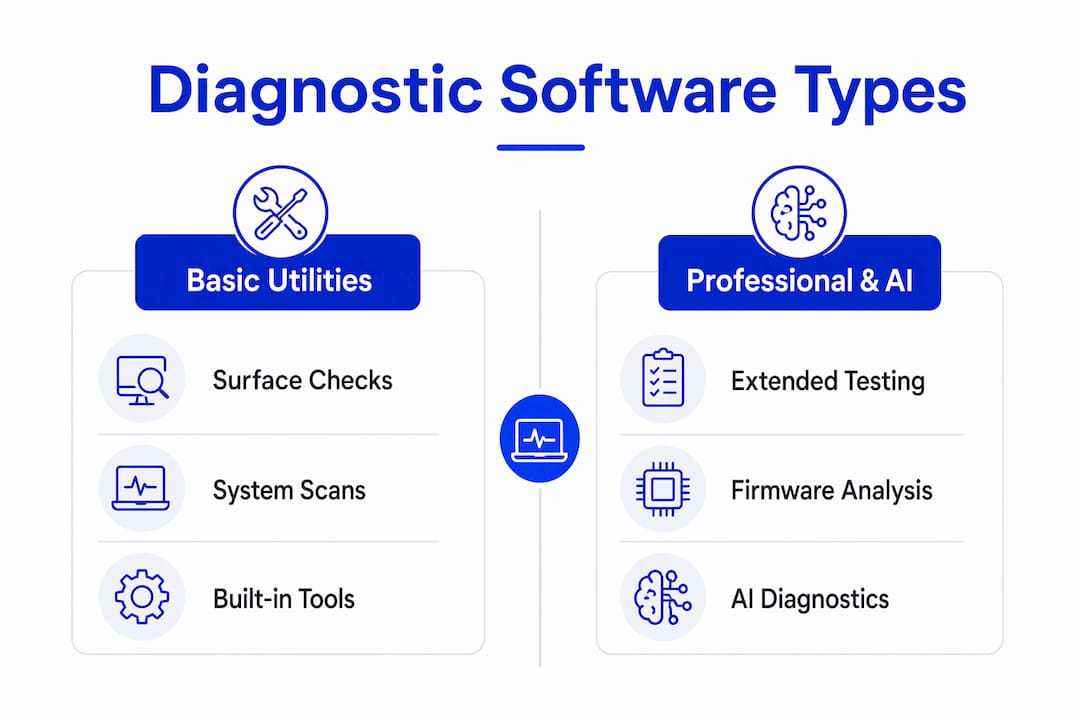
Professional platforms like PC-Doctor Toolbox for Business and Passmark BurnIn Test go further. They run extended hardware stress tests, analyze firmware versions, map driver conflicts, and generate structured reports. Advanced hardware abstraction layers within these platforms distinguish software regressions from physical part failures by mapping device capabilities, firmware versions, and drivers clearly. That distinction alone prevents thousands of unnecessary component replacements each year.
AI-powered systems represent the current frontier. These platforms ingest error logs, repair histories, and real-time sensor data to suggest probable causes ranked by likelihood. Smart scan tools that integrate real-time sensor data and repair histories have already demonstrated their value in automotive diagnostics, and the same architecture is moving into consumer electronics and enterprise IT repair.
| Tool category | Primary function | Best use case | Reporting capability |
|---|---|---|---|
| Basic system utilities | Surface-level hardware checks | Quick triage and initial screening | Minimal |
| Professional repair platforms | Extended stress testing and firmware analysis | Shop-based component-level repair | Full structured reports |
| AI-powered diagnostic systems | Adaptive fault reasoning with ranked causes | Complex, multi-fault device failures | Automated with repair history |
| Remote diagnostic platforms | Live sensor data during device operation | Field service and on-site repair | Real-time logs |
Features that separate professional-grade tools from consumer utilities include multi-device compatibility, firmware version tracking, real-time sensor integration, and workflow standardization modules. Platform support matters too. A tool that covers Windows, macOS, iOS, and Android from a single interface reduces the number of separate programs a technician needs to manage.
How does diagnostic software improve repair accuracy and reduce costs?
The financial case for diagnostic software is direct. AI-driven maintenance systems increase system uptime by 10 to 20% and reduce unexpected hardware and software breakdowns by up to 70%. For a repair shop or IT department managing dozens of devices, that reduction in unplanned failures translates directly into lower labor costs and fewer emergency repair calls.
Unnecessary part replacement is one of the largest hidden costs in electronics repair. Without diagnostic data, technicians sometimes replace components that test within normal parameters simply because they are the most likely suspects. Diagnostic software eliminates that guesswork. When a scan identifies a failing capacitor on a specific board rather than flagging the entire motherboard as suspect, the technician replaces one component instead of three.
Speed improvements are equally significant. Software debugging and maintenance traditionally occupy 90% of developers’ time, and automated repair technology reduces that burden substantially. The same principle applies to hardware repair. A technician who spends 20 minutes on a diagnostic scan instead of two hours on trial-and-error troubleshooting handles more devices per day and delivers faster turnaround to customers.
The benefits extend to technician development. Guided diagnostic workflows teach less experienced technicians how to interpret fault data systematically. Instead of learning only from mistakes, they build pattern recognition through structured exposure to real fault scenarios. This shortens the time from hire to full productivity, which matters in any shop dealing with high device volume.
Additional measurable benefits include:
- Fewer repeat repair visits caused by missed secondary faults
- Reduced customer disputes backed by documented diagnostic reports
- Lower parts inventory costs from targeted rather than speculative replacements
- Faster technician onboarding through guided fault interpretation workflows
- Improved shop reputation from consistent, verifiable repair quality
For organizations where device uptime directly affects productivity, the importance of quick device repair compounds these benefits further, since every hour a device is offline carries a measurable productivity cost.
What are the real challenges of implementing diagnostic software?
Diagnostic software is not a plug-and-play solution. Its accuracy depends entirely on the quality of the fault context it receives. Automated repair models require rich fault context, including error logs and failing tests, to achieve meaningful accuracy and avoid incorrect fixes. A scan run on a device with corrupted logs or incomplete sensor data produces unreliable results that can mislead even experienced technicians.
The practical challenges of implementation, ranked by frequency in professional repair environments:
- Data quality gaps. Devices with damaged firmware or wiped logs provide incomplete diagnostic input, which reduces the software’s ability to isolate faults accurately.
- Information overload. Professional platforms surface dozens of data points simultaneously. Without a well-designed interface, technicians spend more time interpreting output than performing repairs.
- Continuous update requirements. Hardware and operating systems evolve constantly. Diagnostic software that is not updated regularly fails to recognize new fault signatures on current-generation devices.
- Technician acceptance. Some experienced technicians resist structured workflows, viewing them as constraints on their judgment rather than tools that support it.
- Consumer vs. professional grade confusion. Consumer diagnostic apps marketed to end users lack the depth and accuracy that professional repair environments require, yet they are sometimes adopted by shops looking to reduce software costs.
Remote diagnostics add another layer of complexity. Remote diagnosis reduces average repair cycle time significantly, with simulations showing 280 hours versus 403 hours with and without remote diagnosis. However, under high demand conditions, remote triage can delay first physical repair visits, creating a bottleneck that frustrates customers expecting same-day service. The decision between on-site and remote repair approaches depends on demand volume, device type, and the complexity of the fault.
Pro Tip: Treat diagnostic software updates as non-negotiable maintenance. Schedule a monthly review of your platform’s firmware database and fault signature library to keep pace with new device releases.
What does the future of diagnostic software look like?
The next generation of diagnostic tools will be defined by adaptive AI reasoning, repair-first software design, and tighter integration between remote and on-site workflows. Defect-type-aware adaptive repair models using GPT-3.5 and GPT-4 architectures already show over 270% performance improvement compared to baseline models, independently resolving faults that earlier systems could not address. That level of capability will move from software development environments into hardware repair platforms within this decade.
Repair-first software design is gaining traction as a philosophy. Repair-first software exposes module health, firmware versions, and layered diagnostics with guidance that describes the symptom, probable cause, and recommended action. This design approach shifts diagnostic responsibility closer to the end user for minor issues, while reserving complex fault analysis for trained technicians.
Regulatory frameworks are also evolving. Software as a Medical Device standards are shifting toward continuous performance oversight because adaptive AI algorithms change behavior over time. That governance model will likely influence how diagnostic software in consumer electronics and enterprise IT is validated and updated, creating new compliance requirements for repair professionals.
Key trends shaping diagnostic software through 2026 and beyond:
- AI-driven fault reasoning that ranks probable causes by statistical likelihood
- Modular hardware ecosystems with embedded diagnostic APIs accessible to repair platforms
- Remote connected diagnostics that deliver live sensor data during device operation
- Lifecycle management integration that tracks repair history across a device’s full service life
- Regulatory frameworks requiring documented validation of adaptive diagnostic algorithms
Key takeaways
Diagnostic software is the single most effective tool for reducing repair time, cutting unnecessary part costs, and producing verifiable repair outcomes in professional electronics repair environments.
| Point | Details |
|---|---|
| Workflow standardization | Structured test, verify, document, and deliver processes reduce repeat repairs and customer disputes. |
| AI-driven uptime gains | AI maintenance systems reduce unexpected breakdowns by up to 70%, directly lowering repair volume. |
| Data quality is foundational | Rich fault context, including error logs and sensor data, determines diagnostic accuracy. |
| Remote vs. on-site tradeoffs | Remote diagnostics cut cycle time but can delay first visits under high demand conditions. |
| Future-proofing requires updates | Adaptive AI diagnostic tools require continuous updates and regulatory-aligned validation to stay accurate. |
Why I stopped trusting my instincts alone on complex repairs
After more than a decade working with electronics repair operations, the single most expensive habit I have seen in shops is over-reliance on technician intuition for complex faults. Experienced technicians are genuinely skilled. But intuition built on pattern recognition fails on devices with multiple simultaneous faults, and those are exactly the cases that generate callbacks and disputes.
The technicians I have seen grow fastest are the ones who treat diagnostic software as a second opinion rather than a crutch. They run the scan, form their own hypothesis, and then compare. When the software and their instinct agree, they move fast. When they disagree, they investigate. That discipline catches the faults that experience alone misses.
The business case is equally clear. A shop that documents every repair with pre-scan and post-scan reports builds a defensible record that protects against warranty disputes and builds customer trust faster than any marketing effort. Diagnostic-led repairs are not just more accurate. They are more credible. And in a market where customers can read reviews before choosing a technician, credibility is a competitive asset that compounds over time.
The tools are better than they have ever been. The gap between shops that use them systematically and shops that use them occasionally is widening. If you are still treating diagnostic software as optional, you are leaving accuracy, speed, and revenue on the table.
— Michael
How Repair Genius uses diagnostics to deliver better repairs
At Repair Genius, every repair starts with a full diagnostic scan before any component is touched. This approach is what allows the team to offer same-day service in Orlando and Winter Park without sacrificing accuracy. Customers get a clear explanation of what the scan found, what the repair involves, and what the device will look like after handoff.

Whether you need laptop and computer repair or a full device assessment for a complex fault, Repair Genius brings professional-grade diagnostic tools directly to your location. No guesswork. No hidden fees. Just precise, documented repairs backed by over 10 years of experience. Visit Repair Genius to book a same-day diagnostic and repair appointment in Orlando or Winter Park.
FAQ
What is diagnostic software in electronics repair?
Diagnostic software is a program that analyzes hardware components, firmware states, and software behavior to identify faults and guide repair decisions. It replaces trial-and-error troubleshooting with data-driven fault identification.
How do diagnostic tools improve repair accuracy?
Diagnostic tools surface specific error codes, sensor readings, and firmware conflicts that pinpoint root causes rather than symptoms. This precision reduces unnecessary part replacements and repeat repair visits.
What are the main benefits of repair software for technicians?
The primary benefits include faster fault identification, reduced parts costs from targeted repairs, standardized workflows that support technician training, and documented reports that protect against customer disputes.
Can diagnostic software work for remote repairs?
Remote diagnostic platforms deliver live sensor data during device operation, reducing average repair cycle time significantly. Effectiveness depends on demand volume and whether the fault requires physical intervention.
How often should diagnostic software be updated?
Diagnostic software should be updated monthly at minimum to keep pace with new device firmware, operating system releases, and evolving fault signatures. Outdated diagnostic databases produce inaccurate results on current-generation hardware.
Recommended
- Electronics Repair in Orlando & Winter Park | Repair Geniuses
- Same-Day Electronics Repair in Winter Park
- On-Site Computer Repair vs Repair Shop
- On-Site Repair for Office Electronics: 2026 Guide






3 thoughts on “The Role of Diagnostic Software in Electronics Repair”
Comments are closed.