

Minimizing device repair disruption is defined as reducing the time, effort, and productivity loss caused by device failures through proactive repair management and process control. For professionals in Orlando, Winter Park, and beyond, a broken phone or laptop is not just an inconvenience. It is a direct hit to output, revenue, and client trust. The strategies that actually work target the repair process itself, not just the speed of individual technicians. Tools like Mean Time to Repair (MTTR) metrics, preventive maintenance schedules, and software feature toggles give you control before a small fault becomes a full shutdown.
How can measuring MTTR minimize device repair disruption?
Mean Time to Repair (MTTR) is the average time required to restore a device to full function after a failure. It is the single most useful metric for anyone serious about reducing repair downtime. Most people track that a device broke and got fixed. Fewer track how long each stage of that process took and why.
Organizations that actively manage MTTR can cut downtime by 40–60% within one year. That is not a marginal gain. It means a repair that used to take two days now takes under a day, and the pattern repeats across every device in your inventory.

The real value of measuring MTTR is that it exposes where time is actually lost. Common culprits include waiting for a technician to arrive, hunting for the right spare part, and repeating a repair because the root cause was never confirmed. Each of these is a process failure, not a skill failure.
Pro Tip: Track MTTR separately for each device type. A laptop and a smartphone have very different failure profiles. Mixing them into one average hides the real problem.
Here is what actively managing MTTR looks like in practice:
- Log the exact time a fault is reported and the exact time the device is back in use
- Break repair time into stages: diagnosis, parts sourcing, repair, and testing
- Flag any repair that exceeds your baseline by more than 20%
- Review flagged repairs weekly to find recurring bottlenecks
- Use a mobile CMMS (Computerized Maintenance Management System) so technicians access asset history on arrival, not after
Mobile CMMS and integrated asset histories reduce technician arrival delays and repeat visits. That means fewer callbacks and faster first-time fixes, which is the fastest way to cut repair time in any environment.
What preventive maintenance strategies help limit device malfunctions?
Preventive maintenance is the practice of servicing devices on a scheduled basis before faults occur, rather than waiting for something to break. It is the most cost-effective way to prevent service interruptions at scale.
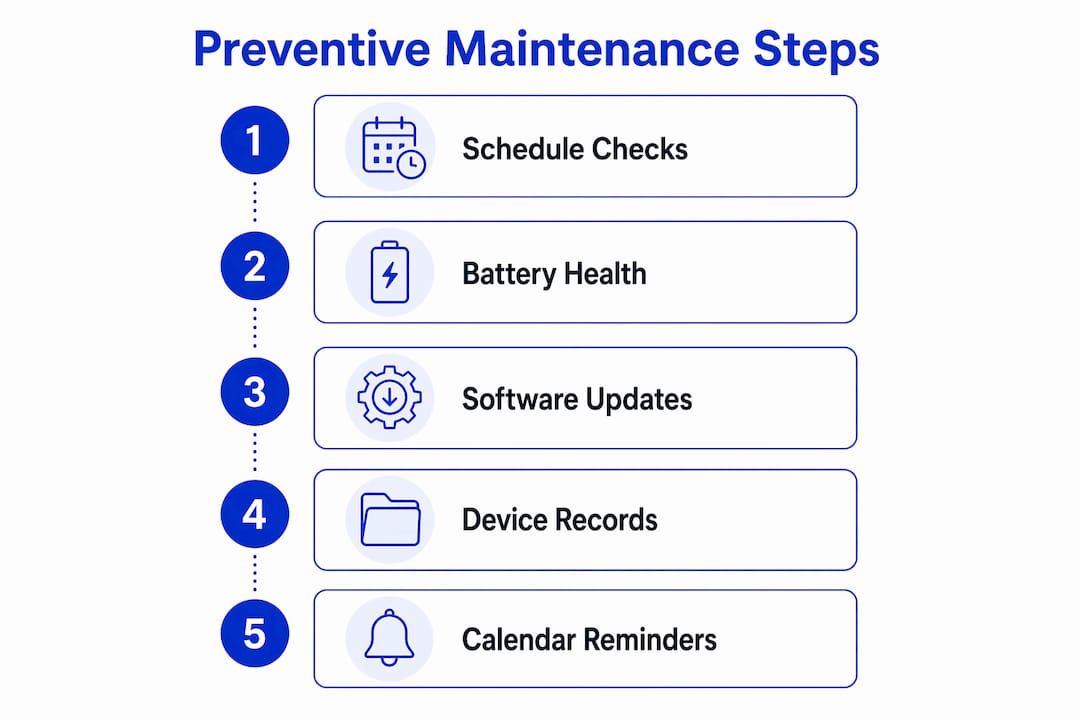
Structured preventive maintenance delivers 60–70% of downtime reduction benefits. That figure reflects the compounding effect of catching small issues before they cascade into full device failures. A battery flagged at 78% health during a routine check costs far less to replace than one that fails mid-presentation.
Regular device health checks, including battery condition and software updates, reduce unexpected malfunctions and repair needs. This applies equally to a school district managing 500 Chromebooks and a solo consultant managing three personal devices.
The table below compares reactive versus preventive maintenance across key performance areas:
| Factor | Reactive maintenance | Preventive maintenance |
|---|---|---|
| Average repair cost | High (emergency rates) | Lower (scheduled service) |
| Device downtime | Unpredictable | Predictable and shorter |
| Data loss risk | High | Low |
| Technician efficiency | Low (scramble response) | High (planned visits) |
| Long-term device lifespan | Shorter | Extended |
Practical preventive steps that reduce repair frequency include:
- Schedule monthly software updates and security patches across all devices
- Run battery diagnostics every 90 days using tools like CoconutBattery (macOS) or AccuBattery (Android)
- Clean device vents and ports quarterly to prevent thermal failures
- Use managed IT services to automate patch management and flag anomalies before they escalate
- Keep a digital log of each device’s service history, not a spreadsheet shared over email
Pro Tip: Set calendar reminders tied to device purchase dates, not arbitrary months. A device bought in March should get its first deep check in September, not January with everything else.
How do software controls like feature flags and kill switches reduce repair impact?
Feature flags and kill switches are software controls that let you disable specific device functions or app modules without taking the entire device offline. The industry term for this approach is selective fault isolation. It is standard practice in enterprise software development and increasingly relevant for anyone managing devices with complex software stacks.
Feature toggles and local kill switches can cut MTTR from days to minutes by immediately disabling risky device functions without requiring a full rollback. That is a dramatic difference. A full rollback might mean wiping a device, reinstalling software, and restoring data. A kill switch means turning off one broken feature while everything else keeps running.
Here is how to apply this logic in a practical repair context:
- Identify which features are fault-prone. On smartphones, this is often camera modules, Bluetooth stacks, or payment apps. On laptops, it is frequently audio drivers or VPN clients.
- Disable the faulty module first. Before sending a device for repair, disable the problematic feature through settings or device management software. The device stays usable for core tasks.
- Use degraded operation mode when available. Devices using degraded operation modes during boot loops prevent total failure by skipping faulty modules. This keeps the device functional while the problem is isolated.
- Apply automated rollback rules. Automated rollback mechanisms triggered by deterministic rules enable immediate risk mitigation without human intervention. This is especially useful for managed fleets of devices.
- Document which toggles were applied. When the repair technician arrives, they need to know exactly what was disabled and why. A clear log cuts diagnosis time significantly.
This approach works best when device management software, such as Microsoft Intune or Apple Business Manager, is already in place. Without a management layer, selective disabling requires manual configuration on each device.
What practical steps and tools speed up device repair workflows?
Efficient device fixes depend on information availability as much as technical skill. A technician who arrives without the device’s fault history, warranty status, or parts compatibility data will take longer and is more likely to return for a second visit.
First-visit fix rates below 70% indicate process issues like missing information or spare parts. That benchmark matters. If more than three in ten repairs require a follow-up visit, the workflow has a structural problem, not a personnel problem.
The comparison below shows how a disorganized repair process differs from an optimized one:
| Workflow element | Disorganized process | Optimized process |
|---|---|---|
| Fault history access | Paper logs or memory | Digital asset record, mobile-accessible |
| Parts sourcing | Ordered after diagnosis | Pre-staged based on device model |
| Technician scheduling | Ad hoc, reactive | Booked with device info in advance |
| Post-repair testing | Skipped or informal | Standardized checklist |
| Repair documentation | None or incomplete | Logged to asset record immediately |
Steps that consistently improve first-time fix rates include:
- Attach full fault history to each device record before scheduling a repair
- Use diagnostic software to confirm the fault before the technician arrives, not during the visit
- Link spare parts inventory to asset records so emergency procurement events drop by 60–70%
- Scan device asset tags at check-in to auto-populate repair orders
- Confirm parts availability before booking the repair appointment
Pro Tip: If you manage more than five devices, treat each one as an asset with its own record. A simple spreadsheet with model, serial number, purchase date, and repair history pays for itself the first time you avoid an emergency parts order.
How to troubleshoot common repair disruptions quickly
The most common repair disruptions are missing parts, incomplete initial diagnostics, and poor communication between the device owner and the technician. Each one is preventable.
Tracking repairs, downtime, and equipment performance over time uncovers patterns that improve maintenance planning. Root cause analysis prevents the same fault from recurring, which is the most direct way to maximize device uptime over time.
Proactive monitoring using leading indicators allows teams to address device issues before formal disruptions occur. For individuals, this means paying attention to early warning signs: slower boot times, battery drain spikes, or intermittent connectivity. For professionals managing device fleets, it means setting automated alerts in device management platforms.
Quick troubleshooting steps that limit repair delays:
- Confirm the fault is reproducible before logging a repair request
- Check for eSIM connectivity issues separately from hardware faults, since software-side connectivity problems are often misdiagnosed as hardware failures
- Verify that the device’s software is fully updated before scheduling a hardware repair
- Communicate the exact symptoms, not just “it’s broken,” to the repair technician in writing
- Set a clear escalation path: if the repair is not resolved within a defined window, who decides the next step?
Key takeaways
Reducing device repair disruption requires managing the repair process itself, not just reacting faster when something breaks.
| Point | Details |
|---|---|
| Measure MTTR actively | Track each repair stage to find bottlenecks and cut downtime by up to 60%. |
| Prioritize preventive maintenance | Schedule regular battery checks and software updates to prevent most unexpected failures. |
| Use software fault isolation | Disable faulty modules with feature flags to keep devices operational during repairs. |
| Optimize repair information flow | Attach full fault history and confirm parts availability before the technician arrives. |
| Monitor for early warning signs | Address slow boot times and battery anomalies before they become full repair events. |
Why I think most people are solving the wrong problem
Most people treat a broken device as a one-time event. They get it fixed, move on, and repeat the same cycle six months later. After years of watching how professionals and individuals handle device repairs, I am convinced that the disruption is almost never caused by the repair itself. It is caused by everything that happens before the technician shows up.
The organizations that genuinely maximize device uptime are not the ones with the fastest repair technicians. They are the ones who know exactly what broke, why it broke, and what part is needed before anyone picks up a screwdriver. That information gap is where most of the lost time lives.
I have also seen people invest heavily in software controls and monitoring tools while ignoring the basics: a device that has not had a software update in eight months, or a battery running at 60% capacity that nobody flagged. The fundamentals of preventive maintenance are not glamorous, but they eliminate the majority of repair events before they start.
My honest recommendation is to start with measurement. You cannot fix a process you are not tracking. Log your repair times, note what caused each delay, and look for the pattern after 30 days. The answer is almost always sitting in the data, waiting to be read.
— Michael
Get fast, on-site repairs from Repair Genius

Device downtime is a process problem, and Repair Genius solves it at the source. Repair Genius brings expert technicians directly to your location in Orlando and Winter Park, Florida, with same-day service for iPhones, Android phones, laptops, and tablets. There is no drop-off wait, no guessing on pricing, and no risk to your data. With over 10 years of experience and transparent flat-rate pricing, Repair Genius handles the repair while you stay productive. Whether you need a same-day phone repair or a full on-site office electronics fix, Repair Genius is the faster alternative to a traditional shop. Book your repair at repairgeniuses.com and get back to work today.
FAQ
What does minimizing device repair disruption mean?
Minimizing device repair disruption means reducing the time, cost, and productivity loss caused by device failures through proactive maintenance, faster repair workflows, and software fault isolation. The goal is to keep devices operational or restore them to full function as quickly as possible.
How does MTTR help reduce repair downtime?
MTTR (Mean Time to Repair) measures how long each repair takes from fault to resolution. Organizations that actively manage MTTR can cut downtime by 40–60% within one year by identifying and eliminating bottlenecks in the repair process.
What is the fastest way to speed up a device repair?
The fastest way to speed up a repair is to have the device’s full fault history, confirmed diagnosis, and correct parts ready before the technician arrives. First-visit fix rates below 70% signal that missing information or parts are slowing the process down.
Can software controls really prevent device downtime?
Yes. Feature flags and kill switches can disable a faulty module without taking the entire device offline, cutting MTTR from days to minutes. This keeps the device usable for core tasks while the specific fault is repaired.
How often should I run preventive maintenance on my devices?
Run battery diagnostics every 90 days, apply software updates monthly, and clean ports and vents quarterly. Structured preventive maintenance delivers 60–70% of downtime reduction benefits compared to a purely reactive repair approach.
Recommended
- Why Employee Devices Need Quick Repair: 2026 Guide
- Laptop Repair Before Replacement Checklist 2026
- On-Site Computer Repair vs Repair Shop
- Tablet Screen Repair & Swollen Battery Risks






2 thoughts on “Minimize Device Repair Disruption: A Pro’s Guide”
Comments are closed.