

Unplanned device downtime is a direct tax on organizational productivity, and the cost compounds every hour a repair is delayed. For IT managers and HR professionals, understanding why employee devices need quick repair goes beyond convenience. Research from Cisco, Splunk, and Rayda published in 2026 confirms that slow repairs drain revenue, expose security gaps, and erode employee trust in the tools they depend on daily. This guide breaks down the financial, security, and logistical realities of device repair speed, and gives you a practical framework for reducing downtime across in-office, remote, and hybrid teams.
Why employee devices need quick repair: the productivity math
Employees lose an average of 30 to 40 minutes daily due to slow or unreliable devices, which adds up to roughly 145 hours per year per person. That figure represents nearly four full work weeks of lost output per employee, before you factor in the cost of frustration, workarounds, and missed deadlines.
The financial scale at the organizational level is staggering. Unplanned downtime costs Global 2000 companies $600 billion annually, averaging $15,000 per minute across enterprise operations. Even for mid-sized organizations, a single device failure affecting a revenue-generating employee can translate to hundreds of dollars in lost output within a single workday.
“Downtime is no longer an IT inconvenience. It is a systemic business crisis that touches revenue, reputation, and resilience.” — Cisco and Splunk, 2026
The gap between in-office and remote workers makes this worse. An in-office employee with a broken laptop can often borrow a spare or get a technician on-site within hours. A remote employee in a different city waits for a courier, a repair shop appointment, and a return shipment. That sequence routinely stretches into multiple days of reduced or zero productivity.
| Scenario | Estimated downtime | Estimated cost per incident |
|---|---|---|
| In-office repair with spare device | 2 to 4 hours | Under $200 |
| Remote repair via local shop | 1 to 2 days | $400 to $800 |
| Remote repair via courier to vendor | 5 to 7 days | $1,200 to $1,800+ |
| No spare, no local option | 7 to 14 days | $2,500+ |
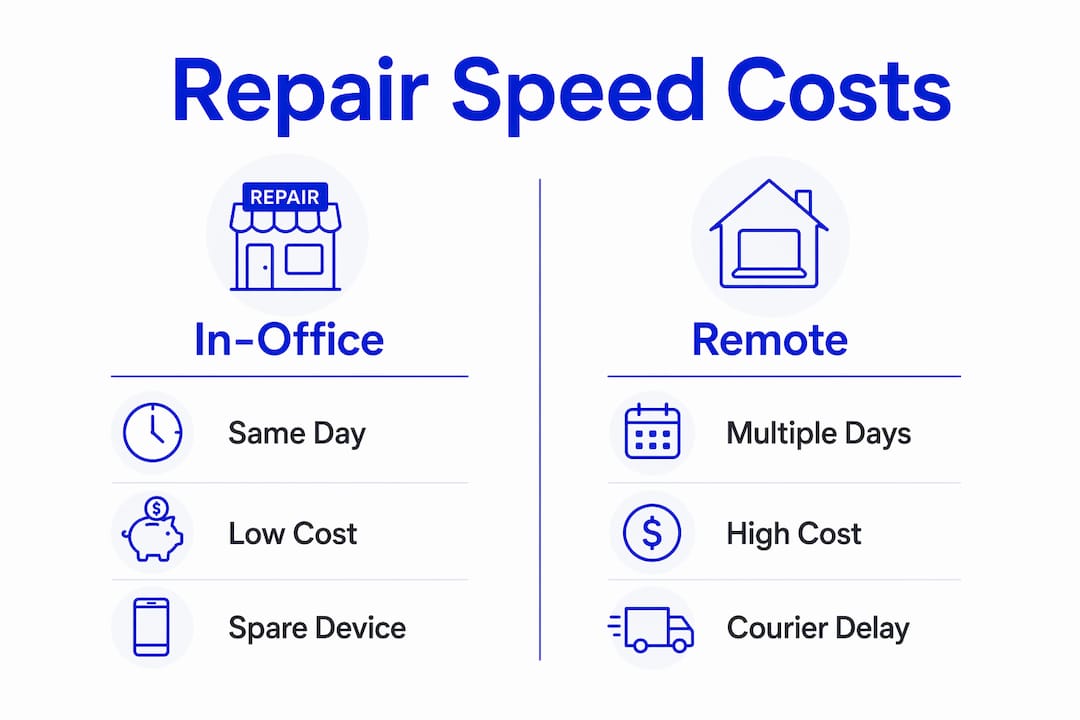
The table above illustrates why repair speed is not just an operational preference. It is a financial decision with measurable return on investment.
What security risks come with delayed device repair?
A broken device is not just unproductive. It is a security liability. When a device goes offline for repair, the security controls that normally protect it stop functioning in real time.
Offline devices delay the execution of remote lock and wipe commands from mobile device management (MDM) platforms. If a device is lost, stolen, or compromised and then goes offline for repair, the MDM command queues but does not execute until the device reconnects. That window, which can last days during a repair cycle, leaves sensitive data exposed.
MDM platforms like Microsoft Intune and Jamf track device states such as “Wipe Pending” or “Lock Pending” to signal that a security action is queued but incomplete. MDM-enabled monitoring tools differentiate these states precisely because the gap between command issuance and execution is a recognized risk window. IT teams that do not track these states during repair cycles are flying blind.
The risks compound in remote and hybrid environments where devices travel through multiple hands during repair. A device sent to a third-party repair shop without proper data wiping protocols exposes corporate credentials, email archives, and application tokens to unknown parties.
Key security actions to take before any device leaves for repair:
- Confirm the device state in your MDM console and document any pending security commands
- Remotely lock the device before physical handoff if the hardware allows it
- Require full disk encryption verification before dispatch
- Brief the repair provider on your data handling requirements in writing
- Re-enroll and re-image the device upon return before returning it to the employee
Pro Tip: Set up an automated MDM alert that flags any device entering a repair state for longer than 24 hours. This keeps your security team informed without requiring manual tracking.
How do logistics affect repair speed for remote and hybrid teams?
Repair speed for distributed teams is primarily a logistics problem, not a technical one. The actual bench repair time for most device issues is measured in hours. The shipping, triage, and coordination surrounding that repair is measured in days.

Courier logistics dominate downtime in remote repair scenarios. A typical repair cycle involving courier pickup, transit to a vendor, bench time, and return shipping totals five to seven business days. For employees in international locations or regions with limited repair infrastructure, that figure can double.
Triage is the single highest-leverage point in this chain. A 10-minute pre-diagnosis call can reduce unnecessary vendor dispatches by 30 to 50 percent. Many reported device failures are software issues, configuration errors, or user errors that a remote IT technician can resolve without any physical repair at all. Skipping triage and defaulting to courier dispatch wastes days and money.
Here is a practical repair triage sequence for distributed IT teams:
- Employee submits a ticket with device model, symptoms, and a short video of the issue
- IT tier-1 support attempts remote diagnosis via tools like TeamViewer or Microsoft Remote Desktop
- If unresolved, a 10-minute live call with the employee rules out user error and software fixes
- If physical repair is confirmed, IT checks regional spare inventory before initiating courier dispatch
- Courier is dispatched with pre-labeled packaging and a tracked return shipment
Time zone differences add another layer of friction. An employee in Singapore reporting a device failure at 9 AM local time may not reach their IT support team for six to eight hours. Asynchronous troubleshooting protocols, pre-written self-service guides, and regional IT contacts reduce this gap significantly.
Pro Tip: Maintain a regional spare device pool in locations where you have five or more remote employees. The carrying cost of two or three pre-configured spares is almost always lower than the cost of a single week-long repair cycle.
| Approach | Typical repair time | Best suited for |
|---|---|---|
| On-site technician dispatch | Same day | In-office or local employees |
| Regional spare device swap | 1 to 2 days | Remote employees in key hubs |
| Courier to central repair vendor | 5 to 7 days | Low-density remote regions |
| Local third-party repair shop | 1 to 3 days | Urban remote employees |
What strategies actually reduce device repair turnaround?
The organizations that resolve device issues fastest share three structural practices: spare inventory management, lifecycle consistency, and proactive diagnostics. Each one addresses a different failure point in the repair chain.
Spare device inventory is the most direct solution to downtime. Pre-configured replacement devices, already enrolled in your MDM and loaded with standard applications, can be shipped to an employee the same day a failure is reported. The broken device ships back for repair while the employee resumes work within 24 hours. This approach requires upfront investment but eliminates the productivity loss associated with waiting for a repaired device to return.
Consistent device lifecycle management reduces repair time by preventing repair events from becoming full reprovisioning events. When devices are enrolled, configured, and documented consistently from day one, a returning repaired device can be re-imaged and redeployed in under an hour. Manual provisioning errors, which are common in ad-hoc IT environments, turn a simple repair into a half-day IT project.
Proactive diagnostics catch failures before they become full outages. Tools like Nexthink, Lakeside Software, and Microsoft Endpoint Analytics monitor device health metrics including battery degradation, storage capacity, and application crash rates. When a device shows early warning signs, IT can schedule a repair or replacement during a low-impact window rather than reacting to an emergency.
Digital friction from slow devices often goes unreported, yet causes employees to lose 1.3 workdays monthly. This figure from a 2026 TeamViewer survey of 4,200 managers and employees confirms that the true cost of deferred repairs is systematically undercounted in most organizations. Employees work around broken devices rather than reporting them, which delays repair and compounds the productivity loss.
Practical strategies for IT and HR teams to implement now:
- Establish a device refresh cycle of three to four years to reduce failure rates in aging hardware
- Partner with a local on-site repair provider for employees in your primary office locations
- Create a self-service device issue portal that lowers the barrier for employees to report problems early
- Integrate device health monitoring into your IT service management platform so alerts trigger tickets automatically
- Review repair turnaround time as a formal metric in quarterly IT performance reviews
Key takeaways
Fast device repair is the single most effective way to protect employee productivity, organizational security, and IT operational efficiency simultaneously.
| Point | Details |
|---|---|
| Productivity loss is quantifiable | Employees lose up to 145 hours per year from device issues, translating to thousands in labor costs. |
| Security gaps widen during repair delays | Offline devices block MDM commands, leaving data exposed for the full duration of the repair window. |
| Logistics drive most of the delay | Bench repair takes hours; courier and triage inefficiencies account for most of the 5 to 7 day turnaround. |
| Triage cuts dispatch rates significantly | A 10-minute pre-diagnosis call eliminates 30 to 50 percent of unnecessary courier dispatches. |
| Lifecycle consistency speeds recovery | Standardized provisioning lets repaired devices return to service in under an hour instead of half a day. |
What I’ve learned about the real cost of deferred repairs
After years of working with organizations on device repair workflows, the pattern I see most often is this: IT teams know repairs are slow, but they underestimate how much of that cost is invisible. The $1,800 direct loss figure for a single remote repair incident is easy to calculate. What is harder to see is the compounding effect of employees quietly working around broken devices for weeks before reporting them.
The 2026 TeamViewer data showing 1.3 lost workdays per month from unreported digital friction confirmed something I had observed anecdotally for years. Employees do not report device problems because the reporting process feels like more friction than the problem itself. That is an HR and IT design failure, not an employee failure. When you make it easier to report a problem than to work around it, repair cycles shorten and the hidden cost disappears.
The security angle is the one that gets the least attention in most organizations. IT teams focus on uptime and productivity metrics, but the repair window is a genuine security gap. A device sitting in a courier bag for three days with a “Wipe Pending” MDM status is a liability that does not appear on any productivity dashboard. Connecting the on-site repair model to your security posture is not a stretch. It is a logical extension of endpoint management.
My recommendation for IT and HR teams is to treat repair turnaround time as a first-class metric alongside ticket resolution time and device availability. When you measure it, you find the bottlenecks. When you find the bottlenecks, you fix them. The organizations that do this consistently spend less on repairs, lose less productivity, and carry less security risk than those that treat device repair as a reactive, ad-hoc process.
— Michael
How Repairgeniuses helps organizations cut device downtime
When your team is in Orlando or Winter Park, waiting days for a repair is not a logistical constraint. It is a choice. Repairgeniuses provides same-day on-site repair for iPhones, Android phones, laptops, MacBooks, iPads, and tablets, bringing certified technicians directly to your location. With over 10 years of experience, transparent pricing, and a strict data safety protocol, Repairgeniuses is built for organizations that cannot afford multi-day repair cycles.

Whether you manage a single office or a distributed team with employees across Central Florida, Repairgeniuses covers Orlando, Winter Park, Conway, and surrounding areas. Get your employee devices repaired the same day and keep your team productive without the wait.
FAQ
How much productivity does a broken employee device actually cost?
Employees lose an average of 30 to 40 minutes daily from device issues, totaling roughly 145 hours per year per person. For remote workers, a single repair incident involving courier shipping can cause up to 40 hours of lost productivity and $1,800 in direct costs.
Why does repair speed matter for device security?
Offline devices cannot receive or execute MDM commands like remote lock or wipe, leaving sensitive data exposed for the full duration of the repair window. The faster a device is repaired and reconnected, the shorter the security gap.
What is the fastest way to resolve a remote employee device failure?
Shipping a pre-configured spare device from a regional inventory is the fastest resolution, typically restoring productivity within 24 hours. Combining this with a 10-minute remote triage call first eliminates unnecessary dispatches in 30 to 50 percent of cases.
How does device lifecycle management affect repair speed?
Consistent provisioning and MDM enrollment from day one means a repaired device can be re-imaged and redeployed in under an hour. Organizations without standardized lifecycle practices often turn a simple repair into a half-day reprovisioning event.
How often should organizations replace employee devices to reduce repair frequency?
A three to four year device refresh cycle keeps hardware within manufacturer support windows and reduces failure rates in aging components like batteries, storage drives, and cooling systems. Proactive replacement is almost always cheaper than repeated emergency repairs on aging devices.
Recommended
- On-Site Computer Repair vs Repair Shop
- Same-Day Electronics Repair in Winter Park
- iPad & Tablet Repair in Orlando | On-Site Service
- Computer Repair in Orlando & Winter Park | On-Site Service
Article generated by BabyLoveGrowth











One thought on “Why Employee Devices Need Quick Repair: 2026 Guide”
Comments are closed.