

The repair vs replace student laptop decision follows one clear financial rule: if the repair quote exceeds 50% of a comparable replacement cost, buying new or refurbished is the smarter move. That threshold, cited by Consumer Reports guidance and widely used by independent repair shops, cuts through the guesswork. Factors like device age, software support timelines, and parts availability sharpen the decision further. This guide covers all of it, with cost data, repairability comparisons, and a step-by-step framework built specifically for students and parents.
What is the 50% rule for laptop repair vs replacement?
The 50% rule is the primary financial threshold for any laptop repair vs replacement decision. If a repair quote tops half the price of a comparable new or refurbished machine, replacement wins on economics. The rule applies per fault, not per device. Multiple simultaneous faults rapidly push cumulative costs past the replacement threshold, which is why chasing sequential repairs on a struggling machine is a losing strategy.
Here is how typical repair costs stack up against replacement prices for common student laptop faults:
| Fault | Typical Repair Cost | Refurbished Replacement | Repair Worth It? |
|---|---|---|---|
| Battery replacement | $60–$130 | $300–$500 | Yes, for laptops under 5 years old |
| Keyboard replacement | $90–$180 | $300–$500 | Yes, if single fault |
| Screen repair | $120–$350 | $300–$500 | Borderline; check age first |
| Motherboard failure | $400–$500+ | $380+ refurbished | No, replacement is cheaper |
| SSD upgrade (performance) | $50–$100 | $300–$500 | Yes, strong value |
Battery, keyboard, and screen repairs are cost-effective on laptops 2–4 years old. A screen repair at $200 on a $600 laptop is a 33% ratio. That clears the 50% threshold comfortably. A $425 motherboard repair on a machine worth $380 refurbished does not.
Pro Tip: Get at least two quotes before authorizing any repair. Prices for the same screen replacement can vary by $80 or more between shops in the same city.
How does laptop age and software support affect the decision?
Device age is the second filter after cost. Laptops under five years old are generally worth repairing for single faults. Machines over five years carry higher failure risk across multiple components, which means a repair today may be followed by another one in three months.

The factor most parents overlook is Auto Update Expiration, or AUE. AUE is the date an operating system stops receiving security updates. Spending on repairs when OS support ends within a year is poor value, according to Elizabeth Chamberlain at iFixit. A Chromebook with an AUE date of 2025 is already a security liability, regardless of how well the hardware runs.
Software problems frequently disguise themselves as hardware failures. A laptop that takes four minutes to boot is not necessarily dying. SSD upgrades costing $50–$100 can deliver a dramatic speed improvement on a machine that feels sluggish. RAM upgrades follow the same logic. Before authorizing a replacement, rule out software and storage bottlenecks first.
Pro Tip: Check your laptop’s AUE date before booking any repair. For Chromebooks, Google publishes the full AUE list online. For Windows machines, check Microsoft’s end-of-support page for your OS version.
Experts at BuySellRepairs recommend a simple future-life test: repairs that provide 2–3 years of reliable continued use are worth the cost. If a repaired machine will still struggle with performance after the fix, replacement is the better investment.
Which hardware faults are usually worth fixing?
Not all faults carry the same financial logic. Some repairs deliver clear value. Others signal the beginning of the end for a device.
- Battery replacement ($60–$130): The highest-value repair on any student laptop. A new battery restores full portability and extends device life by 2–3 years at minimal cost.
- Keyboard replacement ($90–$180): Straightforward on most machines. A single broken keyboard is almost always worth fixing on a laptop under five years old.
- Screen repair ($120–$350): Worth it on 2–4 year machines with no other faults. Costs approach the replacement threshold on older devices, so check the 50% rule carefully.
- SSD upgrade ($50–$100): One of the best-value interventions available. A storage upgrade can revive a slow machine and buy two or more additional years of usable life.
- Motherboard failure: Motherboard repairs average $425 on laptops over five years old. Refurbished replacements often cost less. This fault is the clearest replacement trigger in the student laptop category.
Symptoms that point to simple repairs include a swollen battery, a cracked screen with no other damage, and sticky or missing keys. Symptoms that signal critical failure include random shutdowns, failure to power on, and persistent overheating after cleaning. The first group is fixable. The second group often means the motherboard or logic board is compromised.
How does laptop brand and build quality affect repairability?
The type of laptop a student owns shapes the repair decision as much as the fault itself. Business-class machines and budget consumer devices follow completely different repair economics.
| Device Type | Repairability | Parts Availability | Typical Parts Cost |
|---|---|---|---|
| ThinkPad, Latitude, EliteBook | High | Abundant, widely stocked | Low to moderate |
| Mid-range consumer laptops | Moderate | Available for popular models | Moderate |
| Budget Chromebooks | Low | Limited, often integrated | High relative to device value |
| MacBooks (older models) | Moderate | Available via third-party | Moderate to high |
Business-class laptops like ThinkPad and Latitude can often be refreshed at low cost and outlast newer entry-level devices. Lenovo publishes full service manuals for ThinkPad models. Dell does the same for Latitude. That documentation makes repairs faster and cheaper.
Budget Chromebooks sit at the opposite end. Many Chromebooks have glued or integrated parts that complicate repairs significantly, according to iFixit’s analysis. A cracked screen on a $250 Chromebook can cost $150 to fix, and the AUE date may be only two years away. That combination almost always favors replacement. iFixit’s repairability guides are a reliable starting point for assessing any specific model before committing to a repair.
The lesson for parents buying a student’s next laptop: repairability and brand selection matter as much as the purchase price. A $500 ThinkPad will cost less to maintain over four years than a $300 Chromebook that cannot be economically repaired.
What steps should you follow to make the repair or replace decision?
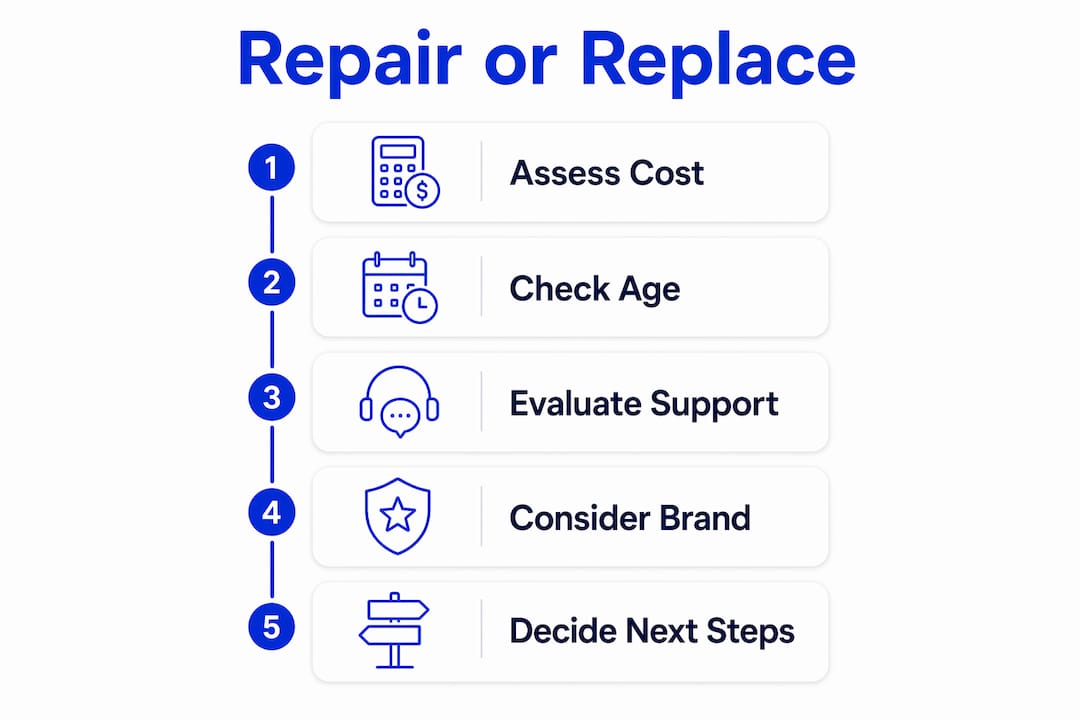
A structured process prevents both premature replacement and costly repair debt. Follow these six steps before spending a dollar.
- Identify the fault clearly. Is it one problem or several? A single cracked screen is a different situation from a cracked screen plus a failing battery plus a broken keyboard. Multiple faults change the math entirely.
- Get a repair quote and apply the 50% rule. Find the current price of a comparable refurbished replacement. If the repair quote exceeds half that price, replacement is the financially sound choice.
- Check the laptop’s age and AUE status. A machine under five years old with a current OS support window is a repair candidate. A machine over five years old approaching end of support is not.
- Rule out software and storage issues. Before replacing a slow laptop, consider whether an SSD or RAM upgrade would solve the problem at a fraction of the cost.
- Assess urgency and data risk. If a student has an exam in 48 hours, a same-day repair may be worth a premium. Factor in the cost and risk of data loss during any transition to a new device.
- Make the call based on future usability, not just today’s cost. A repair that buys two reliable years is worth more than a cheap fix that fails again in three months.
Pro Tip: Never authorize a second repair on a machine that already has one pending issue. The cumulative cost almost always crosses the replacement threshold, and you end up spending more than a refurbished replacement would have cost.
This device repair vs replacement framework applies across device types, not just laptops. The same logic governs phones and tablets.
Key takeaways
The repair vs replace student laptop decision comes down to three factors: the 50% cost rule, device age with software support status, and the repairability of the specific model.
| Point | Details |
|---|---|
| Apply the 50% rule first | If the repair quote exceeds half the replacement cost, buy new or refurbished instead. |
| Check AUE before authorizing repairs | Repairing a laptop with expired or near-expired OS support wastes money on a security risk. |
| Battery and keyboard repairs deliver strong value | These fixes cost $60–$180 and extend device life by 2–3 years on machines under five years old. |
| Motherboard failure almost always means replace | Repairs average $425, which exceeds the cost of most refurbished student laptops. |
| Business-class laptops are cheaper to repair | ThinkPad, Latitude, and EliteBook models have abundant, affordable spare parts compared to budget Chromebooks. |
The real cost of getting this decision wrong
Most parents I talk to frame this as a money question. It is, but only partly. The deeper issue is time. A student who loses their laptop mid-semester does not just lose a device. They lose access to coursework, deadlines, and sometimes weeks of saved work.
I have seen families spend $300 repairing a six-year-old Chromebook with an AUE date eight months away. Six months later, the machine was a security liability running unsupported software. They would have been better off spending $350 on a refurbished ThinkPad with three years of Windows 11 support ahead of it.
The other mistake I see regularly is the opposite: replacing a three-year-old laptop because it runs slowly, when a $75 SSD swap would have fixed the problem entirely. Slow does not mean dead. It usually means the storage drive is full or failing, and that is a $75 fix, not a $400 one.
My honest recommendation: treat the 50% rule as a hard floor, not a suggestion. Then layer in the AUE check and the future-life test. If a repair clears all three filters, fix it. If it fails any one of them, replace it. The environmental argument for repair is real too. Electronic waste from premature laptop replacement is a genuine problem, and a well-timed repair keeps a functional device out of a landfill for another two years.
— Michael
Get expert help with your laptop repair decision
Deciding between repair and replacement is easier with a professional diagnosis in hand. Repair Genius brings certified technicians directly to your location in Orlando and Winter Park, Florida, so you get a clear answer without dropping your laptop off at a shop and waiting days for a callback.

Repair Genius offers transparent pricing with no hidden fees, same-day service on most common repairs, and over 10 years of experience across laptops, phones, and tablets. Whether you need a laptop repair quote or want to talk through whether your student’s device is worth fixing, the team gives you a straight answer. Visit Repair Genius to book a service or request a free diagnostic today.
FAQ
What is the 50% rule for laptop repair?
The 50% rule means any repair costing more than half the price of a comparable replacement justifies buying new instead. Consumer Reports and independent repair shops use this threshold as the standard financial cutoff.
How do i know if my student’s laptop is too old to repair?
Laptops over five years old carry higher multi-component failure risk. Check the OS Auto Update Expiration date. If support ends within a year, repair costs are unlikely to deliver enough usable life to justify the expense.
Is a chromebook worth repairing for school?
Usually not. Chromebooks often have integrated parts that make repairs expensive relative to the device’s value, and their AUE dates limit long-term usability. A refurbished business-class laptop typically offers better repair economics.
What is the cheapest repair that adds the most value to a student laptop?
An SSD upgrade at $50–$100 delivers the strongest return. It can restore near-new performance on a slow machine and extend reliable use by two or more years, according to technician data from Hark Tech.
Should i repair or replace a laptop with a broken screen?
Screen repairs cost $120–$350. Apply the 50% rule against your replacement cost and check the laptop’s age. A screen repair on a three-year-old machine with no other faults is almost always worth it.
Recommended
- Laptop Repair Before Replacement Checklist 2026
- Why Business Laptops Need Screen Repair: 2026 Guide
- Same Day Laptop Repair Explained: What to Expect
- iPhone Battery Replacement vs Buying New | Repair Guide






One thought on “Repair vs Replace Student Laptop: 2026 Guide”
Comments are closed.