
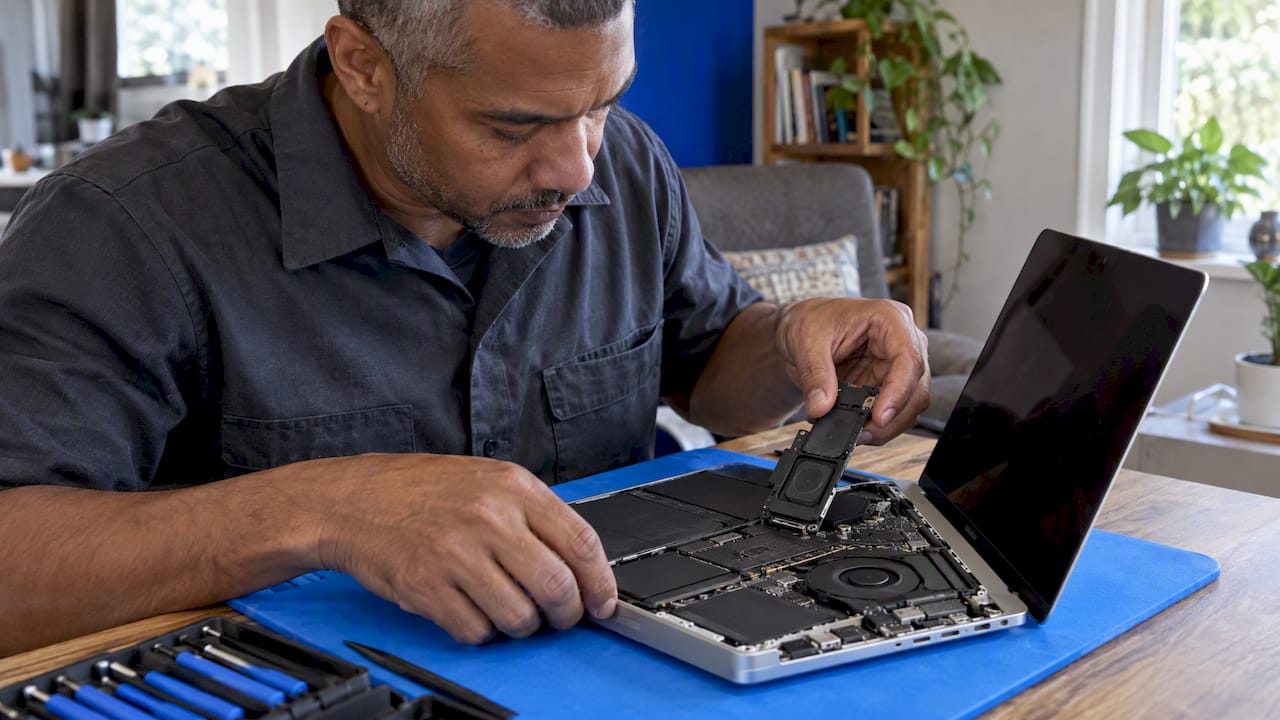
A MacBook speaker replacement can cost anywhere from the price of a small part to several hundred dollars, and the gap comes down to your model. On older Airs and 2020 M1 models, the speaker is a separate part. On many 2016 to 2021 MacBook Pros, it was built into a larger assembly. Before you spend anything, rule out software, because crackling and buzzing are often fixable without opening the case.
This guide walks through that order: test, fix what is fixable, identify your exact model, understand what the repair really involves, and decide whether to do it yourself or have a technician come to you.
TL;DR
- Crackling or distortion is not always a dead speaker. Update macOS, close heavy apps, check the sample rate in Audio MIDI Setup and clean the grille first.
- Test with headphones and different audio sources to tell a software or source problem from failed hardware.
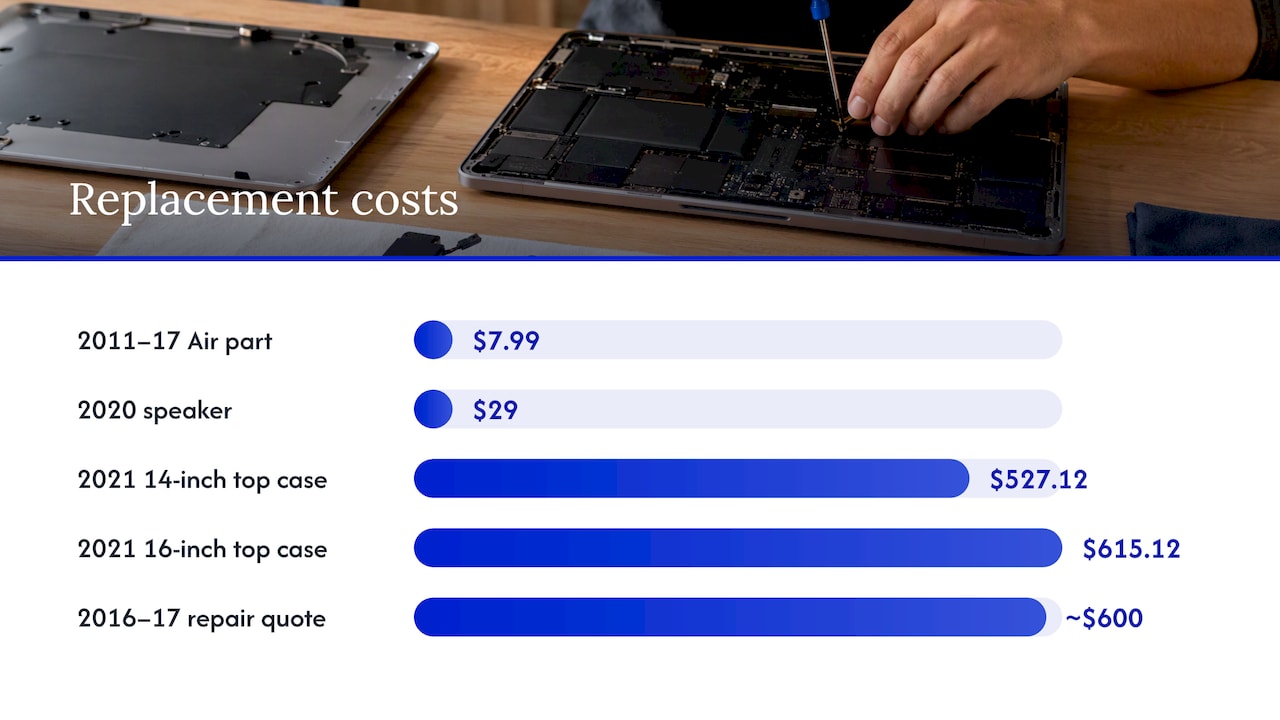
- Price depends on the model: from $7.99 to $37.99 for DIY speaker parts, but some MacBook Pros required a $527.12 to $615.12 top case until individual parts arrived.
- Newer MacBook Pro repairs involve removing fans and the logic board, plus adhesive and battery risk. That is where a professional repair makes sense.
- We repair MacBooks on-site in Orlando and Winter Park, with the price quoted before work starts.
Table of Contents
- Is it really the speaker? Start with the symptoms
- Fixes to try before you replace anything
- What a MacBook speaker replacement costs
- Find the right part for your model
- What the repair actually involves
- Risks that should stop a DIY attempt
- Our perspective: what we see on MacBook speaker jobs
- Need it done at your door? On-site MacBook repair in Orlando
- How to decide: a quick checklist
- FAQ
- Sources
Is it really the speaker? Start with the symptoms
A speaker that sounds bad is not always a speaker that has failed. Sound passes through the app, macOS, the audio output settings, the speaker grille and finally the speaker itself. Any link can produce a crackle.
The pattern of the problem tells you a lot:
- One app only: almost always software. Try the same audio in another app or browser.
- Everything, including system sounds: could be settings, macOS or hardware.
- Only one side distorted at higher volume: points toward a damaged or partly blown speaker cone.
- Sound is fine in headphones but bad from the laptop: the audio source and macOS are probably fine, and the built-in speaker path is the suspect.
- Rattle that appears at certain bass notes: often a loose component, debris, or a speaker that has come away from its adhesive.
The headphone test is the cheapest diagnostic available. Testing with external headphones helps isolate whether the problem lies in the built-in speaker output or in the audio source. The same source advises that a repeatable rattle or dropout matters more than a one-time impression: if it persists across different sources, it is time for a proper service assessment.
If you want to understand why speakers distort in general, our write-up on why a speaker sounds distorted or muffled covers the common causes, and the phone version of the problem is in seven warning signs of distorted phone speaker sound.
Fixes to try before you replace anything
These take minutes and cost nothing. Work through them in order.
- Restart and update. Install the latest macOS update, then restart. Audio driver bugs do get patched.
- Close heavy apps. When the processor is overloaded, audio can stutter and pop. Check Activity Monitor for apps using a lot of CPU, and quit them.
- Change the sample rate. Open Audio MIDI Setup, select the built-in output and try a different format. The Mac Observer’s crackling guide lists this alongside updating macOS and closing unnecessary apps as a standard fix.
- Disconnect everything. Unplug USB hubs, Bluetooth audio devices and external displays, then retest. An external device can hijack the output without you noticing.
- Clean the grille gently. The same guide notes that dust or dirt blocking the grille can cause distortion. Use a soft, dry brush or a short puff of air at a distance. Never push a pin or compressed air straight into the openings.
- Test a clean user account. If the sound is fine in a fresh account, a login item or audio plugin is the culprit.
Physical causes are the other side of the coin. Dust, debris, moisture and impact damage are the usual physical causes of MacBook speaker trouble. If your laptop has been dropped, had a drink spilled nearby or was used somewhere humid, assume hardware until proven otherwise. Liquid damage in particular should not wait: corrosion spreads.
What a MacBook speaker replacement costs
No single number exists, and anyone who quotes one before looking at your laptop is guessing. Apple itself says the device must be inspected to determine the final service fee, and that service options vary by parts availability and location. For warranty status and out-of-warranty costs on your specific Mac, Apple points customers to its repair information system.
What we can do is show the range, and why it is so wide.
| Situation | What the record shows |
|---|---|
| DIY part, MacBook Air 13-inch (mid-2011 to 2017), right speaker | From $7.99 at iFixit |
| DIY part, some MacBook Pro 16-inch speakers | Up to $37.99 |
| 2020 M1 MacBook Pro and MacBook Air, Apple Self Service Repair, 2022 | $29 per speaker |
| 2021 14-inch and 16-inch MacBook Pro, Self Service Repair, 2022 | Speakers not sold separately; top case at $527.12 and $615.12 before any credit |
| 15-inch MacBook Pro 2016 to 2017 | Apple had quoted about $600 because the speakers were glued to the top case |
Three things drive the spread.
Whether the speaker is a separate part. On the 2016 to 2017 15-inch MacBook Pro, the speakers were glued into the top case, which is why the quote reached roughly $600. The same iFixit guide lists individual replacement speakers at $21.99 used or $24.99 new when available, which shows how much the repair method changes the bill.
The year of your MacBook Pro. The situation has improved. MacRumors reported on November 23, 2024 that Apple began offering individual speaker parts for newer 14-inch and 16-inch MacBook Pro models, reversing the earlier practice of replacing the entire top case. The report said this should make out-of-warranty repairs substantially cheaper, though the procedure remains complex.
Labor and risk. A $30 part can sit behind an hour or more of careful disassembly. That is the real cost, and the reason a cheap part price does not mean a cheap repair.
Is it worth repairing an older MacBook?
A common question is whether a seven-year-old MacBook deserves the money. A practical rule: if the repair costs well under the price of a comparable replacement and the rest of the machine is healthy (battery holds charge, storage is fine, macOS still updates), repair usually wins. If the laptop is also unsupported by current macOS, has a failing battery and a cracked display, the combined bill can push you toward replacement. Ask for the full picture in one diagnosis rather than fixing one thing at a time.
Find the right part for your model
Ordering the wrong speaker is the most common DIY mistake. Flip the laptop over and read the model number printed on the bottom case. Then open that model’s page on iFixit and check its Identification section before you buy anything, since similar model numbers can have different processor configurations and different internals.
Things to confirm before ordering:
- Screen size and year (a 2019 16-inch is not a 2021 16-inch).
- Left or right speaker, or whether the part is sold as a pair.
- Whether the part is new, used or refurbished.
The last point matters for warranty. Apple notes that used parts are genuine, taken from existing devices, but repairs performed with them are not covered by Apple’s product warranty or AppleCare plan. That Apple page describes a specific product and region, so check your own coverage in Apple’s system before assuming anything.
What the repair actually involves
The job varies by generation, and the difference between a simple repair and a complex one is enormous.
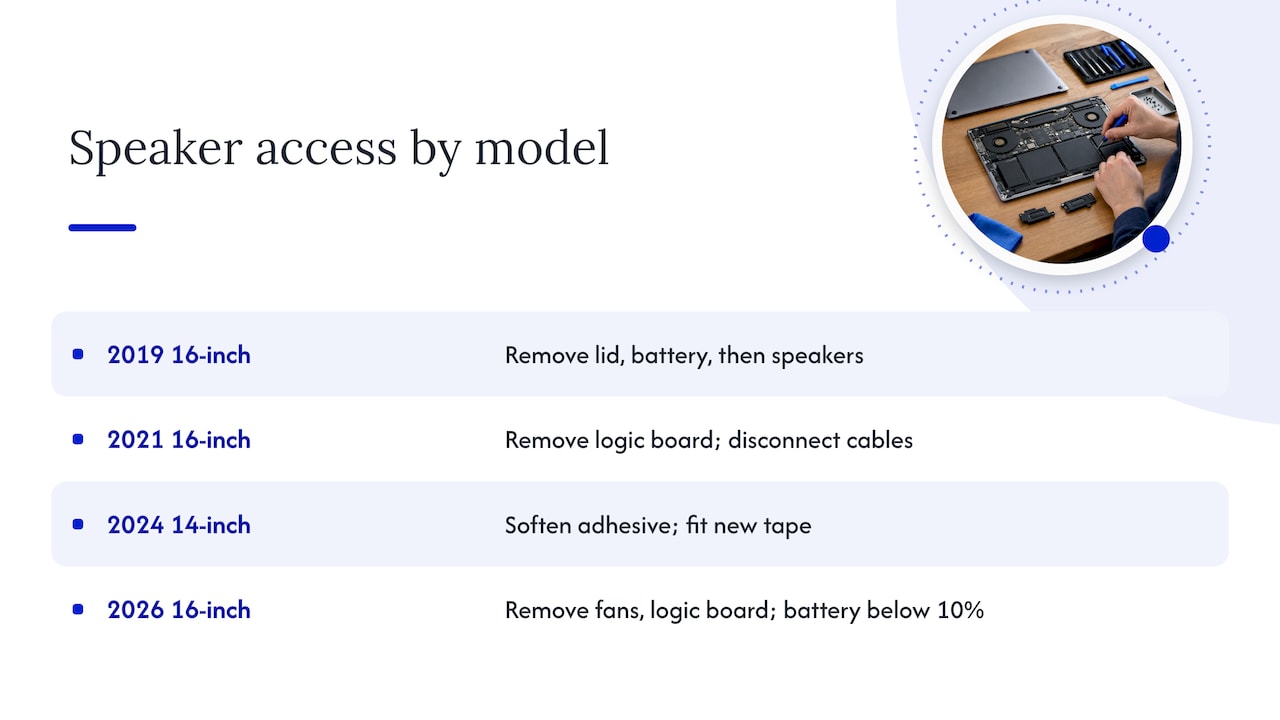
Older and simpler designs. A 2019 16-inch MacBook Pro guide shows the process as removing the bottom lid, disconnecting the battery, then disconnecting and removing the speakers. The most basic version of the job.
2021 16-inch MacBook Pro. iFixit’s guide says replacing the speakers requires removing the logic board. That means disconnecting a dense set of cables and ribbons and reassembling them correctly.
2024 14-inch MacBook Pro (M4 Pro and M4 Max). The guide has you disconnect both speakers, weaken the adhesive with isopropyl alcohol of more than 90%, carefully separate the speakers near the battery and fit new adhesive. It lists Tesa adhesive tape at $8.95.
2026 16-inch MacBook Pro. The guide calls for precision drivers, a suction handle, picks and a spudger, and the job means removing the fans and logic board, using replacement adhesive and draining the battery below 10%.
A sensible mental model for newer MacBook Pros: you are not swapping a speaker, you are emptying most of the laptop to reach it.
Risks that should stop a DIY attempt
Home repair is a legitimate choice for confident people. These are the points where we would stop and hand it over.
- The battery. Bending or puncturing a lithium-ion cell can cause fire. Apple’s repair page says to discharge it below 25% before disassembly and to take precautions if it is swollen. If your battery is visibly puffed, do not open the case and keep the laptop away from anything flammable. Call a technician. We cover battery options separately in our guide to MacBook battery replacement providers.
- Adhesive-mounted speakers near the battery. Prying is where batteries get punctured. The guide’s advice to soften the adhesive and separate carefully exists for a reason.
- Logic board removal. One torn ribbon or a missed screw can turn a speaker repair into a board repair.
- Coverage. If your Mac is under warranty or AppleCare, opening it yourself or using unofficial parts can complicate things. Check before you start.
- Your data. Always back up first. An encrypted local copy plus iCloud is the safest combination, as explained in our backup guide for before a repair.
The price argument for DIY is also thinner than it looks. In coverage of Apple’s 2022 self-repair launch, 9to5Mac’s take was that a $49 tool rental was a good deal even when you were not saving much over having Apple do the repair. Add your time, and the savings can disappear.
Our perspective: what we see on MacBook speaker jobs
Most people who contact us about MacBook sound have already tried the software fixes, which is the right instinct. What they usually have not done is separate “the speaker is damaged” from “something is blocking or loosening it.” We start there, because a clean grille or a reset can save you a repair, and we would rather tell you that than book a job you do not need.
When it is hardware, we diagnose first, then quote the repair before touching the laptop. You approve the price, and there are no surprise fees afterward. That matters most with speaker work, where the cost depends on the model generation, the part available and how much of the machine has to come apart.
We also treat data as the first priority. Your files stay on your device, and we recommend a backup before any teardown. Because we come to your home, office or a coffee shop in Orlando or Winter Park, you can watch the work and do not have to leave a laptop behind for days. Our technicians are certified, and repairs carry a warranty on parts and labor.
One honest limit: if the real fault is a failed logic board or heavy liquid damage, a speaker swap will not hold. We will say so after diagnosis, and explain the options.
— Michael
Need it done at your door? On-site MacBook repair in Orlando
If your MacBook’s sound is failing and your model is one of the complicated ones, you do not have to ship it away or work without it. Our on-site MacBook and iMac repair service in Orlando and Winter Park brings a technician to the location you choose, with the diagnosis, the quote and the repair handled in one visit where parts allow.
Not sure whether to book a repair shop, a manufacturer appointment or a mobile technician? Our page on reliable MacBook repair near you lays out the differences, and our overview of what to expect from an Apple repair specialist explains certification and what to ask. If you are comparing other repairs while we are at it, there is a guide to MacBook screen replacement providers too.
How to decide: a quick checklist
Use this to settle the question in a few minutes.
- Sound fine in headphones and in a different app? Then focus on software and settings first.
- Crackling at all volumes after a macOS update and a sample rate change? Suspect hardware.
- Recent drop, spill or humid exposure? Treat as hardware, and do not wait.
- Which model is it? Pre-2016 Airs and some older Pros are the most DIY-friendly. Newer MacBook Pros need logic board and fan removal.
- Under warranty or AppleCare? Check Apple’s coverage page before anyone opens the case.
- Swollen battery or trackpad pushing up? Stop and get professional help.
- Backed up? If not, do it now.
If you land on steps 2 to 4 with a recent MacBook Pro, a professional repair is usually the lower-risk choice. If you land on step 1, you may not need a replacement at all.
FAQ
How much does it cost to replace a MacBook speaker?
It depends on the model. DIY parts range from $7.99 to $37.99, but labor and complexity change the total, and Apple says the final service fee is set after inspection. Older MacBook Pros with speakers glued into the top case were quoted at about $600 by Apple. Ask for a written quote for your exact model before agreeing to any work.
How do I fix MacBook speakers that crackle?
Update macOS, close heavy apps, then try a different sample rate in Audio MIDI Setup. Gently clean the grille if dust is visible. If the crackle remains with headphones unplugged and persists in every app, the speaker itself is likely damaged and needs inspection.
Can you replace just one MacBook speaker?
On many models, yes. Left and right speakers are sold separately for a number of MacBook Pros and Airs. On 2021 14-inch and 16-inch models, speakers were originally not sold separately, but Apple began offering individual parts in November 2024 for newer 14-inch and 16-inch models. Availability depends on your exact model.
Is it worth repairing a 7-year-old MacBook?
Often yes, if the repair is a fraction of replacement cost and the rest of the laptop is healthy. If the battery, display and storage are also failing, or the Mac no longer gets macOS updates, get a full diagnosis and compare the combined cost with a replacement.
Sources
- The Mac Observer: MacBook Pro speakers crackling fixes
- Check That Mac: Speaker test
- Apple Support: Service and Repair for Mac Laptops
- Apple Support: Product Service and Repair Information
- Apple Support: Parts Support for MacBook Neo
- iFixit: Mac Speakers parts
- iFixit: MacBook Pro 15 2016-2017 Speaker Replacement
- iFixit: MacBook Pro repair help
- iFixit: MacBook Pro 16-Inch 2021 Speaker Assembly Replacement
- iFixit: MacBook Pro 14-Inch 2024 Speakers Replacement
- iFixit: MacBook Pro 16-Inch 2026 Speakers Replacement
- The Verge: Apple part prices for Self Service Repair
- MacRumors: New MacBook Pro speakers are more affordable to repair
- 9to5Mac: Apple self-service repair store goes live










