A phone that has been opened for a screen, battery or back glass repair can keep meaningful everyday protection against rain, splashes and sweat, provided the seals are replaced properly. What nobody can promise is the original lab rating, such as IP68. So treat a repaired phone as splash-resistant, keep it out of pools and showers, and book a technician who tells you plainly what was opened and what was resealed. In Orlando and Winter Park, that is how we work at Repair Genius: on-site, with up-front pricing and clear communication.
TL;DR
- Water resistance is a factory-tested rating, not a permanent feature. Apple says it can decrease with normal wear, and it lists taking the iPhone apart among the things to avoid.
- Any repair that opens the phone disturbs the sealing adhesive or gaskets. A fresh, correctly fitted seal restores everyday splash protection, not a guaranteed submersion rating.
- Keep a repaired phone away from swimming, bathing, steam rooms and pressurized water.
- Before a repair, ask what will be opened, how the seal is replaced and what the warranty covers, and get it in writing.
- Liquid exposure can cause damage that shows up later. If your phone gets wet, power it down and book a diagnosis early.
Table of Contents
- Water-resistant is not waterproof
- What happens to the seal when a phone is opened
- What a resealed phone can and cannot promise
- How to protect a repaired phone around water
- What to ask before you approve a repair
- Buying a used phone? Check the seal first
- Perspective: honest about what a repair restores
- Get it repaired where you are
- FAQ
- Sources
Water-resistant is not waterproof
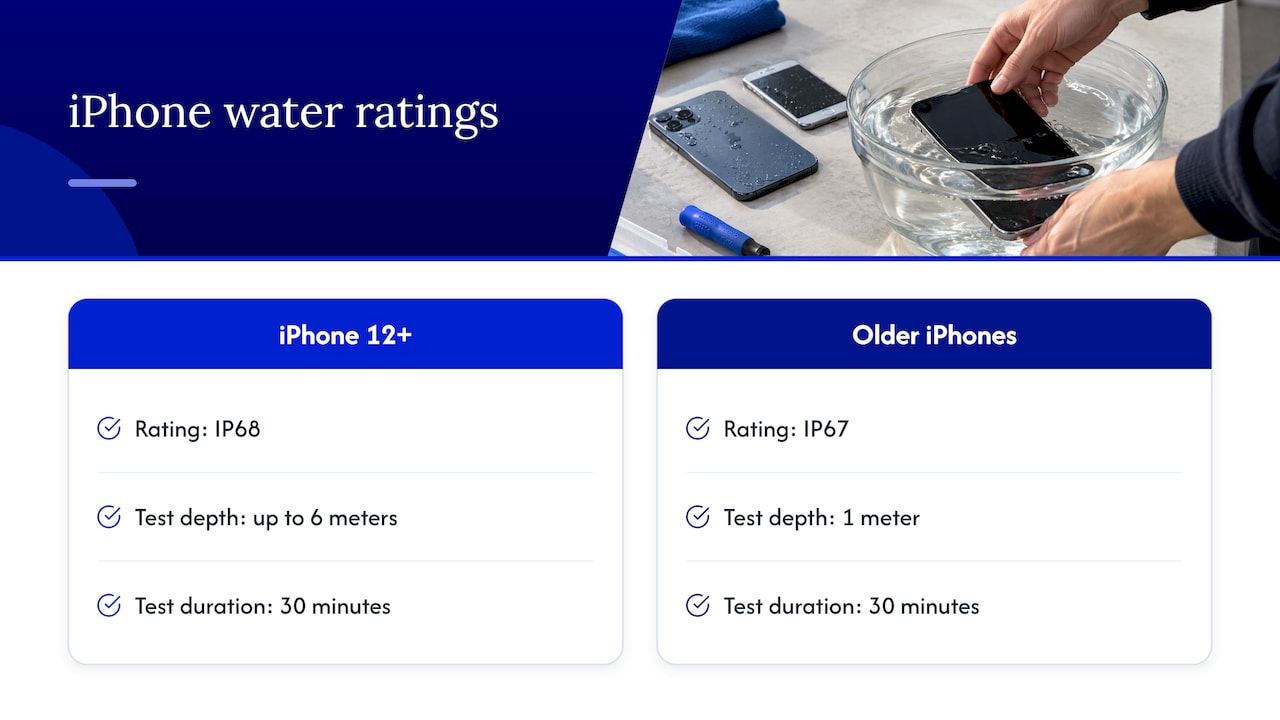
The label on the box says “water resistant” for a reason. Apple’s support page lists current iPhones, from the iPhone 12 onward, at IP68 under the IEC 60529 standard, tested up to 6 meters for 30 minutes. Older iPhone 7, 8, X, XR and SE models are rated IP67, which means 1 meter for 30 minutes. Apple states that these results come from controlled laboratory conditions.
IP stands for “ingress protection.” The first digit covers dust and the second covers water. IEC 60529 is the international standard behind both. The “8” is not a universal depth. Each manufacturer defines its own test conditions, so the same rating can mean different depths on different brands.
The rating also describes a new phone. An IEEE Access study points out that the standard requires a new smartphone to be tested under specified conditions. It does not require every phone to be tested before delivery, and it does not guarantee the phone still passes after normal use. Seals and coatings age, and heat, drops and pocket wear all play a part.
So even a never-repaired phone loses some protection over time. Apple says its resistance is not permanent and may decrease with normal wear. A repair is one more event in the life of that seal, and what matters is how well it is handled.
What happens to the seal when a phone is opened
Most modern phones keep water out with an adhesive gasket around the display and a bonded back panel, plus smaller seals at the charging port and other openings. To reach the battery, camera, charging port or screen, a technician has to break those bonds.
That is why Apple’s guidance on avoiding liquid damage includes not disassembling the iPhone, and why it says liquid damage is not covered by warranty. Google makes a similar point for Pixel phones: its product page says water and dust resistance can diminish or be lost over time through wear, repair, disassembly or damage.
Here is what that means for the repairs people book most often.
| Repair | What gets disturbed | What a good repair does |
|---|---|---|
| Screen replacement | The adhesive perimeter that holds the display to the frame | Cleans off old adhesive and fits a fresh seal before the display goes back on |
| Battery replacement | The same display seal, since the screen usually comes off first | Replaces the seal when the screen is refitted |
| Back glass | The rear bond and surrounding gaskets | Removes old adhesive and re-bonds the new glass evenly |
| Charging port | Lower seals and the port area | Reseats the lower seals and checks the port area for debris or residue |
The common thread is the adhesive. Old adhesive that is only pressed back down does not seal as well as a fresh strip. The technician’s job is to remove what is left, fit new material, apply even pressure and let it set.
How-To Geek’s iPhone water-resistance guide makes the same practical point: when you get a repair, ask whether the display adhesive strips were replaced. It is a fair question for any technician, and one we are happy to answer before the job starts.
What a resealed phone can and cannot promise
Here is the honest version, and the one you can rely on.
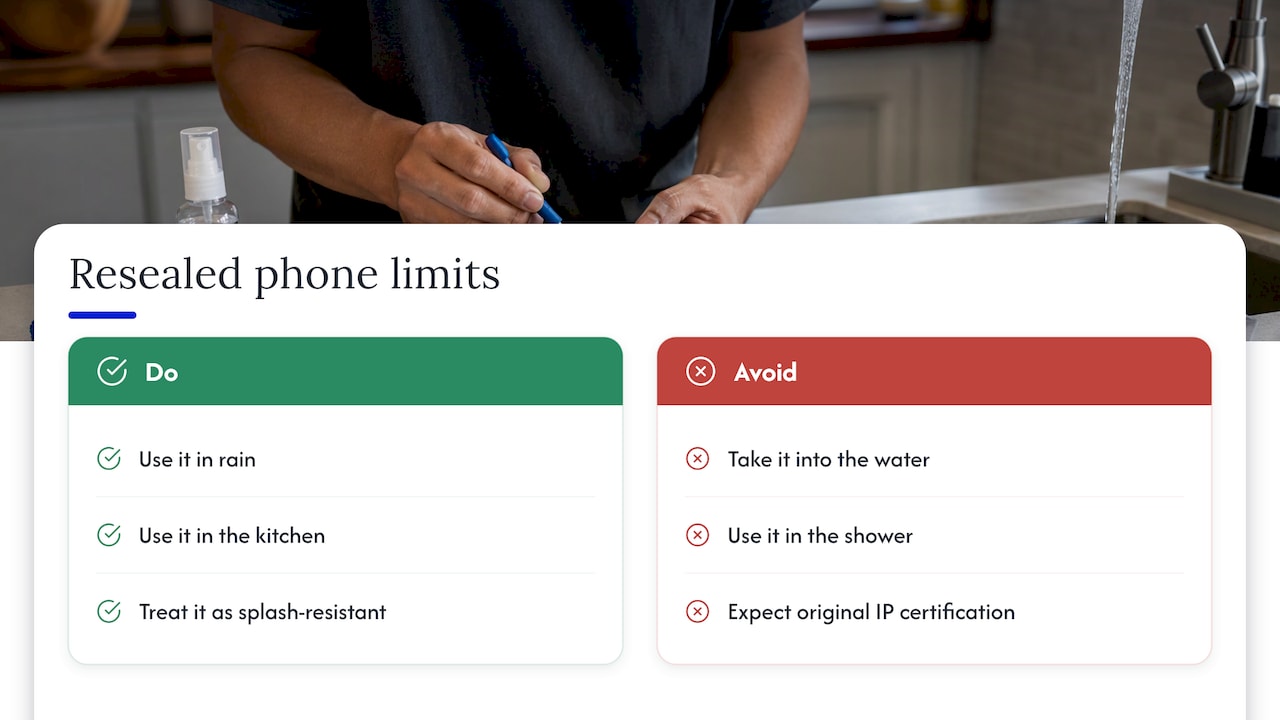
A correctly resealed phone is a better bet against rain, a splash at the sink, a sweaty gym session or a drink knocked over. That is the exposure most people have in daily life. What a repair shop cannot do is certify the phone to its original IP rating. That certification comes from a factory test of the phone as built, and a phone that has been opened is no longer in that factory state.
For you, that means a simple rule: after a repair, think of your phone as splash-resistant rather than submersible. Take it to the beach, but not into the water. Use it in the kitchen, but not in the shower.
That applies whoever opened the phone. Apple and Google both word their guidance around disassembly in general, not around one kind of repair provider. The same applies to the seal on a phone that has simply been carried around for three years.
Does repair affect your warranty?
It is a common worry, and the news is good. Apple’s Longevity by Design document says Apple warranties are not impacted by repair outside Apple’s authorized network, or by third-party parts or tools, unless the product is damaged during the repair. Liquid damage, though, is a separate matter: Apple states it is not covered by its warranty either way.
The practical takeaway is to keep your repair paperwork. A quote and invoice that list the work done show what was opened, and what was replaced.
How to protect a repaired phone around water
This is the part that makes the biggest difference after a repair. Apple’s page lists the situations to avoid to prevent liquid damage:
- Swimming or bathing with the iPhone
- Exposing it to pressurized or high-velocity water
- Saunas and steam rooms
- Intentionally submerging it
- Taking it apart, including removing screws
Two habits help too. Do not test a freshly repaired phone by dipping it in water to see whether it holds. If the seal is not perfect, you will find out in the worst possible way, and liquid damage is not covered by Apple’s warranty. And remember that a seal has a life: heat from a car dashboard, a hard drop or a bent frame can all open a gap that was fine the day before.
If your phone gets wet anyway
Apple’s instructions for a wet iPhone are specific and worth following to the letter:
- Wipe it with a soft, lint-free cloth.
- Tap it gently with the connector facing down to clear liquid from the port.
- Leave it to dry in airflow. A fan blowing cool air toward the connector may help.
- Do not use external heat or push foreign objects, such as cotton swabs or paper towels, into the connector.
- Wait at least 5 hours before charging it.
Salt water is more aggressive than fresh water, so if you have been at the beach, read our guide to what to do in the first hour after salt water exposure. For the full picture on diagnosing and saving a wet device, see our water damaged iPhone repair tips and how to fix a water damaged phone.
A phone that still works after getting wet is not necessarily fine. Moisture can leave residue behind, and problems such as charging faults, muffled speakers, foggy cameras or random shutdowns can appear days later. Our page on spotting phone water damage signs shows what to look for in a couple of minutes.
What to ask before you approve a repair
You can learn a lot about a repair in a five-minute conversation. These are the questions that matter when water resistance is on your mind.
- What exactly will be opened? A battery swap and a screen swap both involve lifting the display. A charging port repair reaches the lower part of the phone.
- Will the seal be replaced? Ask whether new adhesive goes on, not whether the old one will be pressed back.
- How will the result be described? A good answer says “resealed” and “splash-resistant,” and does not promise the factory rating.
- What does the warranty cover? Ask for the terms on parts and labor in writing before work begins, including what is excluded. Rokform’s repair-shop guide gives the same advice: get warranty terms in writing and ask what documentation a claim needs.
- Is the price final? A written quote that covers diagnostics, labor and parts avoids surprises later. See our list of common smartphone repair red flags for what a clear estimate looks like.
A straight conversation up front tells you whether the technician is open about what the repair does and does not change.
A word on warranties and water
Warranty coverage for water damage is narrow with every major manufacturer. Apple says liquid damage is not covered by its limited warranty, though consumer-law rights may still apply. Google says accidental or external water damage is not covered, and Samsung’s outcome depends on the inspection, the cause and the terms, according to FlawCheck’s review of the manufacturers’ policies. The reason is simple: a rating is a statement about a phone in a lab, and a warranty is a decision about what happened to your phone. The two can reach different answers.
That is another reason to keep a wet phone out of the equation: the best protection is keeping water out in the first place.
Buying a used phone? Check the seal first
If you are buying a phone secondhand, you do not know whether it has been opened before. Look for uneven gaps around the screen, a back glass that lifts at the edge, glue residue, scratched screws and corrosion around the ports. Also confirm the phone is not carrier locked before you pay: running an eSIM carrier lock check takes a minute and avoids a second problem on top of a questionable seal.
If you have already bought a used phone and it shows any of these signs, a diagnosis from a technician will tell you what you have.
Perspective: honest about what a repair restores
We get this question constantly, and the straight answer is better than a comforting one. A phone that has been opened should be treated as splash-resistant, not waterproof. A fresh, properly fitted seal puts a lot of everyday protection back, and that is what most people need from their phone.
What we care about is that you know exactly what was done. We bring the repair to you in Orlando and Winter Park, we quote the price up front with no hidden fees, and we explain what the job involves before we start. If your concern is water, tell us at the beginning, so it shapes the conversation.
Our technicians are certified, our parts and labor carry a warranty, and we handle board-level repairs, so a phone that has been through water or a hard drop gets a proper look at the cause rather than a quick patch over the symptom.
Use the phone confidently in daily life. Keep it out of the pool. That balance is the right one.
Michael
Get it repaired where you are
If your phone needs a new screen, battery, charging port or back glass, we come to your home, office or campus in Orlando or Winter Park, usually the same day. We repair iPhones, Samsung and other Android phones, plus tablets and laptops, and you get the cost up front before work begins. Tell the technician you want to talk about seals, and we will walk you through what the repair involves.

Start with our iPhone repair services or our Samsung and Android repair page, or book through Repair Genius.
FAQ
Is my iPhone still water resistant after a battery replacement?
A battery replacement means lifting the screen, which disturbs the display seal. With a fresh seal fitted properly, you can expect good protection against splashes and rain. Apple does not certify the original rating after a phone has been opened, so avoid swimming, showers and submersion.
Can a repaired phone still be IP68?
The IP68 rating comes from a factory test of the phone as built, so it is not something a repair can restore or certify. A repair can bring back everyday splash protection. For anything beyond that, the safest approach is to keep the phone dry.
Does a pressure or leak test prove the phone is waterproof?
No. A test can show whether a seal is seated, which is useful, but it is not an IP certification. Never test a repaired phone by dropping it in water.
How long should I wait before charging a phone that got wet?
Apple’s instructions say to wait at least 5 hours before charging a wet iPhone, to dry it in airflow and to avoid external heat. If the phone shows charging faults or odd behavior afterward, book a diagnosis rather than waiting for it to get worse.
Can a phone with water damage be fixed?
Often, yes, especially when it is looked at early, before corrosion spreads. Power it down, dry it as described above and have a technician diagnose it. Our guide to water damaged iPhone repair covers what to expect.
Sources
- Apple: About splash, water, and dust resistance of iPhone
- IEEE Access: study of IP ratings and smartphone water resistance
- Apple: Longevity by Design
- How-To Geek: Is My iPhone Waterproof?
- FlawCheck: IP68 vs water-damage warranty
- Rokform: Phone repair shop guide
Recommended
- How to Fix a Water Damaged Phone
- Rice vs Silica Gel: When to Stop DIY and Call a Repair Tech
- Salt Water Phone Damage: What to Do in the First Hour
- Water Damaged iPhone Repair Tips