Yes, you can put a screen protector on a freshly repaired phone, and you should use a new one: the old protector rarely survives removal, and it was matched to the screen that was replaced. The safest order is to let the repair be fully tested first, then apply a protector made for the display that is actually installed, in a clean, dust-free spot. When our technicians replace a screen at your home or office in Orlando or Winter Park, we can talk you through the fit before you buy anything.
TL;DR
- Use a new protector after a screen repair. Old ones are hard to lift off without damage and were fitted to the original screen.
- Apply it only after the repaired phone passes its checks: touch, Face ID or Touch ID, proximity sensor, auto-brightness and cameras.
- Choose by the display installed, not only the phone model, and make sure it clears your case.
- Expect to pay roughly $5 to $60 for the protector. Installation by a service adds about $10 to $20.
- Ask for a written, itemized quote before any repair so the bill holds no surprises.
Table of Contents
- Why a new protector beats the old one
- When to apply it: after the checks, not before
- How to choose one that fits the repaired screen
- What a protector costs in the US
- Hidden fees on a phone repair bill
- Our perspective
- Get the repair done where you are
- FAQ
- Sources
Why a new protector beats the old one
A tempered glass protector holds on with a thin adhesive layer. Once you lift it, that adhesive collects dust and loses grip, which is why reapplied glass tends to bubble or fail. Glass also often cracks during removal. Reuse is realistically possible only with thin plastic film, and each reuse weakens the adhesive.
There is a second reason. Repairs change the part under the glass. Fit depends on the display actually installed, so a protector that suited the original screen is not guaranteed to suit the new one.
Some protectors are designed to be repositioned. Anker’s US support page says its tempered glass uses an adhesive that allows up to three removals and reapplications before it should be replaced. That is for fixing a crooked first attempt, not for moving a protector from an old screen to a new one.
When a protector is due for replacement anyway
If the protector is cracked, replace it. Sharp edges, falling fragments or a cracked corner mean part of the display is exposed, and fragments can scratch the screen over time. Peeling, bubbling, yellowing, haze, weaker touch response and smudges that will not wipe off are the other signs. A repair is a natural moment to start fresh with all of that behind you.
When to apply it: after the checks, not before
The order matters. A protector can imitate a repair fault. Glass covering the proximity sensor can keep the screen awake during calls, thick glass over the light sensor can break auto-brightness, and a lifting edge can create touch dead zones, as GeekProParts explains. If you install first, you cannot tell whether a problem comes from the repair or the protector.
So test the bare screen first:
- Touch every corner of the display, including the keyboard area and the edges.
- Unlock with Face ID or Touch ID. If Face ID misbehaves after a repair, see our guide to Face ID repair.
- Make a call and check that the screen turns off at your ear.
- Check auto-brightness in a dim room and a bright one.
- Open the front and rear cameras.
If you notice the colors look different, True Tone often needs attention after a replacement, covered in True Tone after screen replacement.
Once everything passes, apply the protector in a clean area with the screen wiped and dust-free. After installation, leave it alone as long as you can. Ideally 24 hours lets the adhesive settle.
How to choose one that fits the repaired screen
Three habits prevent most mismatches.
Go by the installed display. Ask your technician which display was fitted. Then confirm that the protector’s maker supports that display, since the phone model name alone doesn’t settle fit.
Check your case. Seat the case gently over the dry-fitted protector to confirm the edges clear. A case that presses on a protector edge is a common reason for lifting.
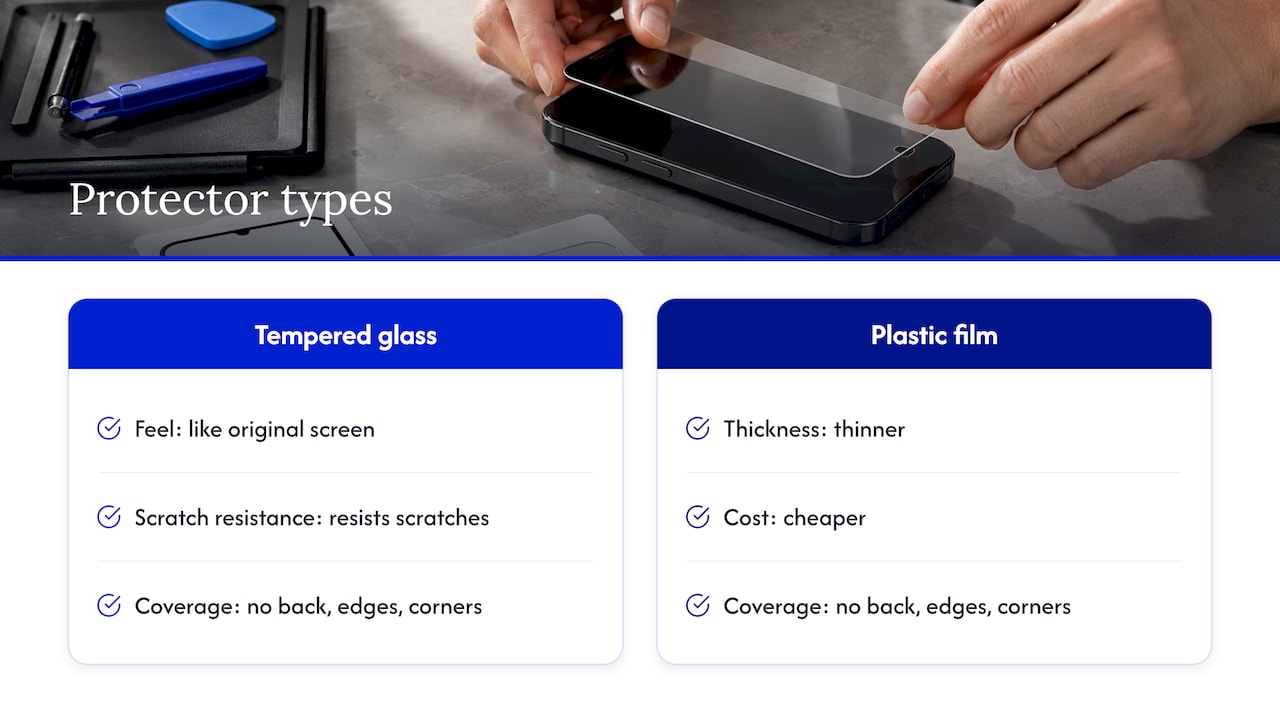
Pick the type for your situation. Tempered glass feels like the original screen and resists scratches. Plastic film is thinner and cheaper. Neither covers the back, edges or corners, so experts quoted by NBC Selected suggest pairing a protector with a heavy-duty case with rubber edges.
What if the screen is still cracked?
If you are waiting on a repair, a protector is only a stopgap. BGR advises inspecting the display first, using flexible plastic film if fragments are raised or loose, avoiding liquid-adhesive products, and applying gently. Black regions, lines or unresponsive touch mean the repair should come first. Back up your data too. Our cracked screen repair process guide walks through what happens next.
What a protector costs in the US
Prices vary widely, and they move, so treat these as published ranges for 2026 rather than a quote. Rokform’s 2026 breakdown puts budget protectors at $5 to $15, mid-range at $16 to $35 and premium at $36 to $60 or more. It says professional installation services add $10 to $20, while carrier stores charge $40 to $50 with installation included.
| Tier | Typical US price | Rokform’s stated life |
|---|---|---|
| Budget (film or basic glass) | $5–$15 | 2–4 months |
| Mid-range tempered glass | $16–$35 | 6–12 months |
| Premium | $36–$60+ | 12–24 months |
For context, NBC Selected reports plastic protectors typically cost under $15 and glass ones run from about $10 to over $50. A protector is a small fraction of the cost of a screen repair, which is the point of buying one right after you have paid for a new display.
Foldables are a special case. For the Galaxy Z Flip, Samsung’s US terms say a Samsung authorized repair technician should apply the protector because of the flexible display.
Hidden fees on a phone repair bill
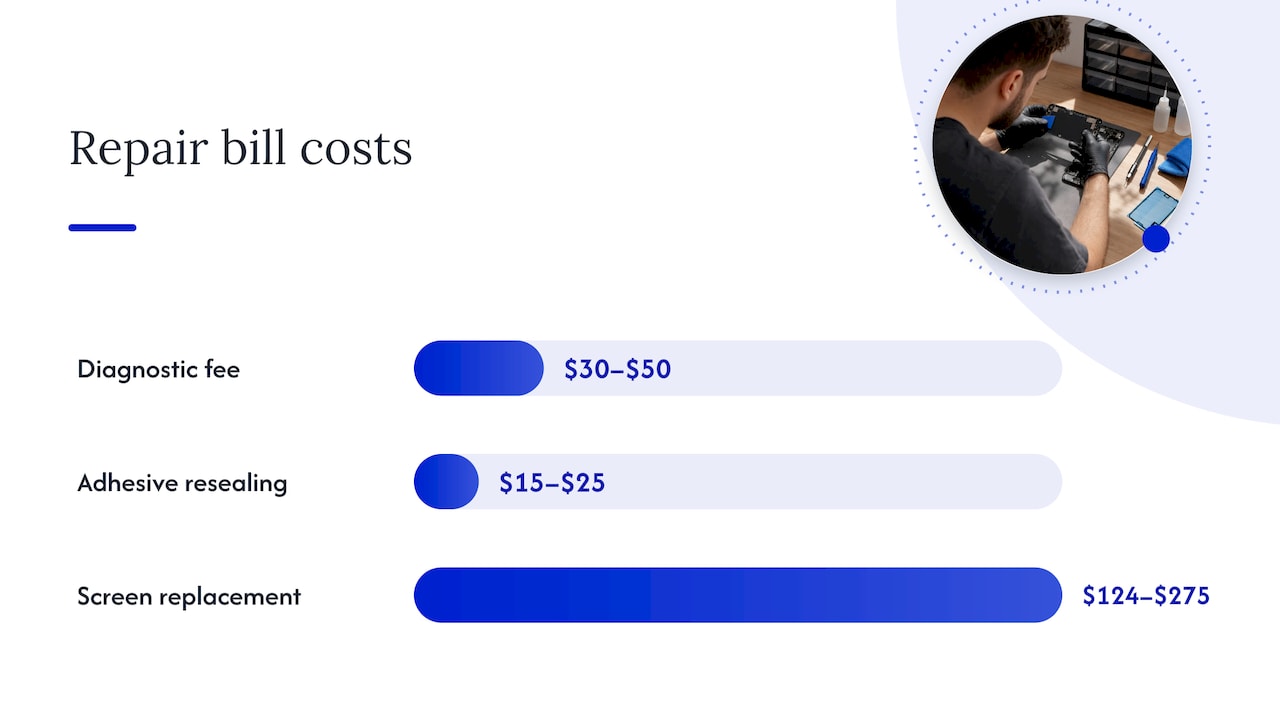
People who search for protectors after a repair often have the bill on their mind too. A low advertised price can grow. Rokform’s hidden-cost guide describes separate diagnostic fees of $30 to $50, adhesive resealing of $15 to $25 and part price increases when a part has to be ordered. It puts a realistic screen-replacement total at $124 to $275.
Before you approve any repair, get these in writing:
- Whether diagnosis is included in the quote or charged separately.
- An itemized quote that separates diagnosis, parts, labor, taxes and optional add-ons.
- What the warranty covers, on parts and on labor.
- Whether any extras, such as a battery swap, are optional.
The rules differ by state. California, for example, requires diagnosis fees to be disclosed in writing and no charges beyond the estimate without your consent. Florida readers should check the state’s consumer protection office for the current rules that apply to them. In general, a vague “go ahead and fix it” is not the same as agreeing to a specific added charge, so ask for any change in price to be stated before the work continues.
For the price side of a screen job, see our iPhone screen repair cost guide for Orlando. It helps to compare repair and replacement too, in our repair vs replacement decision guide.
Our perspective
The best moment to protect a screen is right after it has been repaired and tested, not before. We want you to see the new display working properly on its own, then add the protector, so any issue is easy to trace.
Our approach is built around quoting up front and explaining clearly, with no hidden fees. That is also why we like to tell you which display went into your phone: it makes buying the right protector simple.
Pair the protector with a good case. A protector handles the face of the phone, and a case handles corners and edges, which is where drops usually hit.
Michael
Get the repair done where you are
If your screen is cracked, we come to your home, office or campus in Orlando and Winter Park, with same-day service, certified technicians, transparent pricing and a warranty on parts and labor. You approve a quote up front, and your data stays protected. See our iPhone repair services or our Samsung and Android repair.

FAQ
Can I put a screen protector on right after a screen repair?
Yes, once the phone has passed its checks for touch, biometrics, proximity, brightness and cameras. Apply it in a clean area on a dust-free screen. Then leave it untouched, ideally for 24 hours.
Can I reuse the protector from before the repair?
Usually not. Glass protectors tend to crack when lifted, and the adhesive picks up dust and loses grip. A new protector made for the installed display is the reliable choice.
Does a protector affect Face ID or auto-brightness?
A poorly fitted one can. A protector over the sensors or a thick glass layer can interfere with them, which is why testing the bare screen first and picking a protector made for your exact model matters.
How much does a replacement protector cost?
Typically $5 to $60 or more for the product, depending on the tier. Installation services add about $10 to $20, and carrier stores charge $40 to $50 with installation included, per Rokform’s 2026 figures.
How do I avoid hidden fees on a phone repair?
Ask for a written, itemized quote that states whether diagnosis is included, what parts and labor cost, and what the warranty covers. Agree to any extra charge specifically before work continues.
Sources
- Replacement Screen Protector: What to Use After a Repair
- Screen Protector After Repair: How and Why to Offer It
- How to Fix Common Screen Protector Installation Problems
- Can You Reuse a Tempered Glass Screen Protector?
- Reuse a Screen Protector: Remove, Clean & Reapply Guide
- Anker tempered glass reapplication support article
- Is It Safe To Keep Using A Cracked Screen Protector?
- Signs It’s Time To Replace Your Phone’s Screen Protector
- Are Screen Protectors Still Worth Buying?
- Can You Put A Screen Protector On A Cracked Phone Screen?
- How Much Are Screen Protectors? 2026
- Galaxy Z Flip Screen Protector terms
- Phone Repair Shop Hidden Costs
- How to Choose a Phone Repair Shop: Expert Checklist
- Write It Right! – Bureau of Household Goods and Services
Recommended
- Cracked Screen Repair Process: 2026 Complete Guide
- Best Screen Replacement Services: Find Trusted Pros
- iPhone Screen Repair Process Explained for 2026
- True Tone After Screen Replacement: Why It Vanishes, the Fix