
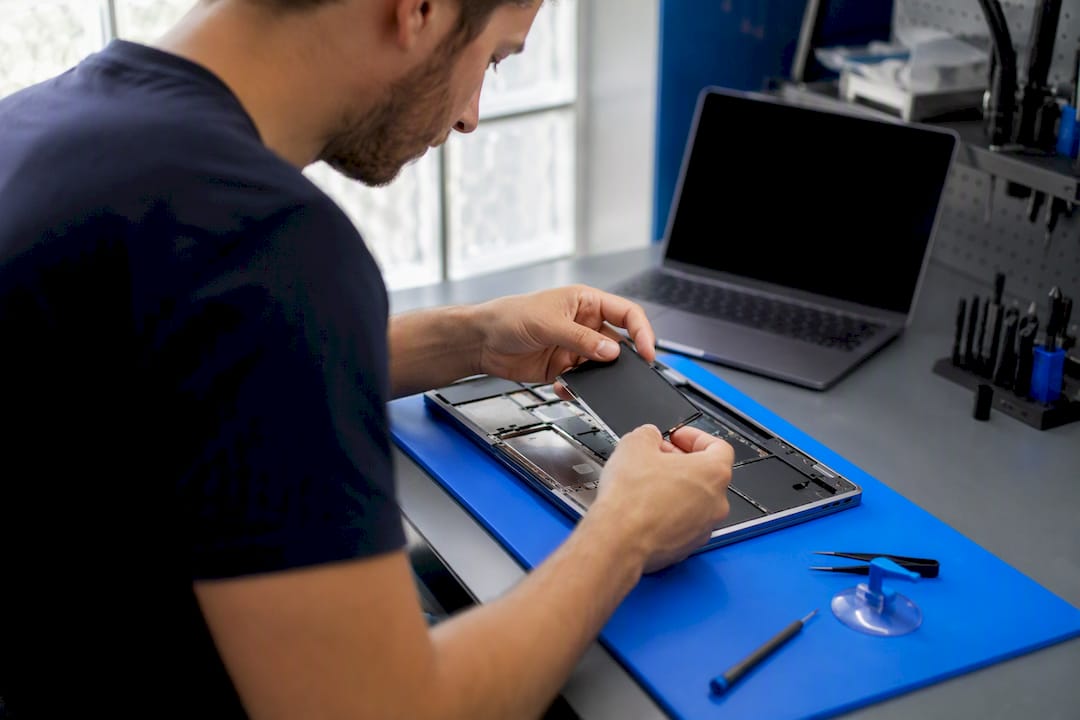
Replacing a MacBook trackpad typically runs $80 to $350 at a repair shop, or $180 to $880 for the full range once you factor in Apple’s out-of-warranty pricing on newer models. The exact number depends on your MacBook’s year, whether you have AppleCare+, and whether the job requires swapping the whole top case instead of just the trackpad itself. A single trackpad part sells for around $79.99 on iFixit, while Apple’s own component pricing has listed the same part closer to $95.92.
- Apple will not quote a price over the phone. It inspects the machine first, every time.
- AppleCare+ users often pay a flat accidental damage fee instead of the full out-of-warranty rate.
Pro Tip: Before you book anything, check your AppleCare+ status in System Settings or on Apple’s coverage checker. It takes two minutes and can cut your bill by more than half.
Key Takeaways
MacBook trackpad replacement costs typically fall between $80 and $880, with the final number driven mostly by repair route, model year, and whether Touch ID is involved.
| Point | Details |
|---|---|
| Typical cost range | Shop repairs run $80 to $350; full Apple/AASP jobs can reach $180 to $880 depending on model. |
| Apple requires inspection | Apple and AASPs need to physically examine the MacBook before issuing a final quote. |
| DIY parts are cheap, labor risk is not | Trackpad parts cost around $79.99 to $95.92, but Touch ID cables are easy to damage. |
| Top case complexity raises price | Models where the trackpad is fused to the top case cost more in parts and labor than standalone designs. |
| On-site repair for speed and safety | Repair Genius offers same-day, warrantied on-site trackpad repair in Orlando and Winter Park. |
Table of Contents
- MacBook Trackpad Replacement Cost by Repair Route
- What Factors Actually Drive the Price Up or Down?
- Should You Go to Apple, a Shop, Mail-In, or DIY?
- Can You Replace a MacBook Trackpad Yourself?
- How to Prepare Before You Hand Over Your MacBook
- Why On-Site Repair Solves the Trackpad Problem Faster
- What’s the Smartest Way to Approach This Repair?
- Book On-Site Trackpad Repair in Orlando or Winter Park
- Frequently Asked Questions
- Sources
MacBook Trackpad Replacement Cost by Repair Route
Where you take your MacBook changes the price more than almost anything else. Here’s how the four main paths stack up.
Apple or an Apple Authorized Service Provider charges the most but backs the work with genuine parts and Apple’s own service and repair policy, which requires a physical inspection before any final quote gets issued. Independent pricing guides put typical AASP totals for trackpad-related work in the $180 to $880 range, with most jobs landing closer to $300 to $520 once labor is added. AppleCare+ softens that number considerably.
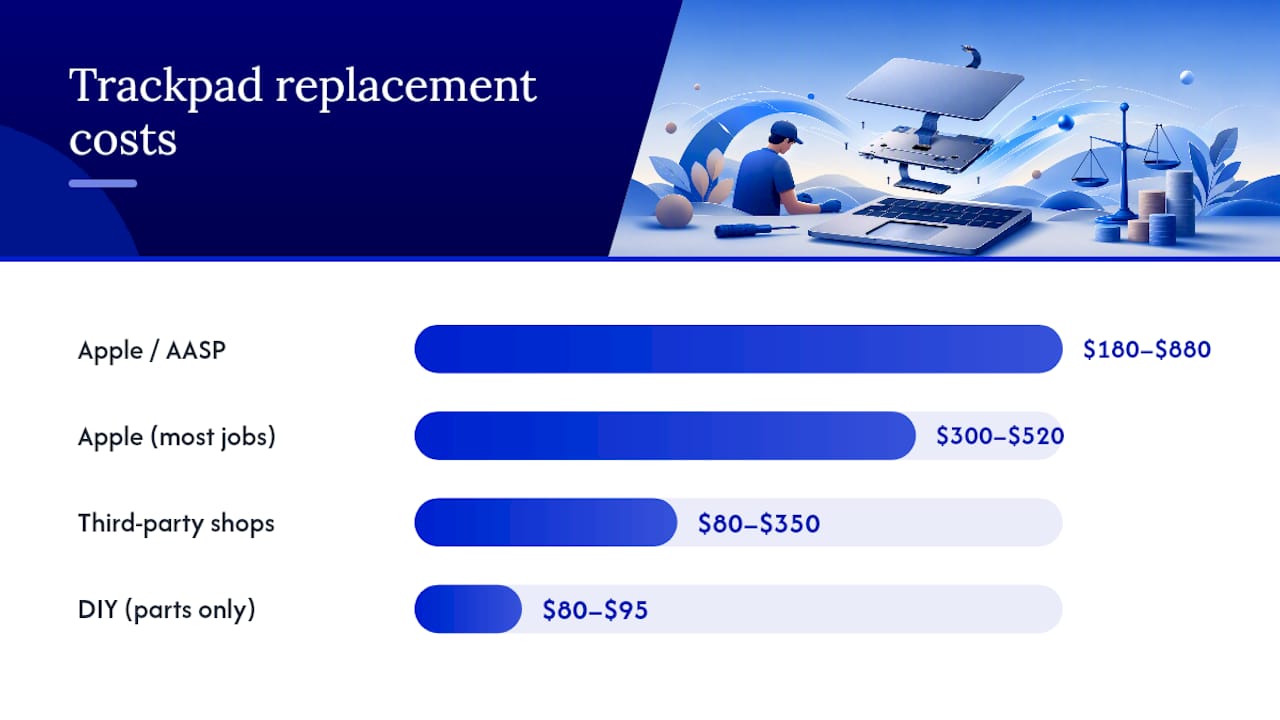
Third-party shops tend to undercut Apple by using aftermarket or refurbished parts and lower labor rates. Reported ranges for shop trackpad repairs commonly sit around $80 to $350, depending on the MacBook model and local labor costs.
Mail-in services land in a similar price band to local shops but tack on shipping costs, insurance, and a longer wait.
DIY means paying for parts only, roughly $80 to $95 based on current iFixit and Apple parts-list examples, but a botched attempt can turn an $80 part into an $800 logic board repair.
A trackpad swap done wrong rarely stays a trackpad problem. Cracked flex cables and disturbed Touch ID boards are what turn a cheap fix into an expensive one.
- Apple/AASP: genuine parts, full warranty, highest price.
- Third-party: faster and cheaper, warranty quality varies by shop.
- Mail-in: convenient if no local shop exists, adds days and shipping fees.
- DIY: lowest cash cost, highest risk of collateral damage.
What Factors Actually Drive the Price Up or Down?
Two MacBooks with the same broken trackpad can generate wildly different quotes. The gap usually comes down to five things.
- Model and year. Older MacBooks with a mechanical trackpad button are simpler and cheaper to service than newer Force Touch models.
- Standalone part vs. top case. Many recent MacBooks fuse the trackpad, battery, and speakers into one top case assembly, which multiplies both the parts cost and the labor hours.
- Touch ID and the T2 or Secure Enclave chip. These components are paired to a specific logic board, so replacing them isn’t a plug-and-play swap.
- Related damage. A sticky or unresponsive trackpad sometimes points to battery swelling underneath it, which adds a second repair to the bill.
- Labor rates and shipping. Regional pricing, rush service, or mail-in shipping and taxes can add $50 to $250 on top of the base quote.
Labor alone typically runs one to three hours, and that’s before any expedited service fee. Ask for an itemized quote so you know exactly what you’re paying for before work begins. Our guide to what affects Apple repair pricing breaks down how these variables interact across different repair categories.
Should You Go to Apple, a Shop, Mail-In, or DIY?
Match the repair route to what you actually care about most: price, speed, or peace of mind. Run through this checklist with any provider before handing over your MacBook.
- Does the quoted price include parts, labor, and taxes, or just one of those?
- Is the diagnostic fee credited toward the repair if you go ahead?
- What warranty covers the parts and the labor separately?
- Are the parts genuine Apple, refurbished, or aftermarket?
- How is your data protected during the repair?
Choose Apple or an AASP when you have AppleCare+, need Touch ID to keep working flawlessly, or simply want the manufacturer warranty intact.
Choose a reputable third-party shop when cost and turnaround matter more than having the Apple logo on the invoice, and the shop can show you its parts sourcing and warranty terms.
Choose mail-in only when no local option exists, and confirm insurance coverage before shipping a laptop across the country.
Skip DIY if your model has Touch ID or a T2 chip and you’ve never opened a laptop before. Our common repair mistakes guide covers the failure points that trip up first-timers most often.
Can You Replace a MacBook Trackpad Yourself?
Yes, and the parts alone are affordable. iFixit’s trackpad parts catalog lists individual components for MacBook Pro models around $79.99, similar to Apple’s own $95.92 listing for the same part category. A full kit with adhesive strips and tools adds a bit more, but you’re still looking at under $150 in most cases.
The catch is everything between unboxing the part and closing the case. You’re dealing with adhesive that has to be removed cleanly, ribbon cables thin enough to tear with a stray fingernail, and a calibration step that some models require after reassembly. Damaging the Touch ID flex cable often means replacing the entire top case, not just the trackpad, and voiding your remaining warranty occurs as soon as a seal is broken. A repair that ideally might be short can take much longer on a first attempt.
Pro Tip: If your MacBook has Touch ID, treat the repair as advanced, not beginner. That flex cable connector is smaller than a fingernail and pairs to your specific logic board.
DIY genuinely saves money on older, non-Touch ID models with a standalone trackpad part. On newer unibody MacBooks, it often ends up costing more once you account for a ruined part or a trip to a shop to fix your fix.
How to Prepare Before You Hand Over Your MacBook
A little prep work keeps the process fast and your data safe.
- Back up everything, either to iCloud or an external drive.
- Write down the exact symptoms: does the trackpad click, drag, or not respond at all?
- Have your serial number and AppleCare status ready.
- Ask upfront whether the diagnostic fee gets credited toward the final repair.
Turnaround varies by route: same-day for on-site service, one to three days at most local shops, and anywhere from three to ten-plus days for mail-in service once you count shipping both ways. Always request an itemized quote listing parts, labor hours, and warranty terms before you agree to anything. Our pre-repair checklist walks through exactly what to document first.
Why On-Site Repair Solves the Trackpad Problem Faster
On-site repair covers diagnostics, the parts swap, and post-repair testing at your location instead of a shop counter. Repair Genius performs these visits across Orlando and Winter Park, with certified technicians who quote parts and labor upfront and back the work with a warranty.
The whole point of on-site service is that your MacBook never leaves your sight. For anyone worried about a stranger handling their data, that alone changes the calculation.
On-site makes the most sense when you need your laptop back the same day, work from it daily, or simply don’t want to ship a computer full of personal files to an unknown mail-in center.
- Transparent pricing quoted before work starts, no hidden fees.
- Certified technicians, not a mystery subcontractor.
- Minimal downtime since you keep the machine at your own address.
What’s the Smartest Way to Approach This Repair?
Most people overthink this decision. If your MacBook still has AppleCare+, use it. That’s the cheapest genuine-parts route available. If it doesn’t, get two or three quotes from local shops before committing. Prices swing more than people expect for the same repair.
Pay the Apple premium when Touch ID or the T2 chip is involved and you can’t tolerate a mismatched sensor. Shop third-party or mail-in when the trackpad is a standalone part and price matters more than the Apple badge on your invoice.
Book On-Site Trackpad Repair in Orlando or Winter Park
Instead of driving across town or shipping your MacBook off for a week, Repair Genius sends a certified technician to your home or office in Orlando and Winter Park the same day you call.

Every quote covers parts and labor with pricing confirmed before the technician touches your machine, backed by a warranty on both. Repair Genius technicians handle the diagnosis, the trackpad swap, and full testing on-site, so your MacBook and your files never leave your hands. If your trackpad has stopped clicking, dragging, or responding altogether, request a quote from Repair Genius and get a technician scheduled for the same day.
Frequently Asked Questions
Is it worth fixing a MacBook trackpad, or should I replace the laptop?
Fixing almost always wins financially. A $180 to $880 repair is far cheaper than a new MacBook, and trackpad issues rarely indicate a failing logic board.
How much does Apple charge for a trackpad replacement?
Apple doesn’t publish a flat rate. It inspects the machine and issues a personalized quote, though AppleCare+ users typically pay a fixed, lower accidental damage fee instead.
Can a cracked trackpad be repaired instead of replaced?
Usually no. Trackpads are sealed units, so cracks or unresponsive clicking almost always require a full part swap rather than a patch repair.
Does a trackpad repair affect my MacBook’s warranty?
Repairs done by Apple or an Authorized Service Provider preserve your warranty. DIY repairs or unauthorized shops can void remaining coverage on certain models.
How long does a MacBook trackpad replacement take?
On-site service can finish the same day. Local shops typically need one to three days, while mail-in services often take a week or more with shipping included.
Sources
- Apple Service and Repair for Mac Laptops – Apple Support
- iFixit product listing — MacBook Pro 14 Late 2023 trackpad
- MacBook Pro trackpad replacement cost (Cost Insider)
- MacBook trackpad repair (New York Computer Help)
Recommended
- Phone Repair vs Replacement Cost: 2026 Decision Guide
- Top 5 MacBook Battery Replacement Providers 2026
- Top 5 Providers for MacBook Screen Replacement 2026
- Apple Repair Specialist: Your 2026 Guide to Certified Service





