

Most laptop and mechanical keyboards can be repaired, and in the majority of cases it costs a fraction of what a replacement device runs. For a stuck key, dead switch, or spill damage, a same-day on-site visit or a trusted local keyboard repair shop is usually the fastest and cheapest fix. The exception is anything that’s damaged the motherboard or fused the keyboard assembly into a riveted, non-serviceable unit. Before you book anything, three things should drive your decision: whether the shop offers a free diagnostic, whether the repair carries a warranty on parts and labor, and how the shop handles your data during the process.
Here’s how to move fast:
- Stuck or dead keys, spilled liquid, loose ribbon cables: book a diagnostic today. These are almost always fixable.
- Need the laptop back the same day: look for same-day on-site repair rather than a mail-in service.
- Mechanical keyboard with a custom PCB: expect a short mail-in wait for the right parts, since specialty boards aren’t always stocked locally.
- Not sure if it’s worth fixing: get a written estimate first. If repair costs come in under roughly half of a replacement, fixing almost always wins.
Key Takeaways
Same-day on-site repair resolves most common keyboard failures faster and with less risk than shipping a device offsite or waiting on a local shop’s queue.
| Point | Details |
|---|---|
| Most failures are fixable | Stuck keys, broken switches, and spill damage are standard repairs, not full replacements. |
| Vet before you book | Confirm a free diagnostic, itemized pricing, warranty length, and data-handling policy up front. |
| Cost and time vary by damage | Simple switch swaps run $40 same day; full assemblies run $150 to $250 and take days. |
| Replace only when it makes sense | Motherboard damage or near-replacement part costs are the signals to stop repairing. |
| Repair Genius offers same-day on-site fixes | Free diagnostic, transparent pricing, warranty on parts and labor, and on-site service in Orlando and Winter Park. |
Table of Contents
- What Keyboard Repair Shops Can Actually Fix
- On-Site, Walk-In, Mail-In, or Manufacturer: Which Route Fits?
- How Much Does Keyboard Repair Cost, and How Long Does It Take?
- What Happens During a Professional Keyboard Diagnostic and Repair
- How Do You Pick a Trustworthy Keyboard Repair Shop?
- Repair or Replace: How to Decide
- Why On-Site Repair Solves the Problems Local Shops Can’t
- Choosing Between On-Site, Local, and Mail-In: My Take
- Book On-Site Keyboard Repair With Repair Genius
- Sources
What Keyboard Repair Shops Can Actually Fix
A keyboard repair shop worth its name can resolve most of the failures that send people searching for help in the first place. Stuck or unresponsive keys, snapped mechanical switches, torn or disconnected ribbon cables, and localized corrosion from a coffee spill are all standard repairs. So are detached keycaps and swapped-out switch modules on mechanical boards, where a technician replaces the specific failed component instead of touching anything else.
Local shops that specialize in this work see the same handful of failure patterns over and over. Ridgeway Computers notes that dust intrusion, worn-out switches, and ribbon cable damage account for a large share of the laptop keyboard repairs they handle, and most resolve with parts replacement rather than a full teardown.
Some damage, though, pushes past what a component swap can fix:
- A severely warped keyboard frame, often from heat or physical impact
- Full-membrane failure paired with visible motherboard damage
- Riveted ultrabook keyboards where the manufacturer bonded the keyboard to the chassis, forcing a full top-case assembly swap instead of a targeted repair
That last one catches people off guard. Ultra-thin laptops save space by gluing or riveting the keyboard directly into the case, so what would be a $40 part on an older machine becomes a $150 to $250 assembly replacement.
Pro Tip: If liquid gets on the keyboard, power the device off immediately and do not turn it back on to “check” if it still works. Powering on a wet board is what turns a simple switch replacement into a shorted motherboard. Flip the laptop upside down in a tent shape to drain excess liquid, photograph the spill and the ports for your technician, and get it diagnosed within 24 hours.
On-Site, Walk-In, Mail-In, or Manufacturer: Which Route Fits?
Every repair route trades speed for something else, usually cost or part availability. The right choice depends on how badly you need the device back and what kind of keyboard you’re dealing with.
On-site repair sends a technician to you, which means no shipping risk and same-day turnaround for most common faults. A local walk-in shop offers similar speed but requires you to drop off and pick up the device yourself, often across two separate trips. Mail-in labs specialize in parts that local shops don’t stock, especially custom mechanical keyboard PCBs, but you’re waiting on shipping in both directions. Manufacturer or retailer service tends to be the slowest and most expensive route, though it’s sometimes the only option under an active warranty.
Mail-in specialists earn their keep on mechanical keyboards with custom or discontinued PCBs. Keeb.io’s repair service is a good example: it’s built specifically around board-level and switch-level fixes for enthusiast keyboards, with shipping-based turnaround because the volume of specialty parts doesn’t exist at your local mall kiosk.
For a laptop you use for work every day, though, on-site computer repair usually beats a repair shop on the metric that matters most: how long you’re without your device. Whichever route you pick, look for the same three trust signals: a free diagnostic before you commit to anything, an itemized quote separating parts from labor, and a technician who can explain, in plain terms, what actually failed.
How Much Does Keyboard Repair Cost, and How Long Does It Take?
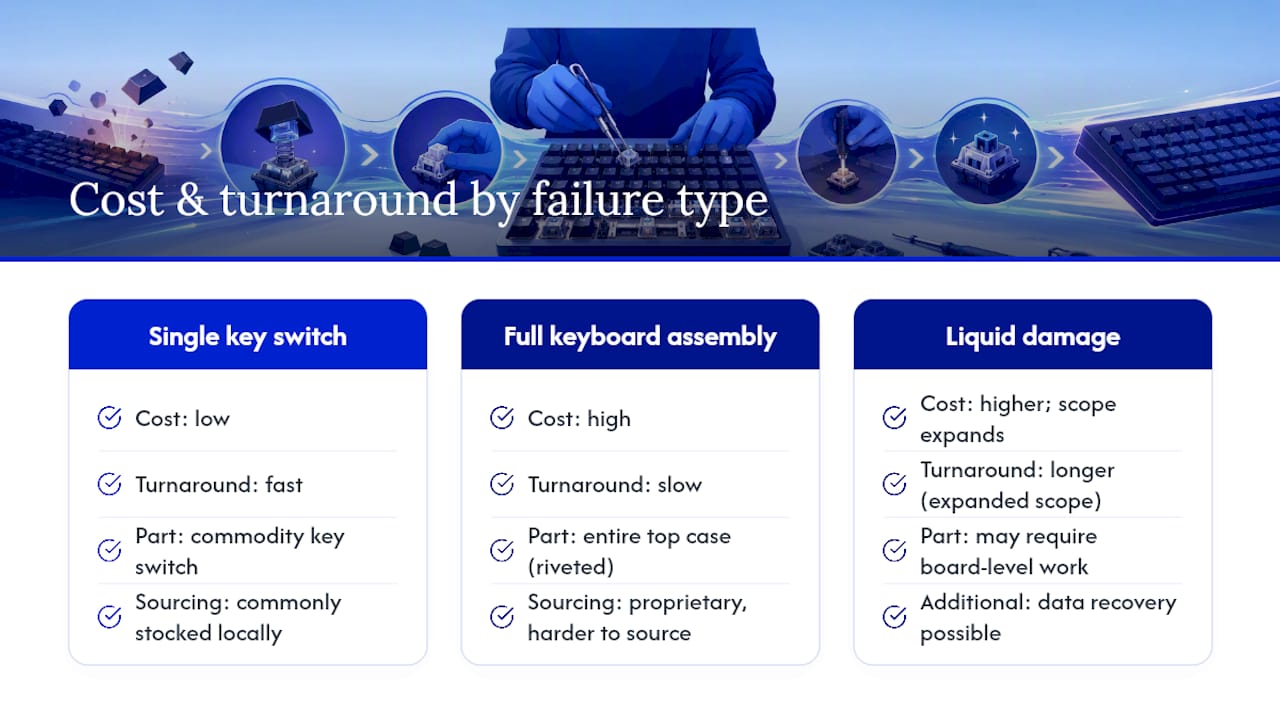
Cost and turnaround both hinge on one variable: what part failed and whether it’s a commodity item or something the shop has to source. A single key switch swap on a standard laptop runs cheap and fast. A full keyboard assembly on a riveted ultrabook runs slow and expensive, because the “part” is the entire top case.
Several things push those numbers around. Ultrabooks and gaming laptops often use proprietary keyboard assemblies that cost more and take longer to source than a mainstream business laptop’s part. If liquid reached the motherboard, the repair scope can expand well beyond the keyboard itself, adding data recovery or board-level work to the ticket. Shops that stock common parts locally beat mail-in wait times by days, sometimes weeks.
Repair fee structures vary by shop, too. Some publish flat, tiered pricing, similar to the class-based repair fees Pckeyboard lists for standard services, where you pay a set rate depending on the repair category rather than a line-item quote. Others bundle everything, part, labor, and return shipping, into one fixed price, a model UK-based Atlantis HC uses for laptop keyboard swaps. Neither approach is wrong, but you want to know which one you’re getting before you agree to anything.
Pro Tip: Always ask for a written estimate that separates the parts cost from the labor cost. If a shop only gives you one lump number, ask them to break it down. A part that costs $30 with $150 in labor tells you something different than a $150 part with $30 in labor, and it changes how you’d compare quotes between two shops.
What Happens During a Professional Keyboard Diagnostic and Repair
A repair that’s done right follows a predictable sequence, and knowing the steps helps you spot a shop that’s cutting corners.
- Intake and triage. The technician logs the symptoms you describe and does a quick visual inspection.
- Diagnostic. This is where the real work happens, and it’s often free or bundled into the repair fee if you proceed.
- Written estimate. You get a breakdown of parts and labor before any work starts.
- Parts ordering and repair. The technician sources the part if it’s not in stock, then performs the fix.
- Quality test. The keyboard gets tested under real use, not just a glance.
- Return and warranty registration. You get the device back with documented warranty terms.
During diagnosis, a competent technician runs continuity tests on individual key switches, inspects the ribbon cable for tears or loose connections, and checks for visible corrosion or signs that the failure has spread to the motherboard. This kind of hardware diagnostic process is what separates a shop that guesses from one that actually tests, and it’s the difference between paying for a $40 switch replacement and getting talked into a $200 assembly swap you didn’t need.
The trust signals worth confirming up front: a free or low-cost diagnostic, a warranty covering both parts and labor (30 days minimum, ideally longer), and technicians with documented repair experience rather than someone learning on your device.
How Do You Pick a Trustworthy Keyboard Repair Shop?
Ask these questions before you hand over your device, not after:
- Do you offer a free diagnostic or estimate before I commit to paying?
- Is the pricing itemized, showing parts and labor separately?
- What’s the warranty length, and does it cover both parts and labor?
- Are the replacement parts original manufacturer parts or equivalents?
- Can your technicians show certification or documented repair experience?
- What’s your policy on handling my data and personal files during the repair?
Watch for these warning signs. A shop that won’t give you a timeline, or gives you a vague one that keeps sliding, is a red flag. So is any shop that refuses to put an estimate in writing before starting work, or one that pressures you to approve “extra” repairs mid-job that weren’t in the original quote. If a shop dodges questions about how they handle your files and login credentials, that’s worth walking away from, especially for a laptop you use for work.
Shops that get this right tend to advertise it plainly. iFixNY, for example, publishes free quotes and a 30-day warranty right on its service page, which is exactly the kind of transparency you should expect elsewhere too.
Pro Tip: Before booking, check recent reviews for mentions of communication and surprise charges, not just “fast service.” Then ask the shop directly whether they can show a before-and-after example of a similar repair, or explain where their parts come from. A shop confident in its work will answer both without hesitation.
Repair or Replace: How to Decide
The math is simpler than it feels in the moment. If the estimated repair cost lands under roughly 40 to 50% of what a comparable replacement device costs, repair almost always makes financial sense, particularly when component-level fixes like a ribbon cable or switch swap can restore full function without touching anything else. Replace when the motherboard shows damage, when the part itself costs close to what a new device would, or when the laptop is already several years past its useful life.
A few other factors tip the scale:
- Urgency favors repair. If you need the device back today for work, same-day on-site service beats waiting on a replacement to ship and set up.
- Sentimental or configured value favors repair. A laptop set up exactly how you like it, or a mechanical keyboard you’ve customized, is worth fixing even at a slightly higher cost.
- End-of-life devices favor replacement. If the laptop is already slow, out of warranty, and showing other signs of age, sinking $200 into a keyboard on a machine with one foot out the door rarely pays off.
- Multiple simultaneous failures favor replacement. A dying battery plus a broken keyboard plus a cracked hinge adds up fast.
If you’re on the fence, a repair versus replace comparison built around total cost of ownership, not just the sticker price of the fix, usually makes the decision obvious.
Why On-Site Repair Solves the Problems Local Shops Can’t
The biggest hidden cost of a traditional repair shop isn’t the invoice, it’s the downtime. Drop your laptop off and you’re without it for one to three days minimum, plus the risk of transporting it in the first place. On-site repair eliminates both problems: the technician comes to you, tests the fix in the environment where you actually use the device, and hands it back the same day in most cases.
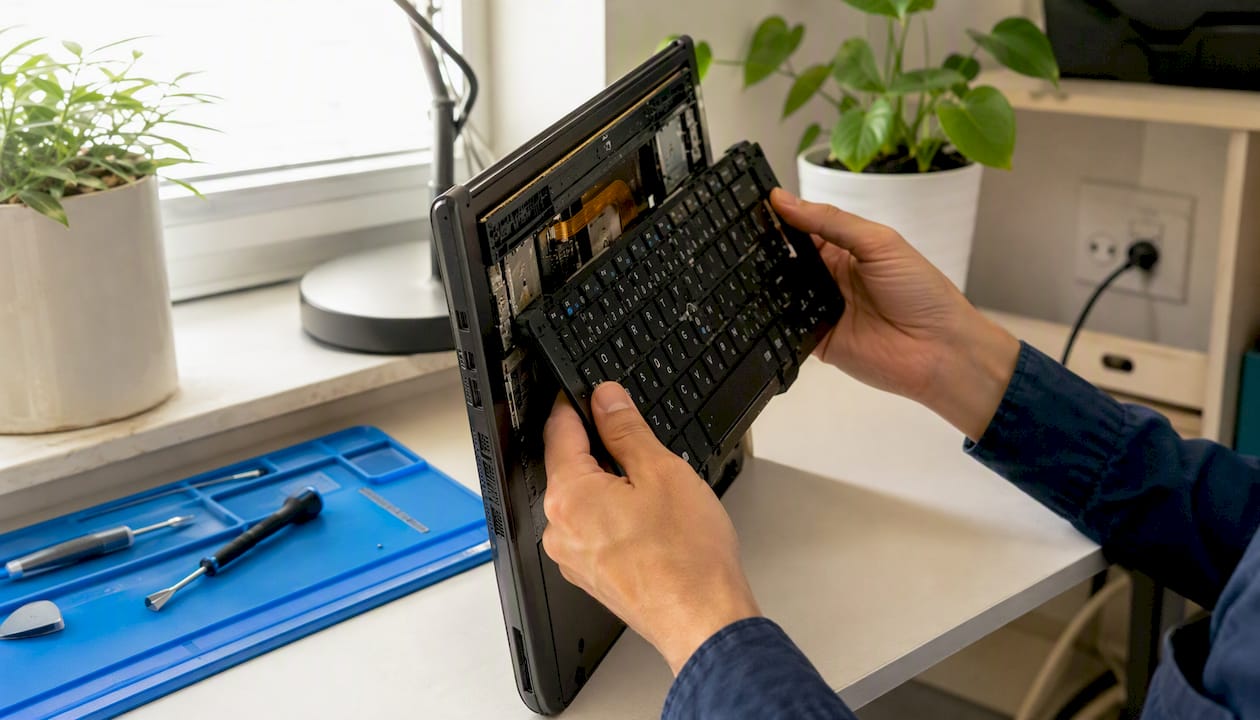
On-site service also cuts out shipping risk entirely, which matters more than people expect. A laptop that survives daily use just fine can get damaged in transit to a mail-in lab, and you have no way to verify handling once it leaves your hands.
Repair Genius runs this model specifically in Orlando and Winter Park, with technicians who come to your home or office, diagnose the keyboard issue on the spot, and quote a transparent price before any work starts. Every repair carries a warranty on parts and labor, and because the device never leaves your possession, your files, passwords, and personal data stay exactly where you left them.
Pro Tip: Before your on-site appointment, back up anything critical, clear a flat surface near an outlet, and have your laptop’s charger within reach. A five-minute setup on your end lets the technician start diagnosing the moment they walk in instead of hunting for a power source.
Choosing Between On-Site, Local, and Mail-In: My Take
I’d pick on-site repair for anything that affects daily use, a work laptop, a student’s primary machine, a small business owner’s only computer. The math is straightforward: losing a device for two or three days while it sits at a shop costs more in lost productivity than most keyboard repairs cost in the first place. Same-day, in-person service closes that gap entirely.
Where I’d make an exception is mechanical keyboards with uncommon PCBs. If you’ve built or bought a custom board and the part simply isn’t something a local technician stocks, a mail-in specialist is worth the wait. That’s a narrow case, though. Most people searching for a keyboard repair shop have a standard laptop with a stuck key or spill damage, and that’s squarely in on-site territory.
Whichever route you choose, verify the warranty and technician credentials before you agree to anything. A shop that hesitates to answer those two questions clearly is telling you something, whether it means to or not.
Book On-Site Keyboard Repair With Repair Genius
Repair Genius is the alternative to shipping your laptop off or losing it for days at a local counter: a certified technician comes to your home or office in Orlando or Winter Park and fixes the keyboard the same day, with the device never leaving your sight.

Every visit starts with a free diagnostic and a transparent, itemized quote covering parts and labor separately, so you know exactly what you’re paying for before any work begins. Repairs are backed by a warranty on both parts and labor, and technicians handle your device with data safety as a priority throughout, meaning your files and accounts stay secure while the repair happens right in front of you. To book, have your device model, a short description of the symptoms, and your preferred appointment window ready. Payment is accepted on completion with a clear invoice covering diagnostic, labor, and parts. If your keyboard is stuck, dead, or damaged, schedule a diagnostic through Repair Genius and get a technician out the same day.
Sources
- Computer Hope — Keyboard Troubleshooting and Repair
Recommended
- Headphone Repair: DIY Fixes and When to Call a Pro
- Top 3 Mobile iPad Repair Providers 2026
- Laptop Charging Port Repair Steps: DIY Guide
- Minimize Device Repair Disruption: A Pro’s Guide





