If your iPhone has stopped charging on its pad, the cause is usually something simple: the case, the alignment, the charger or a software hiccup. When none of those is it, the fault is inside the phone, in the charging coil, the back glass or the battery. That is a hardware repair, and in Orlando and Winter Park we do it on-site, wherever you are, so you don’t lose a day without your phone.
This guide gives you the checks that take ten minutes, the signs that point to hardware, and what to do next.
TL;DR
- Most wireless charging failures come from a thick or metal case, a misaligned phone, a non-certified charger, heat or a software glitch. Rule those out first.
- If wired charging works and wireless doesn’t on two different known-good pads, the fault is likely inside the phone.
- Stop testing at once if you see swelling, smoke, a burning smell or extreme heat.
- Cracked back glass, drops, liquid exposure and earlier repairs are common reasons wireless charging fails.
- We repair iPhones at your home, office or campus in Orlando and Winter Park, with the price quoted up front and a warranty on parts and labor.
Table of Contents
- How iPhone wireless charging works, in one minute
- Why your iPhone won’t charge wirelessly
- Ten-minute checks before you think about repair
- Signs the problem is hardware
- What a wireless charging repair involves
- Why on-site repair fits a busy schedule
- Get ready for the visit
- Cost: what shapes the price
- Our view: fix the phone, don’t work around it
- Book an on-site iPhone repair
- FAQ
- Sources
How iPhone wireless charging works, in one minute
Your iPhone has a coil behind the glass back. A charging pad has a matching coil. Power passes between them through the air, so the two coils need to sit close together and line up. Anything in the gap, or anything that makes the phone hot, weakens or stops the transfer.
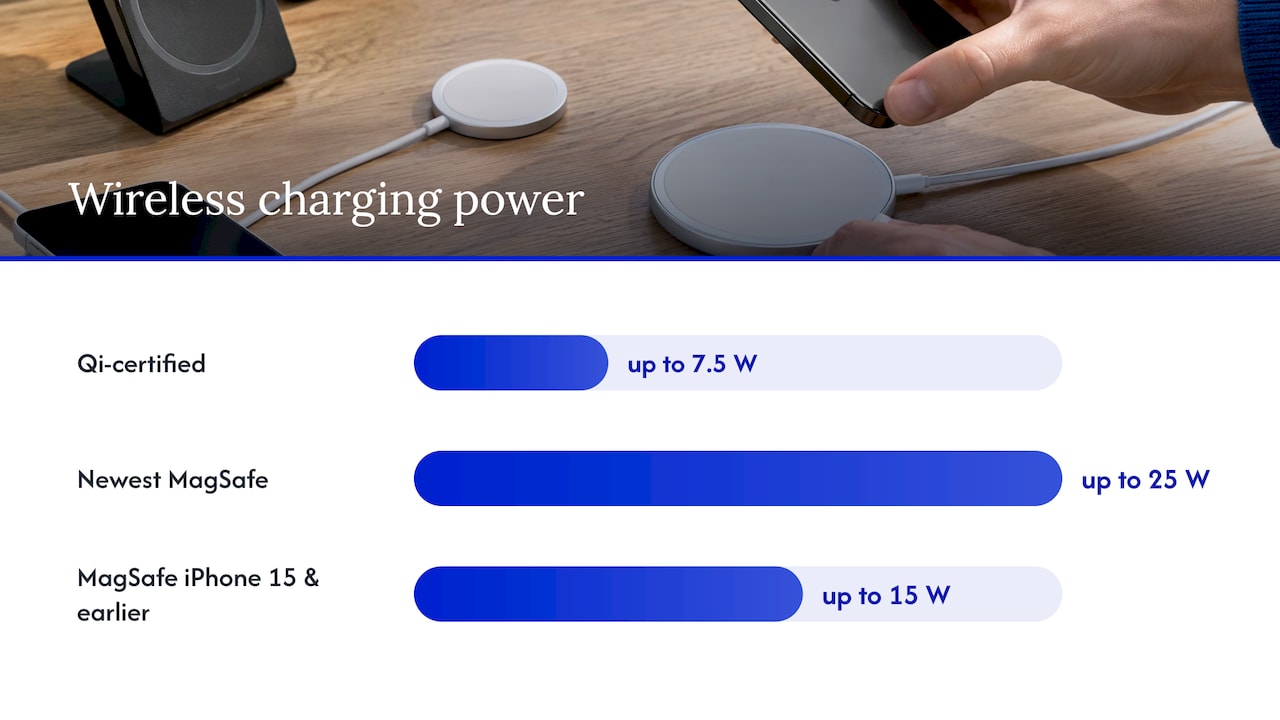
Apple says wireless charging requires an iPhone 8 or later, and that iPhones work with Qi-certified chargers. Qi (pronounced “chee”) is an open standard made by the Wireless Power Consortium. Many Qi-certified chargers charge an iPhone at up to 7.5 watts, according to the same page.
MagSafe is Apple’s magnetic version. Apple’s MagSafe page lists up to 25W for the newest models when paired with a strong enough USB-C adapter and a compatible MagSafe Charger, and up to 15W for iPhone 15 and earlier with a 20W-or-greater adapter. Two practical points follow:
- A weak wall adapter limits MagSafe speed, so “slow” is not always “broken.”
- Older iPhones, such as the iPhone 8 through iPhone 11, charge wirelessly at the slower Qi rate and have no magnets.
Why your iPhone won’t charge wirelessly
Anker’s troubleshooting guide lists the usual causes: coil misalignment, thick, metal or wallet-style cases, dust or debris, overheating, non-Qi-certified or low-wattage chargers, software glitches and outdated iOS, and hardware damage such as cracked back glass or a damaged coil.
That list splits into two groups.
Things around the phone
- The case is too thick or has a metal plate, a card or a magnet in it.
- The phone sits slightly off-center on a non-magnetic pad.
- The pad’s cable or power adapter is weak or faulty.
- The phone is hot from gaming, sun or a warm car. Thermal protection can pause wireless charging until it cools.
Things inside the phone
- A damaged or displaced charging coil.
- Cracked or poorly repaired back glass.
- A swollen or failing battery.
- Liquid damage.
The first group costs you nothing to fix. The second needs a technician. The checks below tell you which group you are in.
Ten-minute checks before you think about repair
Work through these in order and change one thing at a time. If you change three things at once and it works, you won’t know which one mattered.
- Take the case off. Thick cases and cases with metal plates, cards or magnets block charging. Test the bare phone.
- Center the phone, face up. Place it in the middle of the pad. On a non-magnetic pad, even a small offset can weaken or stop the connection, as Anker’s guide points out. Nudging the phone slowly until you hear or see the charging indicator often settles it.
- Check the power source. Plug the pad into a different outlet, with a different cable and a compatible adapter. Apple also says to plug the charger into power before placing the iPhone on it. If you placed the phone first, lift it off, wait three seconds and set it back.
- Clear the gap. Remove credit cards, badges, passports and key fobs from between the phone and the charger. Apple warns that magnets can damage magnetic strips and RFID chips. Wipe dust off the pad and the back of the phone.
- Let it cool. If the phone is warm, take it off the charger, move it out of the heat and try again in a few minutes.
- Unplug any cable. Disconnect any cable from the phone’s port before the wireless test.
- Force restart. iHome’s support article says an iOS glitch can disable wireless charging, and that a force restart can bring it back. Press Volume Up, then Volume Down, then hold the side button until the Apple logo appears.
- Look at Optimized Battery Charging. In Settings > Battery > Battery Health, this feature can limit charging beyond 80%, according to the same iHome article. A phone that stops at 80% may be working as designed.
- Update iOS. Install any pending update, then repeat the pad test.
- Try a second, known-good wireless charger. This is the decisive test. If the second pad works, the first pad was the problem. If neither works, the phone is the suspect.
What the results tell you
| What you see | Most likely cause | Next step |
|---|---|---|
| Works with the case off | Case blocking the signal | Switch to a thinner case |
| Works on pad B, not pad A | Faulty or non-certified pad | Replace the pad |
| Charges only after cooling | Heat protection | Move away from heat, remove heat-trapping case |
| Stops at 80% | Optimized Battery Charging | Leave it on or adjust in settings |
| Fails on two good pads, cable charging works | Coil, back glass or internal fault | Hardware repair |
| Fails on pads and by cable | Charging port, battery or board issue | Hardware repair |
Signs the problem is hardware
Wireless charging that will not start on two good, certified pads, with the case off and the phone cool, points to the phone itself. Other signs that make it more likely:
- A drop or a crack. Even a hairline crack in the back glass, or a drop that looked harmless, can shift the coil or break the connection behind the glass.
- Liquid exposure. Apple allows Qi charging after a liquid alert once the back of the phone is dry, but a phone that has been in liquid should not be assumed safe. If the alert keeps coming back after drying, it needs service. Never push a wet phone onto a pad.
- A recent repair. If wireless charging stopped after a back-glass or battery job, the coil or its connection may not have been seated correctly.
- Both wired and wireless fail. That suggests the battery, the charging circuitry or the port rather than the pad.
- Charging that stops repeatedly with no heat to explain it.
The iPhone 8 was the first model with wireless charging, so a phone that old may simply be showing its age. A battery that has lost capacity can also behave erratically on any charger.
Safety first: when to stop testing
Unplug the phone and stop if you notice any of these:
- A swollen battery, or a screen or back panel lifting away from the frame
- Smoke or a burning smell
- Extreme heat
- Repeated unexpected shutdowns
A swollen battery is a hazard. Do not keep charging it, do not press on it and do not try to open the phone yourself. Have a technician look at it the same day. Wireless charging is not a workaround for a damaged battery or a damaged phone.
What a wireless charging repair involves
On a modern iPhone, the wireless coil sits behind the glass back, close to the battery and the logic board. That means a proper repair usually starts with a diagnosis, because the same symptom can come from several places:
- The coil or its connection. The part that receives power is damaged, loose or disconnected.
- The back glass. If the glass is cracked or was fitted badly, the gap and the pressure on the coil change. Our guide to iPhone back glass cost and the 40% rule explains how that repair is priced.
- The battery. A worn or swollen battery can interrupt charging and needs replacing for safety, not just for convenience.
- The charging port or board. If cable charging is also flaky, the port or a board-level fault may be involved. Our safe checks for an iPhone that won’t charge cover the wired side.
This is not a job to try at home. The coil sits next to a lithium battery under adhesive, and a slip with a pry tool can puncture the cell or tear a flex cable. Describing the symptom precisely helps the technician: does it do nothing, show a repeated alert, or fail on only one pad? Tell us which cases, cables and adapters you tried. That is more useful than guessing that the battery needs replacing.
Why on-site repair fits a busy schedule
Most people who search for this are in the middle of a workday, a semester or a school run. The phone is still partly working, which makes the problem easy to put off, and then the battery runs flat at the wrong moment.
Our technicians come to your home, office, campus or any other spot you choose in Orlando and Winter Park. That has practical advantages:
- No trip and no waiting room. You keep working while the repair is done.
- Your data stays with you. The phone does not sit in a shop queue or leave your sight. Data safety is part of how we work.
- Same-day service. We offer same-day repair, so you are not without the phone for days.
- The price is quoted before work begins. You pay for diagnostics, labor and parts as quoted, with no hidden fees.
Our team has more than 10 years of experience, our technicians are certified, and we handle board-level repairs when the fault goes beyond a simple part swap. Parts and labor carry a warranty.
Get ready for the visit
A little preparation makes a repair quicker and safer for your information.
- Back up the phone. Do it before the technician arrives. If you need a hand with moving your address book, see how to transfer contacts before phone service.
- Turn off Find My. It can block repairs that involve the hardware. Follow our guide to turning off Find My before an iPhone repair.
- Write down what you tried. Case on or off, which pads, which cables, which adapters, and what the phone did.
- Note any history. A drop, liquid exposure or an earlier repair all matter to the diagnosis.
- Keep a clear spot to work. A table and good light are enough.
Cost: what shapes the price
We don’t publish a fixed price for wireless charging repair, because the right quote depends on what the diagnosis finds. These factors move it:
- Your model. Newer iPhones with magnet arrays and glass backs are different jobs from an iPhone 8.
- What is actually broken. A loose connection is a different job from a coil, a back glass or a battery.
- Related damage. A cracked back is often repaired at the same visit as the charging fault.
- Parts used. We use quality parts that come with a warranty.
You approve the quote before we start. Often a repair costs a fraction of replacing the phone, and replacing an iPhone just to get a working charging coil is rarely necessary.
Our view: fix the phone, don’t work around it
We hear the same story again and again. The phone sits on the pad, nothing happens, and the owner tries three chargers and two cases before calling us. Those checks are exactly the right start, and we would do the same first.
What changes our advice is the pattern. If the phone fails on more than one good pad, with the case off, cool, and updated, the fault is inside the phone. That is the moment to stop experimenting. Wireless charging sits right next to the battery, and a swollen cell, a cracked back or water behind the glass are not things to leave for another week.
Our approach is built around your day. A certified technician comes to you in Orlando or Winter Park, looks at the phone in front of you, explains what is wrong and quotes the price before touching a screwdriver. Your data stays in your hands, and the repair carries a warranty on parts and labor. That is why a coil, a back glass or a battery job can be done at your kitchen table or your desk, usually the same day.
If your phone has stopped charging wirelessly and the simple checks haven’t brought it back, book the repair rather than buying another pad.
Michael
Book an on-site iPhone repair
If the checks above point to the phone, our iPhone repair services cover back glass, battery, charging port, camera and screen work, performed where you are in Orlando and Winter Park. Tell us the model, what you tried and what the phone does, and we will quote the repair before we start.

Other devices in the house can be seen on the same visit: iPad and tablet repair and Samsung and Android repair are available too.
FAQ
Can any iPhone charge wirelessly?
No. Apple says you need an iPhone 8 or later. The iPhone 12 series and newer add MagSafe magnets, while the iPhone 8 through 11 use standard Qi only. If your phone is an iPhone 7 or older, it has no wireless charging coil.
Why does my iPhone stop wireless charging at 80%?
Optimized Battery Charging can limit charging beyond 80% to protect battery health, as the iHome support article explains. You can review it in Settings > Battery > Battery Health. If the phone stops well below 80%, or stops repeatedly with no heat involved, the battery or coil may need a technician’s look.
Is it safe to keep using a wireless charger on a phone that gets hot?
A little warmth is normal, but extreme heat is not. Take the phone off the pad, let it cool and move it away from sun or heat. If it heats up again quickly, swells, smells burnt or shuts down repeatedly, unplug it and have it repaired before charging again.
Do I need to remove my case for wireless charging?
Thick cases and cases with metal plates, cards or magnets block the signal, so test with the case off. If it charges bare but not in the case, the case is the problem. If it fails both ways on two good pads, the phone needs a hardware check.
Sources
- How to wirelessly charge your iPhone, Apple Support
- How to use your MagSafe Charger with iPhone, Apple Support
- iPhone Wireless Charging Not Working: Causes & Fixes, Anker
- Why is my iPhone not charging wirelessly? iHome support
Recommended
- Fix Slow Phone Charging Fast: 30W+ Charger, 15 Minute Test, When to Repair
- iPhone Not Charging? 8 Safe Checks Before Calling a Pro
- iPhone Overheating? Technician Approved Fixes in Under 5 Minutes