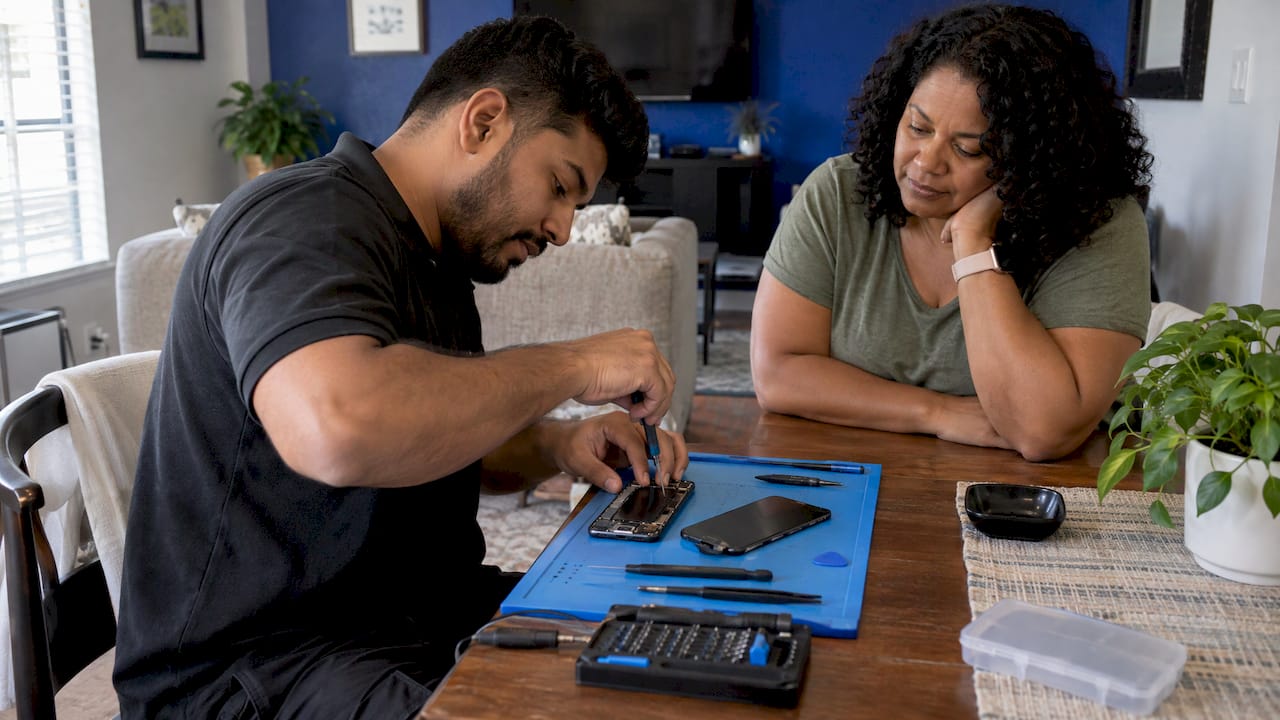
For most people in Orlando and Winter Park, on-site mobile repair is the better choice for a cracked screen, a dying battery or a laptop that won’t behave. The technician comes to your home, office or campus, and you skip the drive, the wait and the hours without your device. A store still gets compared for price and warranty, so this guide sets the two side by side on the things that decide it: time, cost, data safety, parts and warranty, and whether to repair at all.
TL;DR
- On-site repair saves the trip, the wait and the day without your device. At Repair Genius, same-day service is standard in Orlando and Winter Park.
- Common repairs such as screens, batteries and charging ports are routine jobs. Board-level work is also something we do on-site.
- Your data stays under your eyes. You watch the repair and can switch on a privacy mode first if your phone has one.
- Before you book anyone, ask for a written quote, the part type and the warranty terms for parts and labor.
- Repair usually beats replacement when the fix costs a fraction of what the device is worth.
Table of Contents
- What actually differs between mobile repair and a store
- Time: the biggest difference
- Cost: what you really compare
- What can be fixed on-site
- Data safety: who sees your phone
- Parts and warranty: the questions to ask any provider
- Repair or replace: do the math first
- Should you fix it yourself?
- How to choose in two minutes
- Promo: repair that comes to you
- Our perspective
- FAQ
- Sources
What actually differs between mobile repair and a store
The repair itself is the same job. A screen is a screen and a battery is a battery. What changes is everything around it.
In a store, you carry the device in, usually wait in line or leave it, then come back. Apple’s own on-site option shows how much people value skipping that step: Apple began offering at-home iPhone screen repairs through an authorized provider in six US cities in 2020, with a possible visit fee on top of the repair price. When the manufacturer itself offers the convenience, it is clearly not a gimmick.
With on-site repair, the technician arrives with the parts and tools for your device, does the work where you are and tests it before leaving. You keep working, studying or parenting while it happens.
Here is the comparison in one table.
| On-site mobile repair | Repair store | |
|---|---|---|
| Your time | A short appointment where you already are | Travel, parking, waiting, a return trip |
| Device out of your hands | No | Often for hours or days |
| Data | You can watch the work | Device sits at the counter or back bench |
| Quote | Given up front, before work starts | Varies by store |
| Best for | Screens, batteries, charging ports, water damage, software, virus removal, data recovery | Walk-ins when you are already nearby |
If you want the same comparison for desktops and laptops specifically, we cover it in our guide to on-site computer repair vs a repair shop.
Time: the biggest difference
Most people who search this question are really asking how much of their day a repair will take.
A store visit has at least two legs: dropping off and picking up. Even a fast shop turns a 45-minute repair into an afternoon once travel and queueing are added. If the shop has to order a part, you make a third trip.
Independent repair networks advertise quick turnaround too. Google says that at its partner repair locations most Pixel repairs are returned within 2 to 4 hours when parts are available. That is the shop side at its best, and it still means your phone is gone for half a day.
On-site service removes the logistics. We offer same-day service across Orlando and Winter Park, and the repair happens at the location you choose. For different readers that looks like this:
- Busy professionals: the repair happens in your office or home while you take calls.
- Students: a dead screen before an exam gets handled at your dorm or apartment instead of costing you a trip across town.
- Small business owners: a broken laptop or tablet is fixed at your workplace, so the team keeps moving.
- Parents: you don’t pack the kids into the car for a 30-minute repair.
For a closer look at how the at-home model works, read our explainer on mobile repair service near you.
Cost: what you really compare
Price comparisons go wrong when people compare a headline number and ignore what it leaves out. Compare the whole cost: the repair, the diagnosis, taxes and the cost of your time.
Some real reference points help. According to Wirecutter, without insurance, a cracked iPhone screen at an Apple Store costs from $129 for an iPhone 6 up to $379 for an iPhone 15 Pro Max, while third-party quotes ran from a couple hundred dollars to about $450 depending on the model. With AppleCare+ or Samsung Care+, the same screen repair costs $29, though the plans themselves cost $79 to $199 for two years in Wirecutter’s figures.
Two points follow from this:
- Screen repair prices depend on the model far more than on where the work is done. A newer, larger phone costs more at every provider.
- If you carry a manufacturer protection plan, check what it covers before booking anything. If you don’t, the price you pay should be quoted up front and itemized.
We don’t publish a price list, because the cost depends on your exact device and the problem. What we do is quote the cost before work starts: diagnostics, labor and parts, with no hidden fees. Because you are not paying for a lost afternoon of travel and waiting, the real cost of an on-site visit is often lower than the shelf price of a repair that takes your whole day.
On a tight budget? Our guide to phone repair on a limited budget shows which fixes last and which are worth doing first.
What can be fixed on-site
The repairs people book most often are ones that a skilled technician can complete on the spot:
- Cracked or unresponsive screens on iPhones, Samsung, Google Pixel and other Android phones
- Battery replacement for phones, tablets and laptops
- Charging port repair
- Back glass and camera repair on iPhones
- Water damage recovery
- Virus and malware removal, software troubleshooting
- Data recovery and backup
- Hardware upgrades on laptops, MacBooks, iMacs and Windows computers
- Network and internet issues, plus on-site support for small business devices
We also handle advanced board-level repairs, performed by certified technicians. If your problem is deeper than a part swap, the first step is still the same: a diagnosis, then a clear quote.
You can see the full list by device on our pages for iPhone repair, Samsung and Android repair, iPad and tablet repair, MacBook and iMac repair and computer repair.
Data safety: who sees your phone
People search “can phone repair shops go through your phone?” for a reason. Your phone holds messages, banking apps, photos and work email. Handing it over means trusting a stranger with all of it for as long as it is out of your sight.
On-site repair changes that situation. The device stays with you, in your space, and the work happens in front of you. Data security is a core part of how we work, and keeping your information protected throughout the repair is the point of the service.
You can add your own layers before any repair, whoever does it:
- Turn on a repair or maintenance mode if your phone has one. Google says its Pixel Repair Mode protects personal data during repairs without backing up, wiping and restoring: you turn it on before the technician starts and off when the device is returned.
- Back up first. A current backup means a repair problem never becomes a data problem. If you use Apple devices, our guide on encrypting local backups and using iCloud daily walks through it.
- Move your contacts. If your phone has to be out of service for any reason, see how to transfer contacts before phone service.
- Know your passcode and sign-ins. Have your passcode ready for the technician to test the device, and do not share account passwords.
If the problem is lost files rather than a broken part, see our page on data recovery in Orlando.
Parts and warranty: the questions to ask any provider
Whoever you choose, a few questions separate a good repair from a headache. Ask them before you agree to anything:
- What kind of part is it? Original manufacturer, an equivalent grade or aftermarket. The answer affects look, touch response and sometimes battery behavior.
- Does the quote include everything? Diagnosis, parts, labor and tax. You want one figure, in writing.
- What does the warranty cover? Parts, labor or both, how long it lasts and what it excludes.
- What happens if the new part fails? You should know the process before you need it.
- Who does the work? Ask about technician training or certification.
Our repairs come with a warranty on parts and labor, and our technicians are certified. We state the quote before starting so there are no surprises when the job is done.
Manufacturers have their own rules, so it also pays to know what your device’s maker covers. Read the warranty and repair policies of any brand you own to see how repairs may interact with its coverage. For a phone from Apple, our guide to the Apple repair specialist route explains what certified service means in practice.
If you are screening any provider, store or mobile, our list of common smartphone repair red flags shows what to watch for: vague quotes, no written warranty and pressure to approve extra work.
Repair or replace: do the math first
Before choosing who repairs the device, decide whether it should be repaired. Two rules of thumb are widely used.
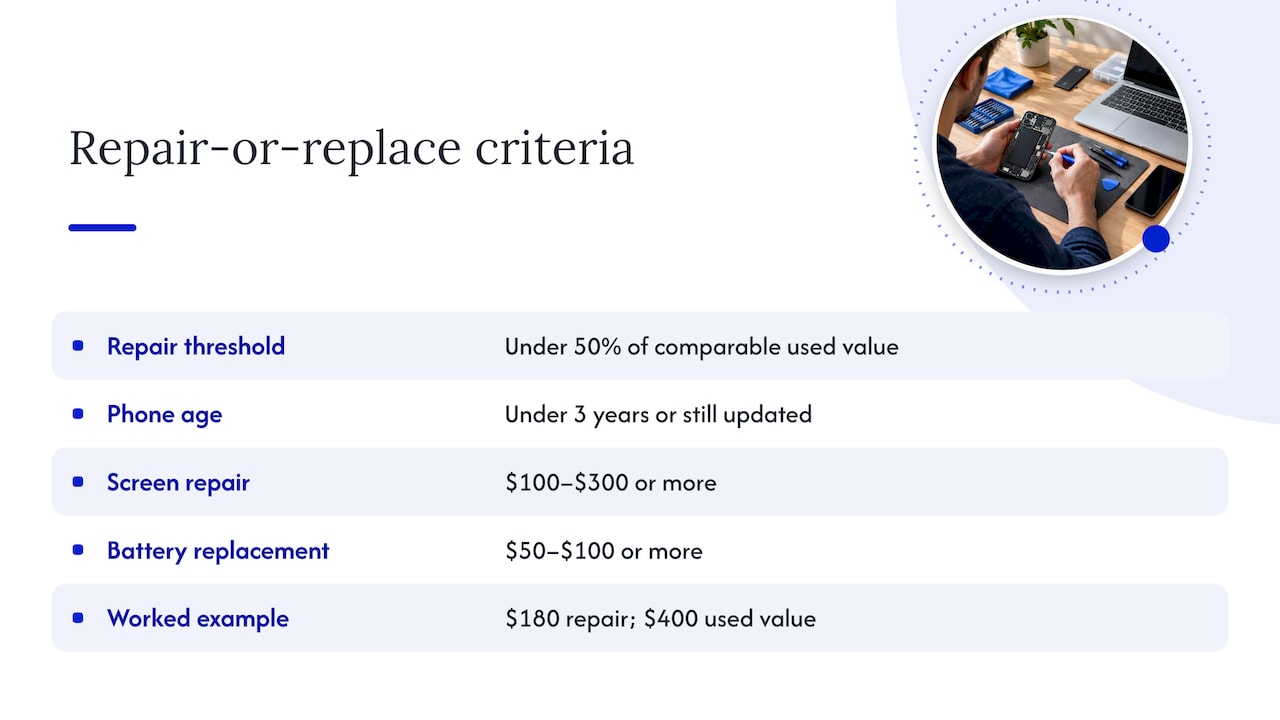
The 50% rule. Swappa’s guide says repair is usually the smarter move when it costs less than half of a comparable used replacement. A $60 battery swap on a $300 used phone is a repair. A $250 screen job on that same phone is a replacement.
The age and update check. T-Mobile’s guide says repair makes sense when the phone is under three years old or still getting software and security updates, the issue is minor (cracked screen, dead battery, charging port, camera lens) and the fix costs well under the phone’s current market value. It puts screen repairs at $100 to $300 or more and battery replacements at $50 to $100 or more.
A worked example: your two-year-old phone is worth about $400 used, and the screen quote is $180. That is under half its value, the phone still gets updates and the damage is isolated. Repair it. The same logic applies to a laptop with a worn battery: a fresh battery on a machine that still runs well costs far less than a new laptop.
We lay out the full decision in our phone repair vs replacement cost guide. Because we repair devices at a fraction of replacement cost in many cases, diagnosing first costs you little and tells you which side of the line you are on.
Should you fix it yourself?
Do-it-yourself kits exist, and manufacturers now sell parts to consumers. Wirecutter’s Roderick Scott still concludes that most people should take damaged devices to a professional, because there is very little room for error with precision tools and heat, and one wrong move can ruin the phone. If you want a professional but don’t want to go anywhere, that is exactly the gap on-site service fills. Our piece on at-home phone repair options goes through it.
How to choose in two minutes
Pick on-site repair if any of these is true:
- You can’t be without your phone or laptop for half a day.
- You are in Orlando or Winter Park and want same-day service.
- You want to watch your device being repaired.
- You need several devices fixed at once, such as a family’s phones or a small office’s laptops.
- You want a written quote before anything happens.
If the issue is a simple, common fix, the on-site route will almost always be faster than any other option. If it is complicated, the first step is the same: a diagnosis, and a plain answer on what the repair needs.
Promo: repair that comes to you
We bring certified technicians to your home, office or campus in Orlando and Winter Park for phones, tablets, laptops, MacBooks and iMacs. You get a quote up front, a warranty on parts and labor and a repair built around keeping your data secure. Start with the page for your device: iPhone repair, Samsung and Android repair or computer repair. Or head to Repair Genius to book.

For an Apple phone in the area, see iPhone repair in Orlando and Winter Park.
Our perspective
We have been repairing devices for over ten years, and the biggest thing we hear is not “how cheap is it?” but “how long will I be without my phone?” That is why we built the service around coming to you.
Our view is simple. A repair should cost you as little time as possible, and it should never cost you your privacy. When the technician works in front of you, there is nothing to wonder about: you see what is replaced and you keep your device in sight.
We quote before we start, we use quality parts, our work is backed by a warranty on parts and labor, and we handle everything from a cracked screen to board-level repairs. For most people in Orlando and Winter Park, that makes on-site repair the first thing to try.
Michael
FAQ
Is mobile repair more expensive than going to a store?
Prices for the same repair depend mostly on the device model and the part, not the location. What changes is the hidden cost of a store visit: travel, waiting and time without your device. We quote the full price before work begins, with no hidden fees.
Can a technician go through my phone during a repair?
You can protect yourself in several ways. Back up first, switch on a repair mode if your phone offers one, and keep the device in sight. With on-site repair you watch the work, and data security is a priority in how we handle every job.
Is it better to fix my phone or get a new one?
It depends on cost and age. A common rule says repair when the fix costs less than half of a comparable used phone’s value and the device still gets software updates. A diagnosis gives you a firm number to check against that rule.
What warranty should I expect on a repair?
Ask for it in writing, with the duration, what it covers (parts, labor or both) and what it excludes. Our repairs include a warranty on parts and labor, and we explain the terms before the work starts.
Sources
- Wirecutter: You Can Now Fix Your Smartphone at Home. But You Probably Shouldn’t
- The Verge: Apple now offers iPhone repairs at home
- Google: More ways to repair Pixel phones
- Swappa: Repair vs Replace
- T-Mobile: Should I Repair or Replace My Phone?
Recommended
- On-Site Computer Repair vs Repair Shop
- Mobile Repair Service Near Me
- Laptop Repair Before Replacement Checklist 2026
- Repair vs Replace Student Laptop: 2026 Guide