

T-Mobile’s consumer guidance and Helpertech’s 50% rule both converge on the same threshold logic: compare the repair quote to the phone’s realistic used-market value, not the original retail price you paid. A $1,200 phone you bought two years ago might sell today for $400. That changes everything.
One important exception: if your phone holds irreplaceable data, you’re covered by insurance, or the device has a safety issue (a swollen battery, for instance), the math takes a back seat. Address those first.
Key Takeaways
| Point | Details |
|---|---|
| The core percentage rule | Under 20% of market value: repair. Over 50%: replace. 20–50%: run the full formula. |
| Use realistic market value | Check Swappa and eBay completed listings; use the lower of two source medians, not retail price. |
| Get written quotes | Ask for itemized quotes covering parts, labor, taxes, warranty, and part sourcing before committing. |
| Check insurance first | A deductible may be lower than the repair quote; always verify AppleCare or carrier coverage. |
| Repair Genius option | On-site same-day repairs in Orlando and Winter Park with transparent pricing and warranty on every job. |
Where to check prices, trade-in values, and repair costs
When pulling values from any of these sources, always specify your phone’s exact model, storage size, and carrier lock status. A 128GB unlocked iPhone 14 and a 256GB carrier-locked one can differ by $40–$60 in trade-in value, which shifts your repair percentage calculation meaningfully.
Table of Contents
- How the rule applies to common situations
- How to calculate whether repair is worth it (4-step formula)
- Where to find your phone’s current market value
- What goes into a repair quote (and what typical U.S. repairs cost)
- Should you repair before you trade in or sell privately?
- How to get trustworthy repair quotes and what to ask
- When on-site repair with Repair Genius is your best option
- A short checklist to reach your decision right now
- The repair vs. replace call is rarely as obvious as it looks
- Repair Genius brings the fix to your door in Orlando and Winter Park
- Sources
How the rule applies to common situations
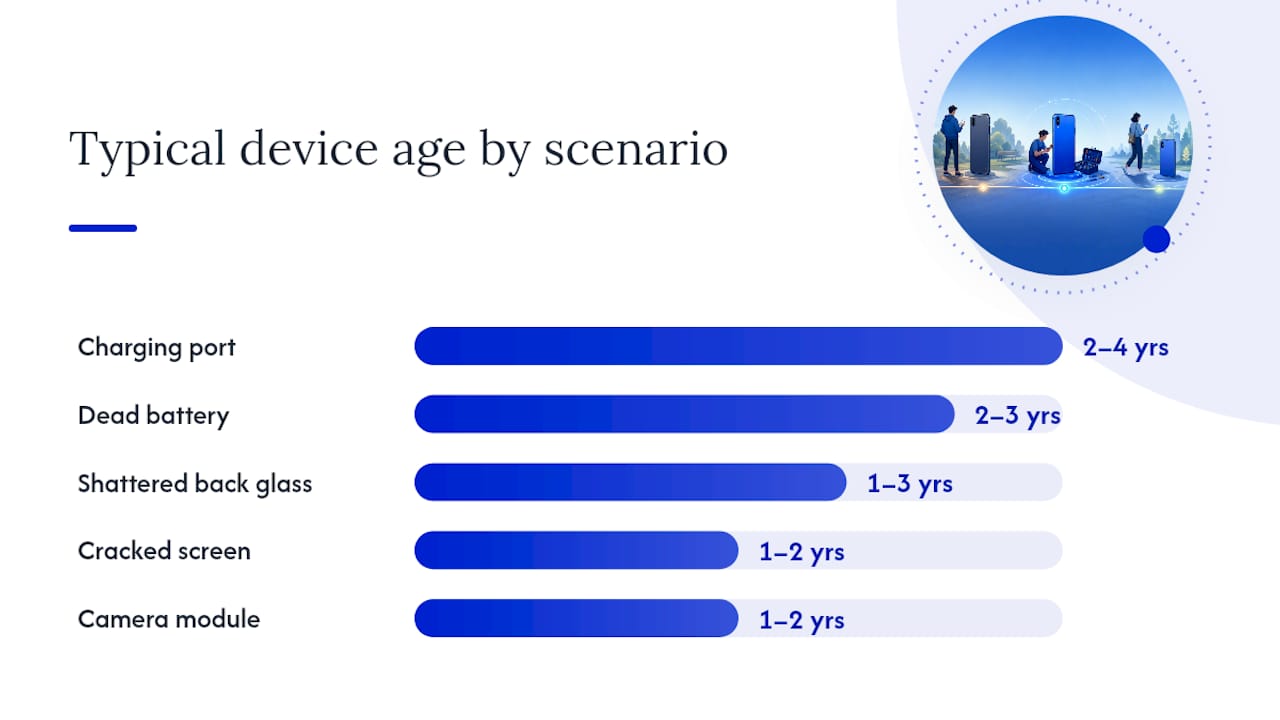
Most people already have a gut sense of their situation. This grid maps the most common scenarios to a quick verdict so you can see where you land before running the full calculation.
| Scenario | Device Age | Damage Type | Quick Verdict |
|---|---|---|---|
| Cracked screen, phone works fine | 1–2 years | Screen only | Repair — usually well under the 20% threshold |
| Dead battery, otherwise good | 2–3 years | Battery | Repair — battery swaps are low-cost, high-value fixes |
| Cracked screen + old model | 4+ years | Screen | Evaluate — check OS support remaining before committing |
| Water damage, phone won’t boot | Any | Board/water | Diagnostic first — cost is unpredictable; data recovery may be the real goal |
| Shattered back glass, phone works | 1–3 years | Cosmetic | Optional — low urgency; repair only if resale matters to you |
| Charging port failure | 2–4 years | Port | Usually repair — ports are predictable and affordable |
| Multiple failures at once | 3+ years | Mixed | Replace — cascading issues rarely stop at one fix |
| Camera module cracked | 1–2 years | Camera | Repair if camera is critical to you; skip if you can live without it |
Urgency changes the math. If you need a working phone today for work or travel, the cost of being without one is real. Sentimental value, a device loaded with unsynced photos, or a phone that’s the only one on a family plan all shift the calculus toward repair even when the numbers are borderline. Insurance coverage shifts it the other way: if your deductible is $99 and the repair quote is $180, the insurance route wins.
How to calculate whether repair is worth it (4-step formula)
This is the part most people skip, and it’s the part that actually settles the question. The Phone Repair And More calculator uses the same four inputs you can pull together in about ten minutes.
The four inputs you need
- Realistic market value — what a comparable used phone in similar condition actually sells for today (not what you paid, not what Apple lists as trade-in).
- Full repair quote — parts, labor, taxes, any diagnostic fee, and shipping if applicable. Get this in writing.
- Expected remaining months of useful life — how long you’d realistically keep the phone after repair, accounting for OS support end dates.
- Insurance or warranty offset — your deductible if covered, or $0 if you’re paying out of pocket.
The 4-step formula
- Repair % of market value = (Full repair quote ÷ Market value) × 100
- Net repair cost = Full repair quote minus any insurance offset
- Monthly cost of repair = Net repair cost ÷ Expected remaining months
- Compare to the cost per month of a replacement (replacement price ÷ months you’d keep it)
Threshold guidance:
- Under 20%: repair without much deliberation
- 20–50%: weigh device age, OS support, and whether other failures are likely
- Over 50%: replacement usually wins financially
Worked example
You have a Samsung Galaxy S22 with a cracked screen. You check Swappa and eBay completed listings and find comparable units selling for $280–$320. You use $280 as your conservative estimate.
A local shop quotes $130 for a screen replacement, including parts, labor, and tax.
- Repair % = ($130 ÷ $280) × 100
- The phone is 2.5 years old; Samsung supports it through Android updates until 2026, giving you roughly 12–18 months of supported life.
- No insurance applies.
- Monthly repair cost = $130 ÷ 15 months
- A refurbished replacement would cost roughly $320, giving $320 ÷ 15 months
But the monthly cost comparison makes repair the clear winner here: $8.67 vs. $21.33. Repair it.
Pro Tip: Always use the lower end of the price range you find across sources. If Swappa shows $280–$320, use $280. A conservative market value makes the repair % look worse, not better, which means if repair still passes the test at the low number, you can trust the decision.
Where to find your phone’s current market value
The single most common mistake people make when they evaluate phone repair cost is comparing the repair quote to the original retail price. That number is irrelevant. What matters is what someone would pay for your phone today, in its current condition.
| Source | What It Shows | How to Use It |
|---|---|---|
| Swappa | Active listings for used phones by model, carrier, storage | Filter by condition; note the median asking price |
| eBay completed listings | Real sold prices (not asking prices) | Search model + storage, filter “Sold Items” — this is the most accurate signal |
| SellCell | Trade-in offers from multiple buyers | Use as a floor; private sale will usually beat this |
| Gazelle | Trade-in quotes by condition | Quick reference; tends to be conservative |
| Apple Trade In | Apple’s offer for your specific model | Convenient but often lower than private sale |
| Carrier trade-in tools | Carrier-specific offers (AT&T, Verizon, T-Mobile) | Useful if you’re upgrading on contract; compare to SellCell first |
To get a reliable number, check at least two sources and take the lower of the two medians. Adjust for your phone’s condition: “good” condition typically means no cracks, minor scratches; “fair” means visible wear or minor screen damage; “broken” means the device doesn’t fully function.
Pro Tip: On eBay, always filter for “Sold” listings, not active ones. Sellers list phones at optimistic prices. Completed sales show what buyers actually paid.
What goes into a repair quote (and what typical U.S. repairs cost)
A quote that just says “$150 — screen repair” is not a complete quote. Before you can properly assess phone damage repair worth, you need to know what you’re actually paying for.
A complete quote should break out: the diagnostic fee (sometimes waived if you proceed), parts cost, labor, applicable taxes, and any shipping if the device is being mailed. For water-damaged or board-level issues, expect a note about potential discovery work: the technician may open the device and find additional damage that changes the price.
Typical U.S. price ranges by damage type:
| Damage Type | Typical U.S. Price Range | Predictability |
|---|---|---|
| Screen replacement (mid-range Android) | $80–$180 | High |
| Screen replacement (iPhone 14/15 series) | $150–$280 | High |
| Battery replacement | $50–$100 | High |
| Rear glass (cosmetic) | $60–$150 | Moderate |
| Charging port | $60–$120 | High |
| Camera module | $80–$200 | Moderate |
| Water damage / board-level repair | $100–$400+ | Low — always diagnostic first |
| Data recovery (failed device) | $100–$500+ | Very low — depends on damage severity |
Screen, battery, and charging-port repairs have predictable costs and clear outcomes. Motherboard and liquid-damage repairs are a different story: the price can shift significantly once a technician opens the device and assesses the full extent of corrosion or component failure. Never commit to a water-damage repair without a written diagnostic estimate first.
Warning: If a shop gives you a firm price on water damage without opening the device, treat that quote with skepticism. Corrosion spreads in ways that aren’t visible externally.
Should you repair before you trade in or sell privately?
The short answer: sometimes, but less often than you’d think. SellCell’s analysis documents cases where owners spent more on repairs than they gained at resale, ending up with a net loss after the fix.
The math that matters here is the value uplift vs. repair cost. If a screen repair costs $130 and raises your private-sale price from $180 to $280, you net $100 more after repair costs. That’s worth doing. If the same repair raises your trade-in offer from $80 to $120, you’ve spent $130 to gain $40. That’s not.
Private sale consistently returns more than trade-in, but it takes more effort: listing, photos, meeting buyers, negotiating. Trade-in is faster and guaranteed. The right choice depends on how much your time is worth and how urgently you need the money.
A few clear rules:
- Repair before private sale when the fix is cosmetic or functional, the cost is low, and the value uplift clearly exceeds the repair cost. Battery replacements and minor screen fixes often qualify.
- Skip repair before trade-in unless the carrier or buyer explicitly grades up for a specific fix. Most trade-in programs grade on overall condition, and a repaired screen on a 4-year-old phone rarely moves the needle enough to justify the cost.
- Never repair before selling if the device has board-level or water damage. The repair cost is unpredictable, and buyers of damaged devices already price that in.
For a deeper look at how specific repairs affect resale prices, this breakdown of repair impact on device value is worth reading before you decide.
How to get trustworthy repair quotes and what to ask
Getting two written quotes takes an extra hour. It can save you $80 or prevent a botched repair that voids your remaining warranty. Here’s what to ask every shop before you hand over your phone.
Questions to ask:
- Can you provide an itemized written quote covering parts, labor, and taxes?
- Are the replacement parts OEM, OEM-compatible aftermarket, or used/refurbished? Apple now permits used genuine parts for certain iPhone repairs, which changes the pricing landscape and what “genuine parts” means.
- What warranty do you offer on parts and labor, and what does it cover?
- Is the diagnostic fee refundable if I decide not to proceed?
- What’s the realistic turnaround time?
- How do you handle data security during the repair?
Red flags to watch for:
- Demands for your passcode without a clear, explained reason
- No written warranty offered, or warranty terms that are vague
- Ambiguous answers about part sourcing (“we use quality parts” without specifics)
- Pressure to approve additional repairs on the spot without a revised written quote
- Quotes that are dramatically lower than competitors with no explanation
Pro Tip: Before dropping off your phone, photograph the existing damage from multiple angles. This protects you if the shop claims damage that was already there, and it gives you a record if a dispute arises. Also check common repair red flags before you commit to any shop.
For context on what can go wrong when vetting is skipped, this guide on why device repairs fail covers the most common technician and customer mistakes.
When on-site repair with Repair Genius is your best option
Some repairs are straightforward enough that any certified shop will do. Others are situations where who handles your phone and how they handle it matters a great deal.
Repair Genius is built specifically for the cases where convenience, speed, and data security aren’t negotiable. Their technicians come to your location in Orlando and Winter Park, which means your phone never leaves your sight during the repair. For anyone with sensitive personal or professional data on their device, that’s not a small thing.
Here’s how Repair Genius maps to the vetting checklist above:
- Written, itemized quotes with transparent pricing and no hidden fees
- Warranty on parts and labor on every repair
- Certified technicians with over 10 years of experience handling iPhones, Samsung, Google Pixel, and other Android devices
- Data-safety practices built into every on-site visit
- Same-day availability for urgent repairs
The on-site model is particularly well-suited to three situations: you need the phone repaired today, you can’t afford to be without it while it sits at a shop, or the device holds data you’re not comfortable handing over to a storefront. For screen replacements, battery swaps, charging port repairs, and water-damage diagnostics, Repair Genius handles all of it at your door.
A short checklist to reach your decision right now
Run through these steps in order. Most people have a clear answer by step four.
- Back up your data if the phone still powers on. Do this before anything else.
- Document the damage with photos from multiple angles.
- Look up market value on at least two sources (Swappa and eBay completed listings are the fastest). Use the lower number.
- Get two written repair quotes that include parts, labor, taxes, and warranty terms.
- Run the 4-step formula: repair % of market value, net repair cost, monthly cost comparison.
- Check your insurance or warranty — AppleCare, carrier insurance, or a credit card purchase protection policy may cover part or all of the repair.
- Apply the threshold: under 20% repair, over 50% replace, 20–50% weigh device age and OS support.
Your fill-in-the-blank verdict: "My phone’s market value is $. The repair quote is $. That’s ___%. My device has roughly ___ months of supported life left. My decision is: [repair / replace / data recovery first]."
Copy that into your notes. It takes two minutes and gives you something concrete to compare against any quote you receive.

The repair vs. replace call is rarely as obvious as it looks
Battery-only fixes are almost always worth doing, full stop. A $70–$90 battery replacement on a phone that otherwise works well can add 18–24 months of useful life. That’s a cost-per-month figure that almost no replacement can match.
Water and board-level damage is where I’d urge the most caution. The repair cost is genuinely unpredictable, and a device that’s been submerged once is statistically more likely to have corrosion-related failures later, even after a successful repair. If the data is the priority, pay for data recovery and then replace the device. If the device itself is the priority and it’s a high-value phone, get a diagnostic first before committing to anything.
Environmental and sentimental factors are real, and I won’t pretend they shouldn’t count. A phone loaded with unsynced photos of a family member who has passed, or a device that’s the only one a child uses for school, carries value the formula can’t capture. Those cases justify repair above what the math alone would suggest.
Repair Genius brings the fix to your door in Orlando and Winter Park

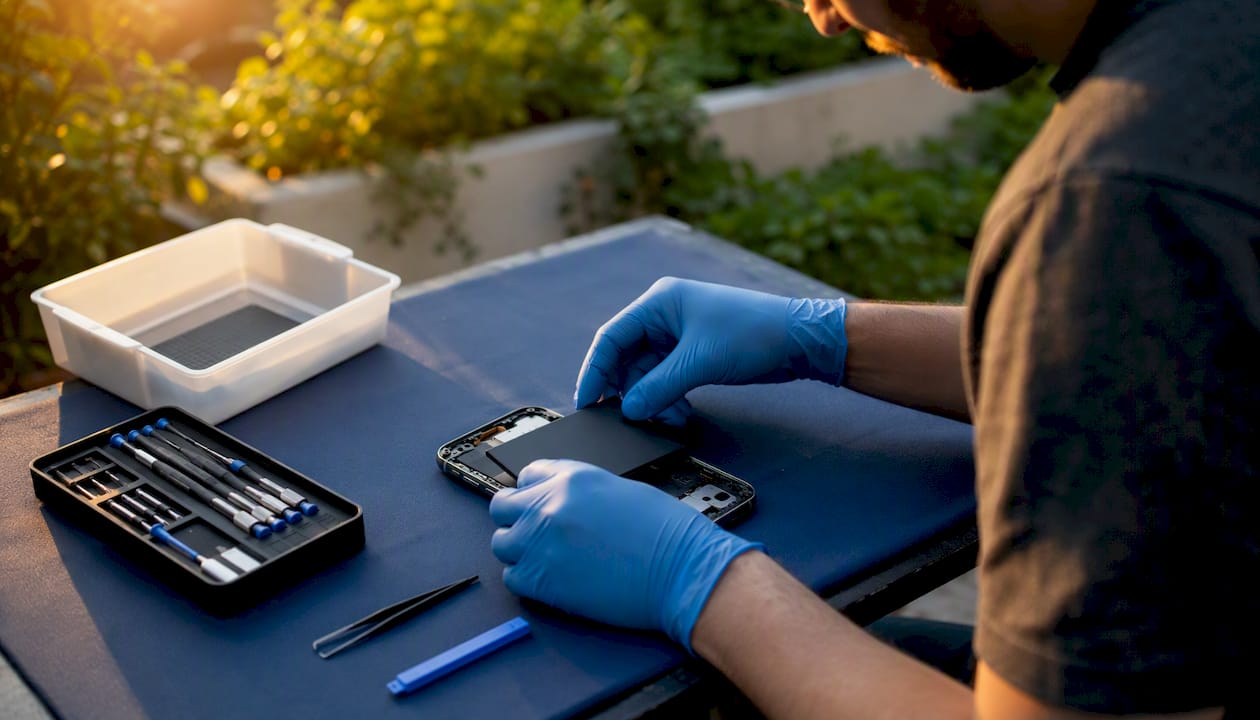
If you’ve run the formula and repair is the right call, the next question is who does it and how fast. Repair Genius handles same-day on-site phone repairs across Orlando and Winter Park, with a technician coming directly to your home, office, or wherever you need them.
Every repair comes with a written quote upfront, warranty on parts and labor, and a data-safety process that keeps your personal information secure throughout. There are no drop-off lines, no waiting days for a callback, and no ambiguity about what you’re paying for. Screens, batteries, charging ports, water damage diagnostics — all handled on-site by certified technicians with over a decade of experience.
To get started, request a quote or book a visit directly on the Repair Genius website. Same-day appointments are available for urgent repairs in the Orlando and Winter Park area.
Sources
- Should I Repair My Phone Before I Sell It?
- Should I Repair or Replace My Phone? | Expert Guide
- Is It Cheaper to Repair or Replace a Phone? The 2026 Guide
Recommended
- How to Fix a Water Damaged Phone
- Phone Repair with a Limited Budget: Smart Fixes That Last
- At Home Phone Repair: DIY vs. Professional Options
- iPhone Battery Replacement vs Buying New | Repair Guide





