

A device repair consultation is a professional diagnostic service where a trained technician examines your device, identifies the root cause of the problem, and gives you a clear cost estimate before any repair work begins. Think of it as a doctor’s appointment for your phone, laptop, or tablet. Services like Repair Genius, CPR Cell Phone Repair, and iFixit all build their repair process around this diagnostic first step. The consultation protects you from surprise charges and helps you decide whether fixing your device is actually worth the money.
What is a device repair consultation and how does it work?
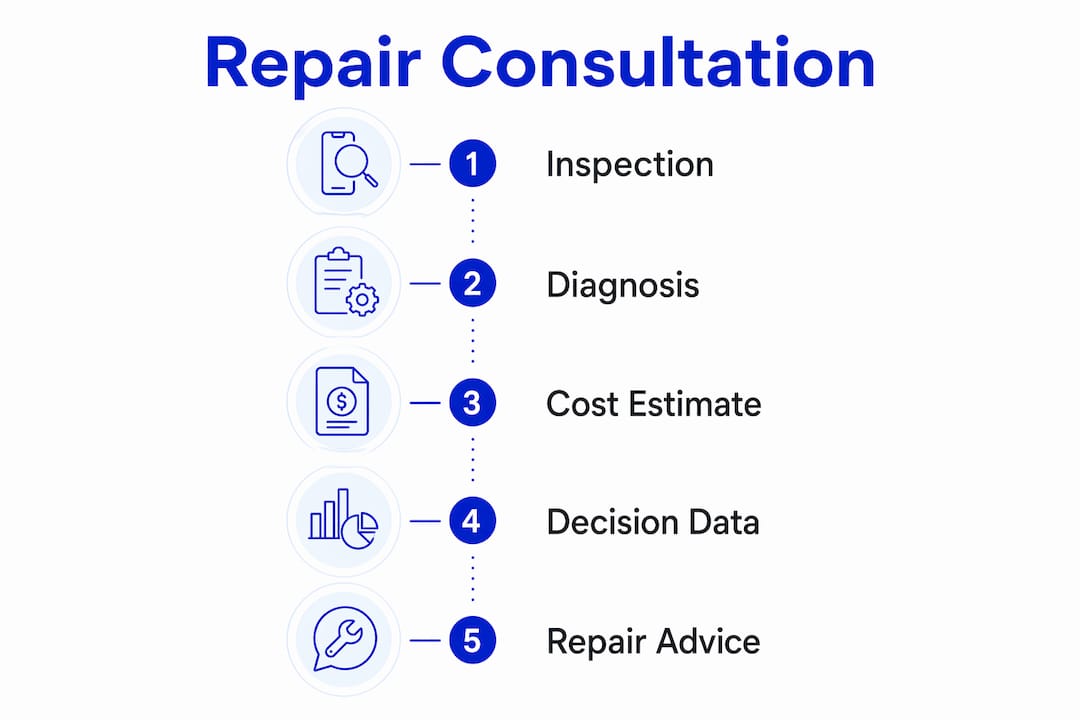
A device repair consultation is the structured intake process that separates professional repair services from guesswork fixes. The industry term for this phase is a diagnostic assessment, and it follows a defined workflow every time. Consultations are frequently free and are designed to determine whether repair costs fall below 50% of the device’s replacement value. That threshold is the standard benchmark technicians use to give you an honest recommendation.
The process moves through several clear stages. Understanding each one helps you get more out of the appointment.
-
Symptom discussion. The technician asks you to describe what the device is doing wrong. A cracked screen is obvious, but issues like random shutdowns or charging failures often have multiple possible causes. Your description narrows the diagnostic focus.
-
Physical inspection. The technician examines the exterior for visible damage, checks ports, buttons, and the display. This step catches problems you may not have noticed, like a bent frame or a loose connector.
-
Diagnostic testing. Hardware and software checks run simultaneously. A technician might use diagnostic software tools to stress-test the battery, read error logs, or check sensor function. Software diagnostics reveal issues that no visual inspection can catch.
-
Partial disassembly when needed. Complex issues often require partial disassembly to properly diagnose the root cause. A water-damaged iPhone, for example, cannot be accurately assessed without opening the device and inspecting the logic board.
-
Cost and time estimate. Once the technician identifies the problem, you receive a firm quote. Upfront quotes act as a firm agreement on scope and final price. No reputable service adds charges after you approve the work.
-
Customer approval. No repair starts without your sign-off. Transparent consultations require customer approval before any work begins, and most services charge nothing if the device cannot be repaired.
Pro Tip: Write down your device’s symptoms before the appointment. Technicians who get a clear history of when the problem started and what changed can diagnose faster and more accurately.
How do repair consultations help you decide whether to fix or replace?

The repair-vs-replace decision is the most practical outcome of any consultation for device repairs. Technicians apply the 50% rule as a starting point: if the repair costs more than half the price of a comparable replacement device, replacement is usually the smarter financial move. But cost alone does not tell the whole story.
Technicians weigh several factors alongside price:
- Device age. A five-year-old laptop approaching the end of its supported lifespan is a weaker repair candidate than a two-year-old model.
- Performance. If the device was already slow or unreliable before the damage, a repair restores a mediocre experience.
- Parts availability. Older or discontinued models may have scarce replacement parts, which drives up cost and repair time.
- Software support. A device that no longer receives operating system updates is a security risk regardless of its physical condition.
The consultation also uncovers damage you did not know existed. Hidden damage like internal frame warping or sensor malfunctions can affect long-term repair success in ways that change the entire cost calculation. A cracked screen repair on a phone with a warped frame, for instance, may fail within weeks because the new glass cannot seat properly.
| Scenario | Recommended action |
|---|---|
| Repair cost under 50% of replacement value, device under 3 years old | Repair |
| Repair cost over 50% of replacement value | Replace |
| Device lacks software support or parts | Replace |
| Hidden structural damage found during consultation | Evaluate total repair cost before deciding |
| Minor damage, device otherwise performs well | Repair |
Pro Tip: Ask the technician directly: “If this were your device, would you repair it?” A good technician gives you a straight answer based on the full diagnostic picture, not just the repair ticket.
The repair vs. replace decision for laptops follows the same logic. The consultation gives you the data to make that call with confidence rather than guessing.
What are typical timelines and costs for consultations and repairs?
Knowing how long the process takes helps you plan around device downtime. Consultations last between 5 and 60 minutes depending on the complexity of the issue. A cracked screen assessment takes minutes. A water-damaged device with multiple symptoms may take the full hour.
Repair turnaround times follow a similar range based on complexity:
| Repair type | Typical turnaround |
|---|---|
| Screen replacement (phone or tablet) | 20–90 minutes |
| Battery replacement | 20–45 minutes |
| Software troubleshooting | 30–90 minutes |
| Water damage assessment and repair | 2–5 business days |
| Motherboard fault or logic board repair | 2–5 business days |
Simple repairs complete in 20–90 minutes while complex issues take 2–5 business days. That gap exists because complex repairs often require ordered parts or extended drying and testing periods for water damage.
Several factors influence how long your specific repair takes:
- Parts availability. Common iPhone and Samsung screen assemblies are stocked by most shops. Rare parts for older or niche devices require ordering.
- Repair complexity. A single broken component is faster to fix than multiple interconnected failures.
- Service model. On-site repair services like Repair Genius eliminate the travel time and drop-off wait that traditional shops require, which often cuts total turnaround time significantly.
Understanding the timeline before you commit lets you plan your day. If you rely on your phone for work, a 30-minute screen repair during lunch is very different from a 3-day motherboard repair that requires a backup device. The repair process timeline is something you can discuss and plan during the consultation itself.
How do professional repair services protect your data during consultations?
Data safety is the concern most customers forget to ask about, and it is one of the most important questions you can raise during a consultation. Professional repair services typically do not reset or wipe device data during common repairs like screen or battery replacements. Your photos, contacts, and apps stay intact. That said, practices vary by service and by the type of repair involved.
Ask these questions directly during your consultation:
- Will my data be accessed or backed up during this repair?
- Does this repair require a factory reset?
- How do you handle devices that need software reinstallation?
- What happens to my data if the repair fails?
Clear answers to these questions tell you a lot about the professionalism of the service. A technician who cannot answer them confidently is a warning sign.
“Consultations build trust by setting expectations upfront. When a technician explains exactly what will happen to your device and your data before touching it, that transparency is the service.” RepairButlers
Reputable services also back their work with warranties. A post-repair warranty on parts and labor means the technician stands behind the diagnosis. If the same issue returns within the warranty period, the fix is covered. Always ask about warranty terms during the consultation, not after the repair is complete.
Key Takeaways
A device repair consultation is a free, structured diagnostic service that gives you a firm cost estimate, uncovers hidden damage, and helps you decide whether repairing your device is worth the investment.
| Point | Details |
|---|---|
| Consultations are usually free | Most reputable services charge nothing for the diagnostic assessment itself. |
| The 50% rule guides repair decisions | Repair is recommended when the cost stays below 50% of the device’s replacement value. |
| Hidden damage changes the math | Technicians often find internal damage that affects long-term repair success and total cost. |
| Timelines range from minutes to days | Simple repairs finish in 20–90 minutes; complex issues like water damage take 2–5 business days. |
| Data safety requires direct questions | Ask about data handling protocols during the consultation, before any repair work starts. |
Why most people misunderstand what a consultation actually is
Customers routinely walk into a consultation expecting a guarantee. They leave disappointed when the technician says the repair might not hold, or that a second issue was found mid-repair. That confusion is the single biggest source of frustration I see in device repair.
A consultation is a risk assessment, not a promise. Consultations are critical for deciding if a repair is worthwhile, not for guaranteeing the outcome. The technician is giving you their best professional judgment based on what they can see and test. Hidden damage, component degradation, and manufacturing defects can all affect a repair in ways no diagnostic can fully predict.
The practical lesson: treat the consultation as a conversation, not a contract. Ask follow-up questions. If the technician says there is a chance the repair does not fully resolve the issue, ask what that scenario looks like and what it costs. The most practical repair decisions balance cost with device lifespan and the likelihood of recurring failures. A good technician will walk you through all of it.
Customers who engage actively during consultations make better decisions. They spend less money over time, replace devices less often, and avoid the frustration of paying for a repair that did not address the real problem. The consultation is where your device’s fate is actually decided. Use it.
— Michael
Repair Genius brings expert consultations directly to you
When your phone screen cracks or your laptop stops charging, the last thing you want is to drive across town and leave your device at a shop for days.

Repair Genius serves Orlando and Winter Park, Florida, with on-site repair consultations that come to your location. Technicians assess your iPhone, Android phone, laptop, or tablet on the spot, give you a transparent quote with no hidden fees, and complete most repairs the same day. Every repair is backed by a warranty, and your data stays protected throughout the process. With over 10 years of experience, Repair Genius has built its reputation on honest diagnostics and repairs that actually last. Book your consultation and get a clear answer about your device today.
FAQ
What does a device repair consultation include?
A device repair consultation includes a physical inspection, diagnostic testing, and a firm cost and time estimate. The full process covers symptom discussion, diagnostics, and customer approval before any repair begins.
How long does a repair consultation take?
Most consultations last between 5 and 60 minutes depending on the issue. Simple problems like a cracked screen are assessed quickly, while complex issues like water damage take longer to diagnose properly.
Is a device repair consultation free?
Consultations are frequently free at reputable repair services, and most operate on a no-repair, no-charge policy if the device cannot be fixed.
Will my data be safe during a repair?
Professional repair services typically do not wipe or reset device data during standard repairs. Ask your technician directly about their data handling policy before approving any work.
When should I replace my device instead of repairing it?
Replace your device when repair costs exceed 50% of its replacement value, when it no longer receives software updates, or when multiple factors like age, parts availability, and performance make a repair impractical.
Recommended
- How Repairs Shape Device Resale Value in 2026
- Minimize Device Repair Disruption: A Pro’s Guide
- What Is a Device Repair Guarantee? 2026 Guide
- Why Employee Devices Need Quick Repair: 2026 Guide





