Yes, 5G can drain your battery faster than 4G LTE, mostly when your signal is weak or your phone keeps hopping between 5G and LTE. The extra cost is usually modest in strong coverage, so if your battery is falling fast, 5G may be only part of the story. Below you will find what the measurements show, when switching to LTE helps, and a short checklist for Android phones that still drain after you change network settings.
TL;DR
- 5G typically uses more power than LTE. Ookla’s data, reported by TechRadar, put the gap at 6% to 11% more battery drain over a day, though that method was criticized as basic.
- The biggest penalty comes from weak 5G signal, constant switching between 5G and LTE, and older phone hardware.
- Switching to LTE helps most on commutes, in basements and anywhere 5G is patchy. In strong 5G coverage the difference is small.
- If drain continues, open Settings > Battery and look for apps or features using power while the screen is off. Then check battery age.
- A battery that has lost capacity cannot be fixed by any setting. That is when a replacement makes sense.
Table of Contents
- Does 5G really use more battery than LTE?
- Why 5G drains the battery
- Should you turn off 5G to save battery?
- How to switch 5G off or to LTE on Android
- Why is my Android battery draining fast even with 5G off?
- Quick checklist: 5G or something else?
- When it is the battery, not the network
- Get your battery checked where you are
- FAQ
- Sources
Does 5G really use more battery than LTE?
In most real-world conditions, yes. Android Authority reports that early 5G phones lost one to two hours of battery life compared with a standard 4G connection, with the iPhone 12 and Pixel 6 series among those where users noticed it.
The measured numbers vary by method:
| Source | What it found |
|---|---|
| Ookla via TechRadar (2023) | 6% to 11% more drain on 5G than 4G LTE. On a Snapdragon 8 Gen 2 phone, 31% drain on 5G versus 25% on LTE |
| DTU comparative study (2024) | 5G non-standalone used 92% to 111% more energy than LTE. 5G standalone used 79% more |
| Reviews.org (2026) | The 5G radio uses 15% to 20% more power than an LTE radio. Forcing LTE can save 10% to 20% of battery |
Read those with care. The DTU study measures energy use of the connection itself, which is not the same as your whole day, because your screen and apps use power too. The Ookla method was described by one analyst as very basic, since it ignored screen time, brightness and app use. The practical takeaway: expect a noticeable but not dramatic difference, with the gap widening in poor coverage.
Why 5G drains the battery
Three things drive the cost, according to Android Authority: the type of 5G network, your phone’s hardware and your reception.
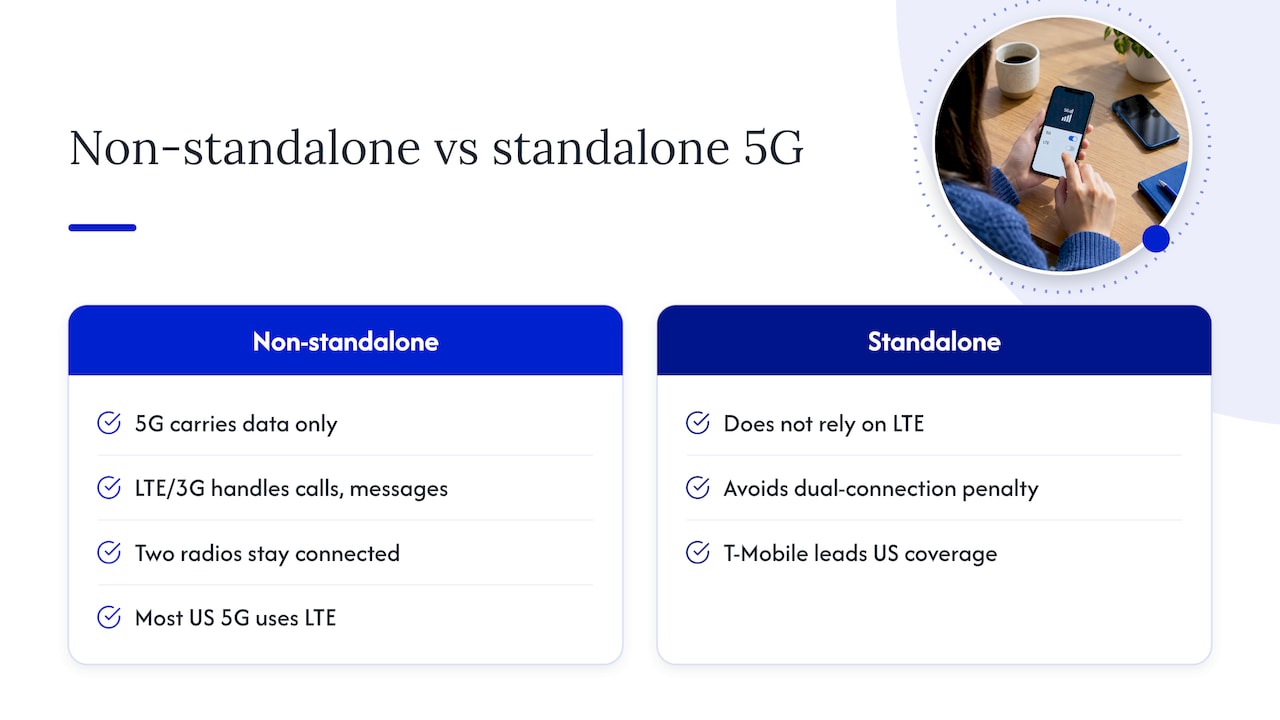
Non-standalone 5G keeps two radios busy
Most 5G in the US still leans on LTE. Samsung’s support page explains that 5G carries data only, so the phone must also stay connected to 3G or LTE for calls and messages. That is why the battery can drain faster than expected and the phone can run warmer. Standalone 5G does not rely on LTE and avoids this dual-connection penalty. Android Authority notes that T-Mobile leads in US standalone coverage.
Weak signal makes the modem work harder
When you are far from a 5G tower, the modem works harder to hold a connection. Android’s developer documentation says that searching for a cell signal is one of the most power-draining operations on a mobile device. Android Authority makes the same point: phones spend plenty of resources hunting for a signal where 5G is unavailable. This is why battery drops fastest in elevators, parking garages, concrete buildings and at the edge of coverage.
Older modems were less efficient
Early 5G phones used separate modems rather than integrated ones, which led to exceptionally high power draw. Newer chips have improved. Ookla’s data, as reported by TechRadar, showed MediaTek’s Dimensity 9200 using less on 5G than the generation before it. If you are on a newer flagship, your 5G penalty is probably smaller than the headlines suggest.
Should you turn off 5G to save battery?
It depends on where you are and what you do. Reviews.org offers a simple rule: keep 5G on for gaming and 4K streaming, and switch it off for travel, commutes and basements. In places with weak 5G, dropping to 4G saves battery because the phone stops searching for a connection. In strong 5G zones the difference is minimal.
Some users go further. John Gruber of Daring Fireball says he keeps his iPhone on LTE all the time because at his typical 50 to 100 Mbps speeds he sees no practical advantage from 5G, and will only switch back if LTE seems weak or slow.
A sensible approach:
- Leave 5G on if you have strong bars, download large files or stream in high quality.
- Switch to LTE when your phone is warm in your pocket, when you are in a low-signal building, or when you need the battery to last until evening.
- Try a week on each and watch what your battery graph does. Your carrier, phone and neighborhood matter more than any average.
How to switch 5G off or to LTE on Android
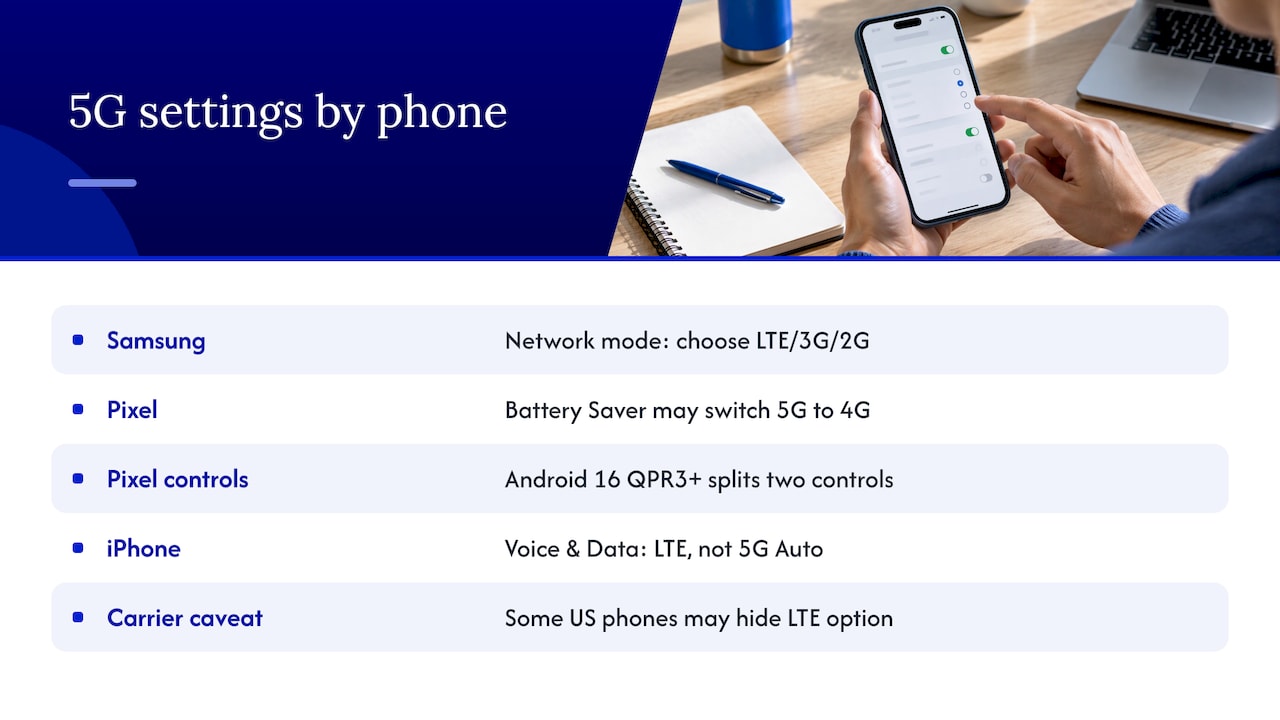
Menus differ by brand and carrier. On many Samsung Galaxy phones, go to Settings > Connections > Mobile networks > Network mode and choose LTE/3G/2G. How-To Geek noted back in 2021 that carriers had removed the option on some US phones, so if you do not see it, your carrier may have hidden it. That article is old, so menus may have changed on your phone.
On Pixel phones, Google’s tips page lists switching 5G Pixel phones to 4G as one action Battery Saver and Extreme Battery Saver may take to conserve power. Pixel also has a connectivity setting worth a look. Gadget Hacks explains that Adaptive Connectivity handles two jobs: switching from Wi-Fi to mobile data when Wi-Fi is weak, and choosing the most power-efficient network. On Android 16 QPR3 and later, those were split into two controls: Auto-switch to mobile network and Optimize network for battery life. The first is where battery cost can hide, since unexpected radio switches during standby keep the modem active.
On iPhone, the control is under Settings > Cellular > Cellular Data Options > Voice & Data, where you can pick LTE instead of 5G Auto. If your iPhone is the one draining, our guide to diagnosing iPhone battery drain in 10 minutes walks through the Battery screen step by step.
Why is my Android battery draining fast even with 5G off?
Often 5G is not the main cause. Google lists several common reasons for a fast-draining Android: lots of apps running at once, screen brightness at maximum, a hot device, and a non-original charger that regulates voltage poorly. Work through this list in order.
1. See what is using power
Go to Settings > Battery and tap View details (wording varies by phone). You will see apps and system features ranked by use, along with screen-on and screen-off time, as Technobezz describes. Pay attention to anything draining power while the screen is off. If “Mobile network” or “Cell standby” sits near the top, your radio is working too hard, which points back to signal strength and 5G.
2. Check for a recent update
After a software update, a bit of extra drain is normal. Google’s Pixel help says the phone works hard to download and optimize the new software. Its overnight test is useful on any phone: if the battery loses less than 10% overnight, it is behaving as expected. If it loses more than 10%, look at what is using the power. Give it a day or two after an update before you judge.
3. Watch heat and charging habits
Heat accelerates drain. Avoid leaving the phone on a car dashboard, and check that your charger and cable match your phone’s specs. If your phone charges slowly or gets unusually hot while charging, see our guide on fixing slow phone charging.
4. Check how old the battery is
This is the one many people skip. Android Authority says that age is the primary reason battery life gets shorter, as batteries lose performance over time. If your phone is two or three years old, turning off 5G may only slightly offset a battery that has lost much of its capacity. Our overview of phone battery lifespan for US owners explains what to expect and when decline becomes noticeable.
Quick checklist: 5G or something else?
| What you notice | Likely cause | What to try |
|---|---|---|
| Drain is worst in basements, garages, rural drives | Weak 5G signal, constant searching | Set network mode to LTE in those places |
| Phone feels warm in a pocket with the screen off | Modem working hard or a background app | Check Battery details, then try LTE |
| Drain began right after an update | Post-update optimizing | Wait a day or two, then run the overnight test |
| Drain is the same on Wi-Fi and LTE | Apps, brightness or an aging battery | Review app usage, then check battery health |
| Battery falls fast from a high percentage, or the phone shuts off | Worn battery | Consider replacement |
When it is the battery, not the network
If you have changed network mode, reviewed app use, and the phone still dies by mid-afternoon, the cell itself is usually the problem. Signs include a battery that drops quickly from 100%, sudden shutdowns at 20% to 30%, a phone that runs hot when idle, or a back panel that looks slightly raised. A swollen battery needs prompt professional attention, so stop using and charging the phone if you see it.
On Pixel phones, our guide to Pixel battery replacement covers when to do it and what to expect. For iPhones, see iPhone battery replacement versus buying new. In many cases a new battery costs a fraction of a new phone and gives you back a full day of use.
Our view on 5G drain
We see this question constantly from Orlando and Winter Park customers: “Is it 5G, or is it my phone?” In our experience, people blame the network first, change a setting, and keep living with a battery that has quietly worn out. Our advice is to rule out the cheap fixes first: LTE mode in weak-signal spots, a look at Battery details, and a clean overnight test.
If the drain stays, we would rather diagnose it properly than guess. Our technicians come to your home, office or campus, check the battery and the charging system, explain what they find in plain language, and quote the work up front. For many phones, replacing a worn battery on the spot is the fastest way to get a full day back, and we design our repairs to be backed by a warranty on parts and labor. We also keep your data safe throughout, which matters when the phone is your wallet, calendar and inbox.
Michael
Get your battery checked where you are
If your phone still drains quickly after the steps above, we can come to you. Repair Genius handles battery replacements and diagnostics for iPhone, Samsung, Pixel and other Android phones across Orlando and Winter Park, same day in many cases, with pricing quoted up front and no hidden fees. See our cellphone and Android repair page or our iPhone repair services to book.

If your issue also includes freezing or odd behavior, our guide on why Android phones keep freezing can help you narrow it down.
FAQ
Does 5G use more battery than LTE?
Usually, yes. Ookla’s data reported by TechRadar showed 6% to 11% more drain on 5G, and the gap is larger with weak signal. In strong coverage on a recent phone, the difference is smaller.
Should I have 5G on or off?
Keep it on when you have strong signal or need top speeds for gaming and 4K streaming. Turn it off or set LTE when you are commuting, in a basement or anywhere coverage is spotty, as Reviews.org suggests. Test both for a week and keep what gives you the better battery graph.
Why is my Android battery draining so fast all of a sudden?
Common triggers are a recent software update, a misbehaving app, a hot phone or poor signal. Check Settings > Battery for what is using power, then run an overnight test, as Google’s Pixel help describes. If nothing stands out, an aging battery is the next suspect.
Is 5G standalone better for battery than non-standalone?
It can be. The DTU study found 5G standalone was 6.5% more efficient than non-standalone, because it does not depend on a parallel LTE connection. Availability depends on your carrier and area.
Sources
- Does 5G use more battery on your smartphone? Android Authority
- Using 5G can really be a drain on your smartphone battery, TechRadar
- Evaluating Energy Efficiency: A Comparative Study of LTE, 5G NSA and 5G SA, DTU
- 5G network service drains battery quickly on Samsung phone, Samsung
- Optimize network access, Android Developers
- Why is my phone’s battery draining so fast? Android Authority
- How to Turn Off 5G on Android and iPhone, Reviews.org
- Should I Turn Off 5G on My Phone? HONOR
- I Repeat Myself (5G vs. LTE Edition), Daring Fireball
- How to Turn off 5G on Android, How-To Geek
- Tips to Improve Android Battery Life & Fix Battery Drain, Android
- How to Fix Google Pixel Battery Drain, Gadget Hacks
- Samsung Galaxy Battery Draining Fast? Technobezz
- Fix issues with your Pixel phone battery, Pixel Phone Help
Recommended
- Diagnose iPhone Battery Drain in 10 Minutes Using Settings > Battery
- Expect 80% at 1,000 Cycles: Phone Battery Lifespan for U.S. Owners
- Optimize Battery Charging on iPhone: Setup and Fixes
- How to Fix an Overheating Phone | Causes & Solutions