If your iPhone has stopped vibrating, buzzes like a rattling can, or no longer gives that crisp tap when you type, the Taptic Engine is the part to look at. It is a small, replaceable component, and a replacement is a routine bench job for a technician who works on iPhones daily. The right fix depends on your model and on whether the fault is the part itself or something around it. In Orlando and Winter Park, we bring that repair to your home, office or campus.
TL;DR
- The Taptic Engine produces every vibration and haptic tap on your iPhone. Dead, weak, intermittent or rattly feedback are the classic signs of failure.
- Quick checks come first: the silent switch, the System Haptics setting and a restart. If feedback is still gone, the part or its connection is the likely cause.
- Replacement means opening the phone, disconnecting the battery, swapping the engine, resealing the adhesive and calibrating the new part.
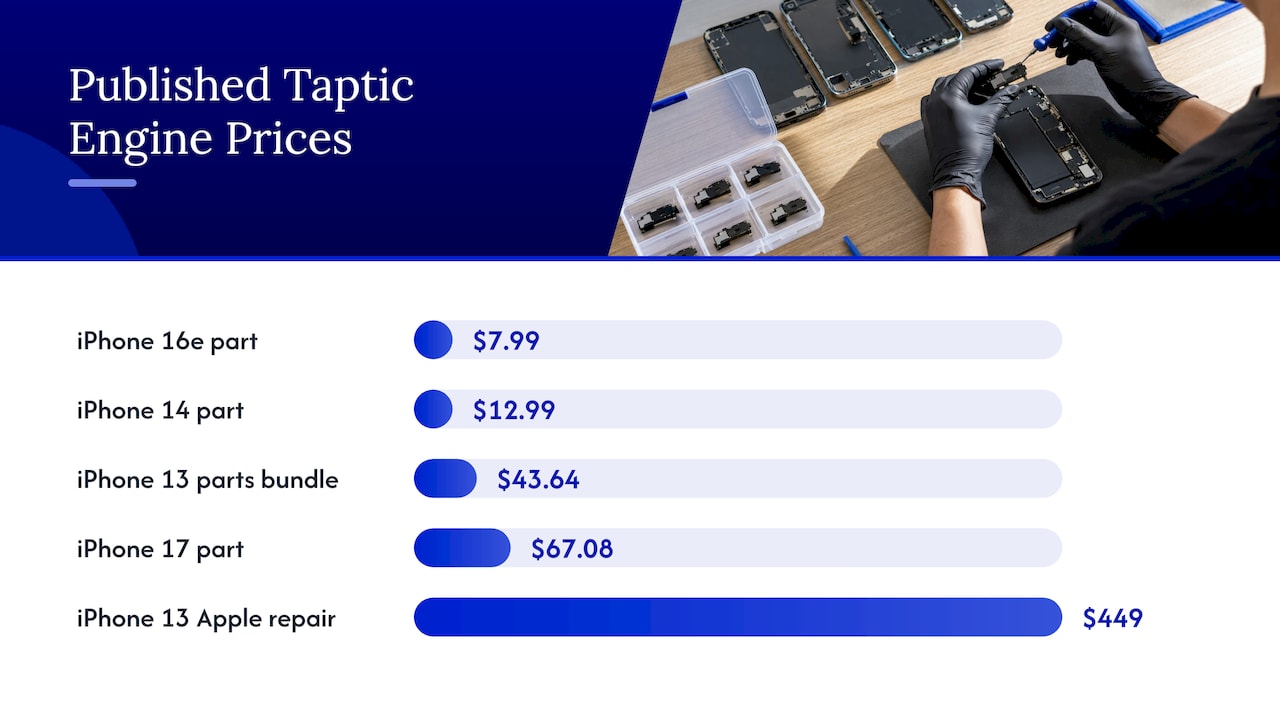
- Parts alone run from roughly $8 to $67 depending on the model, and labor and warranty terms change the final price. We quote up front.
- We repair iPhones on-site in Orlando and Winter Park, often the same day, with a warranty on parts and labor.
Table of Contents
- What the Taptic Engine does
- Symptoms that point to the Taptic Engine
- Rule out the simple causes first
- How a Taptic Engine replacement works
- Why a new Taptic Engine sometimes does not fix the problem
- What iPhone Taptic Engine replacement costs in the US
- Warranty, AppleCare and genuine parts
- What the repair can and cannot fix
- Our perspective
- Book an on-site iPhone repair in Orlando or Winter Park
- How to prepare for the visit
- FAQ
- Sources
What the Taptic Engine does
The Taptic Engine is the vibration motor in your iPhone, but it is a more refined part than the spinning-weight motors in older phones. It is a linear resonant actuator: a magnetic mass on a spring that moves along a single axis, introduced by Apple in the iPhone 6s. Because the motion is so controlled, the phone can produce short, precise taps instead of a generic buzz.
You feel it in many places:
- Incoming calls, texts and alerts when the phone is on silent or vibrate
- Keyboard clicks and long-press menus
- System haptics when you toggle switches, scroll pickers or use the camera
- The simulated Home button click on the iPhone 7, 7 Plus and SE
When it fails, you notice quickly, because a phone that does not vibrate means missed calls in your pocket and a keyboard that feels dead under your thumbs.
Symptoms that point to the Taptic Engine
A failing engine rarely announces itself the same way twice. These are the patterns we see most often described, and they match what repair guides list as reasons to replace the part:
- No vibration at all. Calls and alerts arrive silently, and haptic taps never fire.
- Weak or intermittent feedback. It works one minute and disappears the next.
- A rattly or buzzy sound. iFixit’s guides say that rattly or intermittent vibrations suggest it may be time to replace the engine.
- Haptics only on part of the phone. On some older models, only the fingerprint sensor click works, while alerts do not vibrate.
- Vibration after a drop or liquid exposure. Impact can shift the engine or damage its flex cable, and moisture can corrode the contacts.
A harsh grinding noise with every vibration can also mean something is loose inside the phone. That is a reason to have it opened and inspected rather than live with it.
Rule out the simple causes first
Before any part is ordered, a good technician eliminates the cheap explanations. You can do the same in two minutes:
- Check the ring/silent switch. On iPhones with the physical switch, the position changes how alerts behave. Flip it both ways and test.
- Check Settings. Open Sounds & Haptics and make sure System Haptics is on. Toggle it off and on again.
- Check Do Not Disturb and Focus modes. A scheduled Focus can mute vibration for certain apps and contacts without you remembering.
- Restart the phone. A forced restart clears software states that can freeze haptic behavior.
- Update iOS. A pending update sometimes fixes feedback glitches.
- Test with a case removed. Thick or loose cases can dampen feedback, though not eliminate it.
If haptics return after any of these, you saved a repair. If they do not, the issue is hardware: the engine, its connector, or the circuitry that drives it. That is where a diagnosis matters, and where we can help.
How a Taptic Engine replacement works
The Taptic Engine sits low in the phone, near the battery and beneath antenna and flex cables. Reaching it takes careful disassembly. Here is what the job involves, drawn from published repair guides for recent models.
Opening the phone and securing the battery
On the iPhone 14, iFixit’s guide says to discharge the battery below 25% before disassembly to reduce fire risk. On newer models such as the iPhone 16, the engine is reached through the back glass, and the guide rates the job as Moderate, at 45 minutes to 1 hour. The technician disconnects the battery first, then the engine’s own connector.
Swapping the engine
The engine is held by a small number of screws. On the iPhone 14, that means three 2.1 mm screws removed with a Phillips driver. Apple’s own service manual for the iPhone SE (3rd generation) notes that the engine’s flex cable lies under the lower antenna flex cable, so that antenna cable has to be lifted carefully. The manual cautions against bending the Wi-Fi antenna beyond 90 degrees or the lower antenna flex cable beyond 60 degrees. This is why we treat the repair as precision work rather than a quick part swap.
Resealing and calibrating
Two steps at the end separate a clean repair from a frustrating one:
- Adhesive. Opening the phone disturbs its seal. iFixit’s iPhone 14 guide warns the device will most likely lose its IP rating after the repair, and its iPhone 15 guide notes that without fresh adhesive, water resistance is compromised. Fresh adhesive is part of doing the job properly.
- Calibration. On newer models, iFixit’s iPhone 16e guide has the technician calibrate the replacement engine through Repair Assistant in Settings under General, About, Parts & Service History.
Why a new Taptic Engine sometimes does not fix the problem
Forum threads are full of people who installed a new engine and still got no vibration. The cause is usually one of three things, according to Apple’s service documentation and repair guides:
- The flex connector is not fully seated. It must click down evenly. A connector that is slightly off gives intermittent or partial feedback.
- The engine was never calibrated. On models that need it, the part will not behave until Repair Assistant finishes the process.
- The fault is on the logic board. If the haptic driver circuit is damaged, no engine will work until the board itself is repaired.
The third one is the reason diagnosis comes before parts. Our technicians handle board-level repairs, so if a dead engine turns out to be a driver problem, the fix does not end with “we replaced the part and it still does not work.” We find the actual fault and quote it before we start.
What iPhone Taptic Engine replacement costs in the US
Prices vary by model, part quality and who does the work. Here is what published sources show for the parts and for Apple’s own routes.
| Item | Published figure | Source |
|---|---|---|
| iPhone 16e Taptic Engine part | $7.99 | iFixit |
| iPhone 14 Taptic Engine part | $12.99 (adhesive card $2.95) | iFixit |
| iPhone 13 self-repair parts bundle | $43.64 (engine $38.35) | AppleInsider, 2022 |
| iPhone 17 Taptic Engine, Apple repair-part price | $67.08 | GSMArena, Nov 2025 |
| iPhone 13 repair through Apple, out of warranty | $449 (or $99 with AppleCare+) | AppleInsider, 2022 |
Two things stand out. First, the part itself is inexpensive on most models. Second, a vibration fault can be treated by some channels as a broader “other damage” repair, which is how the $449 figure for the iPhone 13 arose. The labor and the care taken in opening, sealing and calibrating are what you pay for in a repair.
We do not publish a flat price for Taptic Engine work because it depends on your model and what the diagnosis finds. What we do is quote the full amount for diagnostics, labor and parts before we begin, with no hidden fees. Compared with the cost of a new phone, a part this size is a small fraction of replacement.
If you want a spare handset while yours is being repaired, a renewed iPhone 13 Pro comes with a one-year warranty and can cover calls and messages in the meantime.
Warranty, AppleCare and genuine parts
Where you repair your phone affects what coverage you keep, so read this part before you book anything.
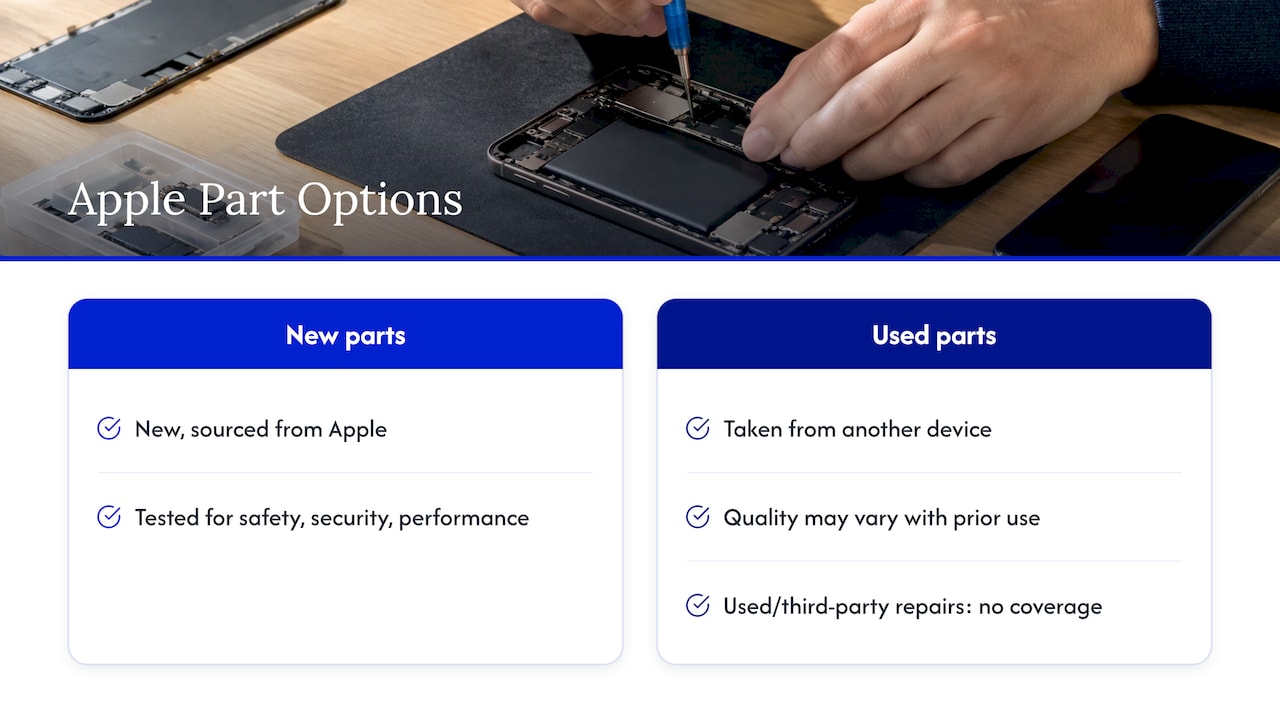
Apple’s Parts Support page explains that genuine Apple parts are new parts sourced from Apple, designed and tested to meet its safety, security and performance standards. Used Apple parts are genuine parts taken from another device, and their quality may vary with prior use. The same page states that used Apple parts, third-party parts and repairs performed with them are not covered by Apple’s product warranty or an AppleCare plan.
That is useful context if your iPhone is still under coverage. If it is, check with Apple first to see what they will do for a haptics fault. If it is out of warranty, which is the case for most phones with a failing Taptic Engine, you are free to choose a repair provider on convenience, speed and the warranty they give you. We back our work with a warranty on parts and labor. For more on keeping your coverage position straight, see our guide to same-day Apple repair that keeps your warranty.
What the repair can and cannot fix
A healthy Taptic Engine swap restores vibration, keyboard feedback and haptic taps. It does not change other parts of the phone, which is why we check the neighbors while the phone is open. Common companions we look at on the same visit:
- Battery condition. The battery sits right next to the engine and gets disconnected for the job anyway.
- Charging port. If you have been fighting the port too, our overview of iPhone charging port repair providers explains what to expect.
- Back glass. Cracked back glass on newer models needs attention before resealing. Our iPhone back glass cost guide covers typical model pricing and the 40% rule.
- Screen. If you also need the display done, read how the iPhone screen repair process works.
Bundling these in one visit saves you from taking your phone apart twice.
Our perspective
Most people come to us assuming a dead vibration motor means a dead phone, or a trip across town and a few days without it. Neither is true. The Taptic Engine is a contained, well-understood part, and the real skill is in the details around it: lifting the antenna cable without stress, seating the connector, sealing the adhesive, and calibrating on the models that require it.
We built Repair Genius around doing that work where you are. A technician arrives at your home, office or classroom, diagnoses the phone in front of you, and tells you what the fault is and what it costs before any screwdriver comes out. Your data stays with you throughout, because the phone never leaves your sight.
When a part swap is not the whole answer, we say so, because our board-level repair experience means we can chase the problem further. With over 10 years in this work, we have seen that the honest diagnosis is what saves customers money, and that a repair done once and done right is the best advertisement we have.
Michael
Book an on-site iPhone repair in Orlando or Winter Park
If your iPhone’s vibration is dead, weak or buzzing, we can diagnose it and replace the Taptic Engine without you leaving work or home. We come to the location you choose in Orlando and Winter Park, often the same day, and you get a clear quote before work starts. Parts and labor are covered by our warranty. See our iPhone repair services and book a visit.

Running a business with several devices? Our on-site computer repair and IT support covers laptops and office machines in the same visit.
How to prepare for the visit
A few minutes of preparation makes the appointment faster:
- Note your model. Settings, General, About shows it. The engine, screws and procedure differ between generations.
- Describe the symptom exactly. No vibration, intermittent vibration or a buzzing sound each point to slightly different causes.
- Mention any drop or liquid contact. It guides the first checks.
- Back up if you can. iCloud or a computer backup is good practice before any repair, even though our approach is built around keeping your data secure.
- Charge the phone. Technicians generally prefer a lower battery before opening a phone, and we handle the discharge safely when needed.
- Pick a quiet spot. A table in good light helps for careful, small-screw work.
FAQ
Can Apple repair a Taptic Engine, or do they replace the phone?
Policies depend on the model, the warranty status and the type of damage. Apple’s pricing for an iPhone 13 haptics fault under out-of-warranty service was $449, while AppleCare+ customers paid $99. A local on-site repair is another route when you are out of warranty and want the part replaced in place.
How long does a Taptic Engine replacement take?
The hands-on work is short. iFixit rates the iPhone 16 job at 45 minutes to 1 hour. Diagnosis and testing add time, and we aim to complete most visits the same day.
Will replacing the Taptic Engine affect water resistance?
Opening any iPhone disturbs its adhesive seals. iFixit warns the phone will most likely lose its IP rating after the repair, so keep it away from water and let your technician know if that is a concern.
Why does my iPhone vibrate weakly or buzz loudly?
Weak, intermittent or rattly vibration usually means the engine is wearing out or is no longer secured properly. Repair guides list rattly or intermittent vibrations as a sign to replace it. Check the silent switch and System Haptics first, then book a diagnosis.
Does the repair work on every iPhone model?
The Taptic Engine is a standard component across modern iPhones, but the procedure and parts vary by model. Tell us your model when you book and we will confirm the details and quote before we begin.
Sources
- iPhone Taptic Engine Replacement Sourcing Guide
- iFixit: iPhone 16 Taptic Engine Replacement
- iFixit: iPhone 16e Taptic Engine Replacement
- iFixit: iPhone 14 Taptic Engine Replacement
- iFixit: iPhone 15 Taptic Engine Replacement
- iFixit: iPhone 15 Pro Taptic Engine Replacement
- Apple iPhone SE (3rd generation) Self Service Repair manual
- Apple Support: Parts Support for iPhone
- AppleInsider: Apple’s Self Repair Program vs. Genius Bar
- GSMArena: iPhone 17 teardown
Recommended
- iPhone Screen Repair Process Explained for 2026
- Affordable Device Repair in Orlando
- iPhone 16 Repair: How to Get It Fixed Fast and Safely